Posts

Cumulus Global to Feature Web-Based Learning at MassCUE 2012 Conference

Westborough, MA – October 8, 2012 – Cumulus Global (www.cumulusglobal.com) announced it will feature web-based learning solutions at the company’s first-ever participation in the MassCUE Technology Conference.  Cumulus Global will conduct live demonstrations of how Chromebooks and Google Apps for Education combine to provide students with better access to educational resources, expand collaborative learning, and improve student-teacher interaction. Cumulus Global will be at Booth 219 on October 24th and 25th.

“Google Apps is much more than email, it creates a learning platform that empowers students and teachers to work together, providing students access to productivity tools without expensive hardware or software,” stated Allen Falcon, CEO of Cumulus Global.  “Chromebooks give students a fully web-connected computer at a fraction of the cost of laptops and netbooks and without the expensive administrative overhead.”

While many schools begin with carts, providing Chromebooks to students in specific classes and subjects, districts are starting to deploy Chromebooks as part of a one-to-one program.  As a web-centric device, students can access educational applications and resources without the limitation of an “app store”.

“While other devices get more press, Chromebooks deliver more value in the classroom”, notes Falcon.  “Students can write and edit papers, create presentations, and work with video.  Schools can manage Chromebooks without the complexity and cost that comes with iPads and traditional laptops.”

With a full keyboard, mousepad, 12.1” screen, and HD audio and video, Chromebooks enable students to complete papers, presentations, and projects with the ability to share, collaborate, and get feedback directly from teachers.  Chromebooks are more secure than laptops, with automatic operating system updates, built-in malware protection, and no local user profiles or local data. The ChromeOS Management Service gives administrators full control over the devices without monthly updates and expensive imaging/ghosting systems.

Do Your IT Choices Help or Hurt Your Ability to Hire the Best Talent?

When you think of your IT decisions, you probably think of features, functions, cost, operations, and, hopefully, how well your IT decisions support your business goals and objectives.

Have you, however, ever considered if your IT decisions impact your ability to hire the best talent? Just like your reputation as an employer, office space, and benefits package make an impression on prospective employees, so does your IT.

Case in Point: Blackberry.  As recently as two years ago, most companies picked a carrier, a few models of phones, and provided them to employees.  Blackberry was on top.  With the rapid expansion of smartphone capabilities, a growing number of employees chose to opt-out of the company option and use their personal device.  Businesses obliged and “Bring Your Own Device” is becoming the norm (as are Android and IOS devices).  After all, why limit your employees to a lesser solution that makes them less productive?

Why would a potential employee want to work at a company where the technology is a step backward?

With the adoption rate of cloud computing solutions, such as Google Apps, at universities, high schools, and even grade and middle schools exploding, your future employees are already used to working in an IT environment that enables communication and collaboration in ways traditional in-house systems cannot.

The people you want to hire already …

  • Use on-line and real-time collaboration.
  • Expect secure access to information from any device they choose, wherever they are working, without the headaches and challenges of VPNs and remote desktop solutions.
  • Take advantage of integrated communication services.
  • Expect constant improvements in the IT services they use.

So when the people you want to hire walk into your business, what do they see?  Do they see the dynamic, responsive, IT infrastructure that they know and love?  Or, do they see reliance on centralized information silos, collaboration via email attachments, limited access to information and their peers, and an environment that only sees improvements every three to five years?

As you plan your next round of IT upgrades and changes, avoid inertia and look beyond the next version of the status quo.  Look at IT solutions that can fundamentally change and improve the ability of your knowledge workers to communicate and collaborate — to use their knowledge.  Look at IT solutions that scale as your business evolves.  Look at IT solutions that give your business the power of continuous innovation.

Look at Cloud Computing.  Look at Google Apps.
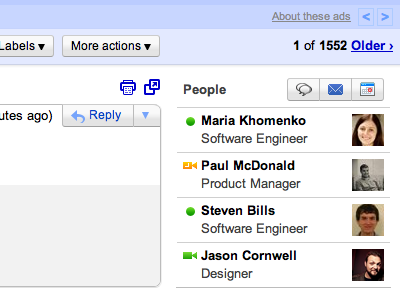
People Widget Gives Context to Email Senders

Email is not just a way to communicate … to send and receive messages.  Email can and should be a tool for collaborating.  A tool that places your communication within the context of your relationship with the senders and recipients.  A tool that makes it easier to move from sending/receiving to sharing.

People Widget

Over the next two weeks, Google is rolling out the People Widget across Google Apps platforms.  The widget highlights content and communications from colleagues, friends, and family, placing your communications within a broader context.

The widget, which will appear next to your inbox provides context for the sender of each email.  More than seeing who the sender is, the People Widget lists any recent email conversations and joint calendar events.  It also provides on-click access to chat, initiate a new email conversation, schedule a meeting, or update the sender’s information.

For more information, visit the Official Gmail Blog.

If you are interested in trying Google Apps, contact us or complete our 12 Minute Assessment.


Businesses Go from Ground to Cloud in 30 Days

Nationally recognized cloud solutions provider Horizon Info Services announced a new program for helping small and mid-size business move into cloud computing with less risk and at lower costs. Horizon’s FasTrack Services provide rapid deployment of Google Apps for Business for companies with up to 250 employees, giving companies quick access to the integrated suite of email, calendar, and collaboration tools. Depending on each customer’s needs, Horizon helps customers through setup, migration, and user education, completing deployments in 1 to 5 weeks.

“For businesses with IT staff looking to move to the cloud, we offer the expertise needed for a quick, successful migration,” stated Allen Falcon, CEO of Horizon. “We nearly eliminate the learning curve, transferring knowledge and minimizing risk.”

FasTrack services provide customers with a project kick-off meeting and a customized, best-practice project plan, technical guidance and assistance throughout the project, status calls and updates, and template user communications. Core FasTrack Services are fixed-price, offering savings over most per-user and full service options.

“We also offer a many value add services and technologies,” notes Falcon. “These solutions facilitate data migrations, improve integration between Google Apps and existing technologies, and, most importantly, enhance the end users’ experience using Google Apps”

Businesses can learn more about Horizon’s FasTrack Services at a dedicated web site, http://fastrack.horizoninfoservices.com. Companies that complete the 12 minute assessment will receive a free analysis of their potential migration to Google Apps.
