• Link to Instagram
  • Link to LinkedIn
  • Link to Facebook
  • Support
  • Resource Center
  • News & Events
  • Blog
  • Pay Online
Cumulus Global
  • What We Do
    • Managed Cloud Services Provided by Cumulus Global
    • Cloud Computing Security, Privacy, Compliance, & Continuity
    • Collaboration, Productivity, & Transformation
    • Managed Infrastructure & Platforms
  • How We Do It
    • Understand & Assess
    • Cloud Computing Strategy & Planning
    • Cloud Migration & Deployment
    • Cloud Managed Services
    • Service & Support for Cloud and IT Solutions
    • Global Strategic Services
    • Guide, Educate, & Train
  • What We Offer
    • Managed Cloud Services
    • IT Admin, Service, and Support
    • Security CPR® Managed Security
    • Google Cloud Workspace / Education / Chrome / Voice
    • Google Cloud Platform Computing Services
    • Microsoft 365 and Office 365 Managed Services
    • Microsoft Azure
  • Who We Are
    • Our Mission
    • Our Team and Opportunities
    • Our Cloud Computing Partners
    • Our Reviews and Testimonials
    • Our Community
    • Our Sustainability
  • Click to open the search input field Click to open the search input field Search
  • Menu Menu

Archive for category: Education

3rd of 5: More Ways to Collaborate in Google Apps

July 3, 2014/in Education, General

google drive
Google Apps is designed for secure sharing and collaborations.  Many users, however, still rely on the back-and-forth of email to get their work done.  Here is the 3rd of 5 other ways to collaborate in Google Apps.

Shared Folders in Drive

Instead of sharing individual files with users or groups, create a project folder and share the folder with the team.  When you share a folder, all work uploaded to the folder or created within the folder, the file automatically is assigned the same sharing settings as the folder.

Project managers can still set permission levels based on need — view, comment, or edit — and you can override the inherited permissions for individual files and for sub folders as needed.

Training users to find and enter a project folder before working on the project is an easy tip that saves time and effort.

—

If you want to help your team get more from Google Apps, Contact us about our training options.

https://www.cumulusglobal.com/wp-content/uploads/2018/06/Cumulus-Global-logo-with-spacing.png 0 0 Allen Falcon https://www.cumulusglobal.com/wp-content/uploads/2018/06/Cumulus-Global-logo-with-spacing.png Allen Falcon2014-07-03 10:00:192014-07-03 10:00:193rd of 5: More Ways to Collaborate in Google Apps

2nd of 5: More Ways to Collaborate in Google Apps

July 2, 2014/in Education, General

calendar
Google Apps is designed for secure sharing and collaborations.  Many users, however, still rely on the back-and-forth of email to get their work done.  Here is the 2nd of 5 other ways to collaborate in Google Apps.

Collaborate via Calendar

Google Calendar is good for more than just setting appointments.  Create a calendar for a project and share it with team members.  You can now track meetings, events, and project deadlines.   Adding member names to entries helps track responsibility and expectations; color coding helps flag priorities.

Team members can also create a task list on the side of the calendar.  Members can check-off completed tasks, making it easy for teammates and project leaders to get a sense of project status at-a-glance.

Need a way to track issues that come up each day?  Have team members add issues as “all day” events, colored in red.  Fellow team members can see critical issues at a glance, each time they check the calendar.

—

Helping your team understand and use Calendar in more advanced ways can improve team productivity.  Both of our self-paced Google Apps training solutions step people through the process.  Contact us to learn more about Boost eLearning and Synergyse.


https://www.cumulusglobal.com/wp-content/uploads/2018/06/Cumulus-Global-logo-with-spacing.png 0 0 Allen Falcon https://www.cumulusglobal.com/wp-content/uploads/2018/06/Cumulus-Global-logo-with-spacing.png Allen Falcon2014-07-02 10:00:292014-07-02 10:00:292nd of 5: More Ways to Collaborate in Google Apps

1st of 5: More Ways to Collaborate in Google Apps

July 1, 2014/in Education, General

groups
Google Apps is designed for secure sharing and collaborations.  Many users, however, still rely on the back-and-forth of email to get their work done.  Here is the 1st of 5 other ways to collaborate in Google Apps.

Use Google Groups for your Group

Google Groups is designed to facilitate discussions among its members.  Create a group for your project team and your team members can read and respond to threaded discussions on the group’s home page, as well as by email.   Once created, you can subscribe or invite members to join (or require members to subscribe themselves).  And, you can invite and include project team members from outside your organizations.

Team members can post questions, ideas, issues, and get a quick response from teammates.  And, all project discussions are organized in a single location.

Groups also let you manage distribution lists and security.  Invite a group to an event using Calendar, and all members get the invite.  Share a document of folder on Drive with the group, and all members get access.

Since members can elect to be notified of every message immediately, or via daily and/or volume-based digests, individuals can still manage their inboxes as well.

—

Helping team members learn how to best use groups to collaborate is easy, as “Google Groups Training” is included in the Google Apps Training service from Boost eLearning. Contact us to learn more.


https://www.cumulusglobal.com/wp-content/uploads/2018/06/Cumulus-Global-logo-with-spacing.png 0 0 Allen Falcon https://www.cumulusglobal.com/wp-content/uploads/2018/06/Cumulus-Global-logo-with-spacing.png Allen Falcon2014-07-01 10:00:472014-07-01 10:00:471st of 5: More Ways to Collaborate in Google Apps

Restore Google Drive Files Offers Some (but not enough?) Protection

June 26, 2014/in Education, General

google drive
Among the myriad of new features and upgrades announced at Google I/O this week, Google added the ability to restore users’ Drive files that have been deleted from the Trash folder.

While offering some protection, the feature is limited in its scope.

  • You cannot restore individual files; you can only restore all files deleted within a date range you provide.  The minimum date range is 1 day (24 hours).
  • You can only restore files for individual users, one at a time.
  • You can only restore files that were deleted from Trash within 25 days.
  • When restoring files, the permissions are not restored.  Only the user will have access to the files.

With these limitations, we do not expect the ability to restore a user’s Google Drive files will be of great use to most organizations.  With a limited retention period and lack of granularity, the tool provides a big shovel when most users need a spoon.

The solution also depends on users’ ability to recover information from the Trash folder, a process we find difficult at times due to the limited ability to search Trash in Drive.

True backup/recovery solutions give users and administrators that critical features that deliver more usability and effectiveness:

  • Flexible retention:  Allow organizations to implement policies related document and records management, including extended retention and removal of data past retention windows.
  • File-Level / Item-Level Restore: Most data loss and restore needs result from human error or action and impact fewer than 5 files.  Acceptable restore capabilities include the ability to restore individual files (or entire accounts) and should include the ability to select file by version or point in time.
  • Protect Meta Data:  Protect the meta data as well as the files themselves.  File ownership, permissions, etc. should be preserved and recoverable with the file.
  • Data Export:  Provide the ability to export data so that it may be migrated to other accounts and/or other systems.
  • Administrative Control:  Identify and allow backup/restore administrators that are not full domain administrators.

Absent many of these features, the ability within Google Apps to restore a user’s Drive files is a limited feature that will not meet most organizations’ needs for data protection.

Third party backup/restore solutions are still a necessary and appropriate component of a robust Google Apps environment.

Feel free to contact us if you would like to explore backup/recovery options and solutions.

—

https://www.cumulusglobal.com/wp-content/uploads/2018/06/Cumulus-Global-logo-with-spacing.png 0 0 Allen Falcon https://www.cumulusglobal.com/wp-content/uploads/2018/06/Cumulus-Global-logo-with-spacing.png Allen Falcon2014-06-26 15:45:462014-06-26 15:45:46Restore Google Drive Files Offers Some (but not enough?) Protection

Vault for Drive is (Finally) Here!

June 26, 2014/in Education, General

Google Apps Vault
Within the announcements for Google Apps Unlimited and Google Drive for Work (more on these shortly!), are important changes to Google Apps Vault.

First and foremost, Google Apps Vault now includes Vault for Drive.  With Vault for Drive, you can immediately:

  • Search for specific users’ Drive files.
  • Preview search results in Vault to make sure you find just what you need.
  • Create copies of search results and export them for future use.

Settings retention policies, creating holds, and conducting domain-wide searches for Drive content will be available in the near future.

These new capabilities come at no additional cost for existing and new Google Apps Vault customers.

On July 8th, we are holding an open, free live webcast to provide an overview of Vault for Drive and the Admin Console features.  Please attend, or contact us if you have any questions.


https://www.cumulusglobal.com/wp-content/uploads/2018/06/Cumulus-Global-logo-with-spacing.png 0 0 Allen Falcon https://www.cumulusglobal.com/wp-content/uploads/2018/06/Cumulus-Global-logo-with-spacing.png Allen Falcon2014-06-26 09:30:102014-06-26 09:30:10Vault for Drive is (Finally) Here!

Return of the Message Center and More

June 24, 2014/in Education, General


As Google continues to migrate Google Message Security and Message Discovery customers from the old Postini infrastructure, our clients have been concerned about functional and performance equivalency.   While filters and settings have been comparable for a while, and Google had previously added the quarantine notification, Google today announced the new Message Center.

Specifically for users that forward some or all of their email to on-premise servers or other email services, the Message Center lets users and administrators:

  • View and search 30 days of clean/spam mail
  • Mark single or multiple messages as spam or not spam
  • Deliver messages that are not spam to the on-premise mailbox
  • Add and remove contacts for whitelisting purposes
  • Bookmark URLs for searches and individual messages

This expanded functionality coincides with a series of upgrades to the SMTP relay service in Google Apps.   These updates help administrators in several ways:

  • Multiple authentication configurations: Admins can now configure multiple sets of authentication rules. For instance, you can specify that messages sent from one IP address are always allowed, messages from another IP address are only allowed if encrypted with TLS, and messages from another IP address range require SMTP AUTH.
  • SMTP AUTH: This newly supported authentication method uses Google “application-specific passwords” to allow admins to configure clients to authenticate to the relay service. This feature is available for registered Google Apps users only.
  • IP range description field: To manage IP addresses more efficiently, admins can enter descriptions in text fields for each IP address or range that you use to set authentication rules.
  • Selective enable/disable of IP ranges: Admins can selectively enable/disable IP ranges approved for relay as needed
  • Increased rate-limits for certain customers: In special circumstances, admins may increase the rate limits of 2,000 emails/user/day and 2,000 recipients/user/day by calling customer support. Requests need justification and are reviewed on a case-by-case basis.

With these enhancements, Google continues to increase the robustness of the Google Apps Platform, and reduces the need for most GMS and GMD customers to move to other spam, virus, and archiving solutions.


https://www.cumulusglobal.com/wp-content/uploads/2018/06/Cumulus-Global-logo-with-spacing.png 0 0 Allen Falcon https://www.cumulusglobal.com/wp-content/uploads/2018/06/Cumulus-Global-logo-with-spacing.png Allen Falcon2014-06-24 10:00:562014-06-24 10:00:56Return of the Message Center and More

Lots of Bots; Not so Many People on the Internet?

June 11, 2014/in Education, General

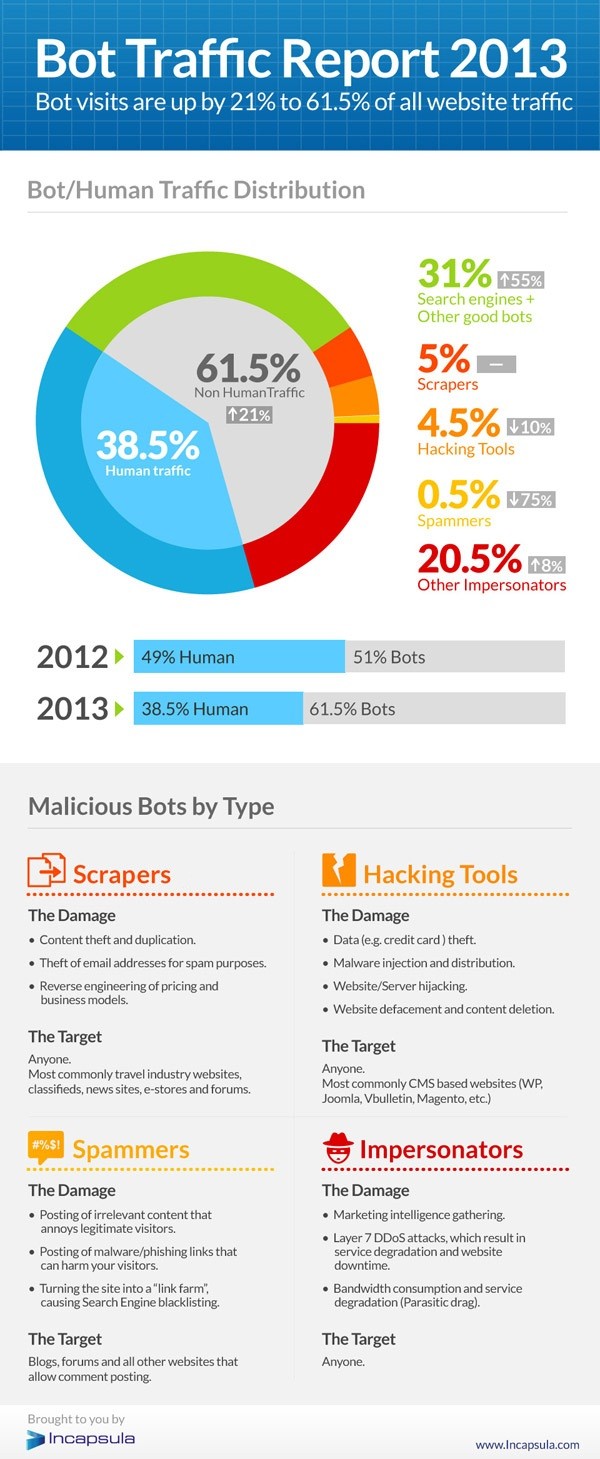
bot-traffic-report-2013
As recently reported by CloudTweaks, a recently published analysis tells us that only 38.5% of Internet traffic is from humans.  The rest is from Bots — good and evil.

Good Bots are primarily search engines and data aggregation services.  These represent 31% of Internet traffic.  This leaves 30.5% of traffic originating from Bad Bots.  

What are the Bad Bots?

  • Scrapers: These bots scrape web sites, capturing text to steal email addresses for spam purposes or to reverse-engineer pricing and business models
  • Hackers: These bots break into sites to steal credit card data or inject malicious code
  • Spammers: Email addresses are the target for these Bots, enabling billions of useless and annoying email messages and inviting “search engine blacklisting”
  • Impersonators: These bots specialize in intelligence gathering, DdoS attacks and bandwidth consumption

The result?  Web sites, email systems, and other online activities should be secure.  Our defenses must continue to evolve and all technology users should have a basic understanding of the threats at hand.

Focusing on protecting users and data, rather than devices, creates a mindset that enables a more integrated approach and solutions.

Contact us to explore solutions that fit your business and budget.

https://www.cumulusglobal.com/wp-content/uploads/2018/06/Cumulus-Global-logo-with-spacing.png 0 0 Allen Falcon https://www.cumulusglobal.com/wp-content/uploads/2018/06/Cumulus-Global-logo-with-spacing.png Allen Falcon2014-06-11 10:00:462014-06-11 10:00:46Lots of Bots; Not so Many People on the Internet?

Cumulus Global CEO Named Strategic Cloud Advisor for NexGen Cloud Conference

May 28, 2014/in Education

Cumulus Global today announced the addition of Allen Falcon, CEO of Cumulus Global, as a Strategic Cloud Advisor for the NexGen Cloud Conference & Expo slated to launch December 3, 2014 in San Diego, CA. Falcon brings his knowledge of cloud computing for SMBs and education to the advisory board, and will provide insight and direction through selecting topics and speakers for this industry event. The NexGen Cloud Conference & Expo is aimed at IT service providers looking to emerge as leaders in cloud computing services.

“I am honored by the invitation to the Advisory Board and I am looking forward to the opportunity to help further the industry”, stated Falcon. “Cloud Computing is not just a new technology and is not just a new approach to IT service delivery, Cloud Computing is transformative in its ability to enable change and growth for businesses of all sizes.”

The NexGen Cloud Conference & Expo intends to educate and inspire value-added resellers and managed service providers. The conference and exposition provides a great venue for company leaders to make connections, and find new directions.

“The Channel Company understands that cloud computing is driving ISVs, VARs, MSPs, and other IT service providers to rethink their strategy and business model”, notes Falcon. “This event brings the experts and advisors together in one place for an intensive learning and networking opportunity.”

Registration for the NexGen Cloud Conference & Expo is open, with pre-registration discounts available until June 6, 2014 at www.nexgencloudcon.com/.

https://www.cumulusglobal.com/wp-content/uploads/2018/06/Cumulus-Global-logo-with-spacing.png 0 0 Allen Falcon https://www.cumulusglobal.com/wp-content/uploads/2018/06/Cumulus-Global-logo-with-spacing.png Allen Falcon2014-05-28 10:30:332014-05-28 10:30:33Cumulus Global CEO Named Strategic Cloud Advisor for NexGen Cloud Conference

Cumulus Global CEO Named Among 10 to Watch by Worcester Business Journal

May 19, 2014/in Education

The Worcester Business Journal named Allen Falcon, CEO of Cumulus Global among the “10 to Watch” today in the MetroWest 495 BIZ special supplement.  The “10 to Watch” list identifies emerging business leaders who foster unique skill sets, find and develop new opportunities, and bring their respective companies to new heights.  The Worcester Business Journal covers business activity in the vibrant Central Massachusetts, 495 Corridor, and MetroWest regions.

“This is more than a personal honor for me”, noted Falcon while acknowledging the award.  “This honor reflects the commitment of the entire Cumulus Global team to the businesses, schools,  non-profits, and governments we serve.”   Falcon also praised Cumulus Global’s customers, stating “We are fortunate to have customers that want to learn, innovate, and grow, and that focus on the business value of our solutions.”

Based in Westborough, Massachusetts, Cumulus Global serves small and mid-size businesses, schools, and local governments in Massachusetts, throughout New England, and across North America. The company recently opened offices in New York and is looking forward to continued growth and expansion.

“While we deliver cutting edge and proven solutions, do not let our zeal for cloud solutions fool you,” added Falcon, “We serve much like a traditional value-add partner.  We assess business objectives, needs, and priorities; we select technologies and services to create pragmatic and effective solutions; and we follow through with deployment, education, training, and support.”

Recognition among the “10 to Watch” in MetroWest follows other recent industry accolades, including Cumulus Global’s recognition as a 2014 Pacesetter and the 5th fastest growing private company in Massachusetts by the Boston Business Journal, being named to CIO Review’s list of the 20 Most Promising Education Tech Providers,  and being included on CRN’s Next-Gen 250 list of cutting edge solution providers for the second consecutive year.

https://www.cumulusglobal.com/wp-content/uploads/2018/06/Cumulus-Global-logo-with-spacing.png 0 0 Allen Falcon https://www.cumulusglobal.com/wp-content/uploads/2018/06/Cumulus-Global-logo-with-spacing.png Allen Falcon2014-05-19 16:36:542022-09-30 13:37:35Cumulus Global CEO Named Among 10 to Watch by Worcester Business Journal

Google Extends “End of Life” for ALL Chrome Devices

May 16, 2014/in Education, General


Google is updating the official “End of Life” policy for all Chrome devices, including retroactive coverage to previous models.

This change extends the minimum “End of Life” (EOL) term from 3 years to 5 years, adding at least 2 additional years of automatic Chrome and security updates.  When a device’s EOL term is reached, Google no longer guarantees Chrome updates will be provided.

The new minimum EOL term is now 5 years from the date the device hardware is made available for purchase. Some models may have a further extension based on regional releases and the length of sale. Google will be updating the EOL policy and projected dates on the Chrome OS End of Life Policy page soon to reflect this change.

https://www.cumulusglobal.com/wp-content/uploads/2018/06/Cumulus-Global-logo-with-spacing.png 0 0 Allen Falcon https://www.cumulusglobal.com/wp-content/uploads/2018/06/Cumulus-Global-logo-with-spacing.png Allen Falcon2014-05-16 11:30:292025-05-05 23:19:53Google Extends “End of Life” for ALL Chrome Devices
Page 15 of 17«‹1314151617›»

Recent Posts

  • Secure Gemini AI in Google Workspace
  • Your Path to Full Cloud Adoption
  • How We Use AI for Data Enrichment

Featured Blog Topics

  • Artificial Intelligence / AI
  • Managed Cloud Services
  • Cybersecurity

Read

  • Blog
  • Newsletter
  • Microsoft Cloud Monday
  • Google Workspace Wednesday

Watch

  • 3T@3 Series
  • Coffee and Clouds
  • Event Recordings
  • Cumulus Global Channel

Explore

  • Library
  • Events Calendar

Phone / Fax / Email

  • 866-356-1202
  • 508-948-4070
  • info@cumulusglobal.com

Headquarters / Boston

  • Street Address

    4 Bellows Rd / 2nd Floor
    Westborough, MA 01581

  • Mailing Address

    PO Box 1129
    Westborough, MA 01581-6129

Regional Offices

  • Southeast Office

    120 W Trinity Pl
    Decatur, GA 30030

Copyright © 2026 - Cumulus Global | Privacy Policy | Terms of Service | Disclaimer | Website by Cold Spring
Scroll to top Scroll to top Scroll to top