What is Slowing Down Your Internet? 5 Things Hurting Your Connection Speed

what could be slowing down your internet speed

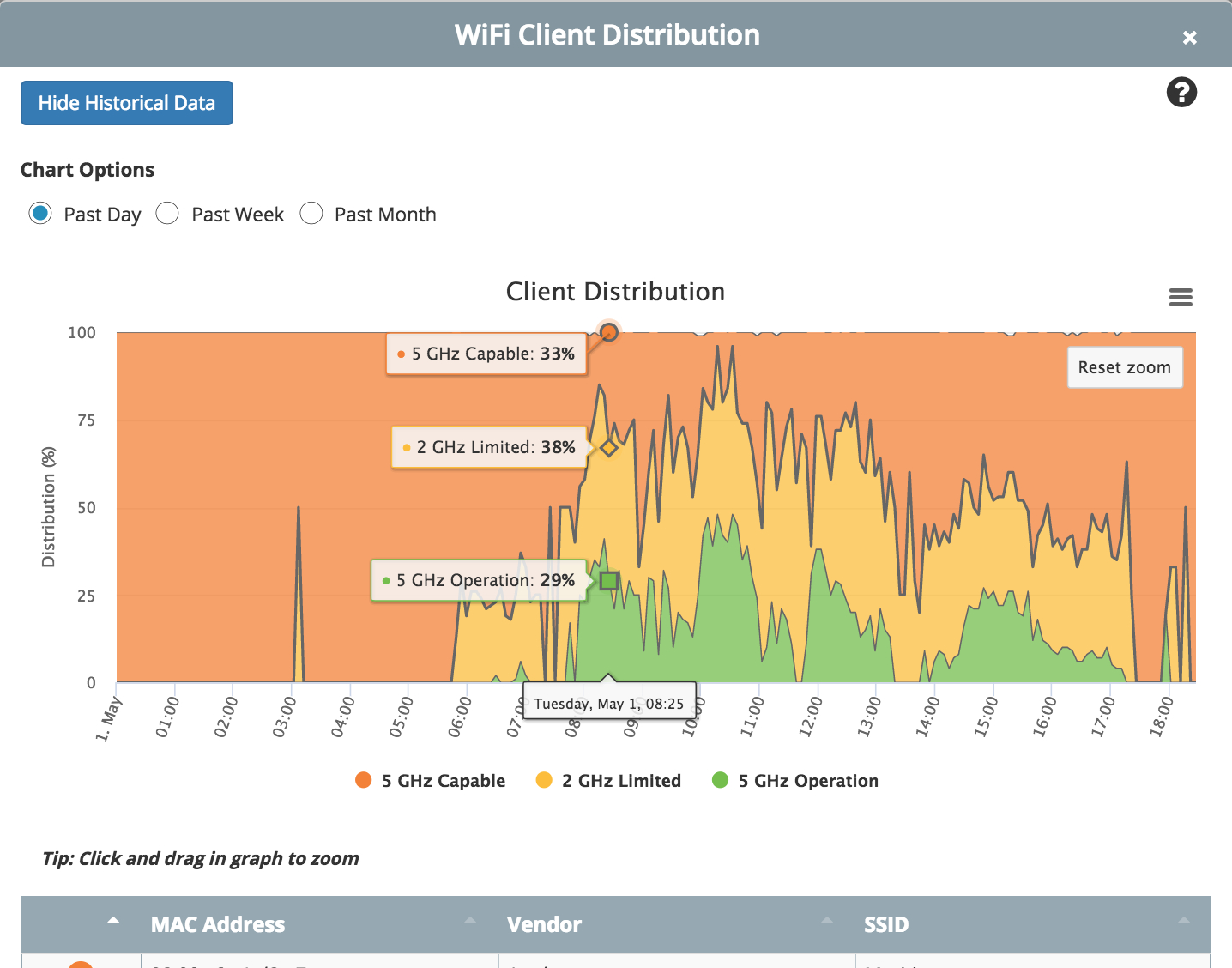
Bad WiFi service frustrates employees, hurts productivity, and can send customers to your competitors. Even if you use your wireless access point (AP) vendor’s management tool, there are still things that may be hurting your WiFi service quality or slowing down your internet speed without your knowledge. Read on below to learn about network connectivity, and the top five issues we usually see slowing down your internet speed.

Here are five thing that are likely slowing down your internet speed

  1. Network traffic actually transmitted over the air:
    APs know that they attempted to transmit data to a client, but cannot detect if a malfunction prevented transmissions.  Wireless access points cannot detect their own transmission problems, such as dropped packets, chatter, and jitter.
  2. Clients consuming channel bandwidth that are not connected to your infrastructure:
    Not every device using channel bandwidth connects to your network. These devices often interfere with connected traffic, hurting performance for others.
  3. Misconfiguration within your infrastructure:
    APs cannot self-detect if they are configured improperly or if neighboring APs are creating interference. APs are not clients on the network, so they can only see what they transmit and what they receive.
  4. Clients connected to APs not managed by your AP controller:
    While your AP management tool may identify unmanaged or unauthorized APs on your network, they cannot detect or analyze clients connected to those APs and/or the impact these unmanaged devices have on your WiFi performance.
  5. Interference from devices and networks outside of your control:
    Vendor AP management tools are built to manage the vendor’s APs. These tools do not identify or analyze neighboring networks that interfere with yours. Bandwidth and channel conflicts go undetected and unresolved.

Your vendor AP manager misses these issues because your APs are not WiFi clients.

How to Fix Slow WiFi Speed

The best way to monitor and manage WiFi performance and reliability is to place a passive sensor client in your environment.  Unlike expensive WiFi assessments of the past, done by on-site technicians lugging around specially equipped computers and meters, innovative services like the Wyebot Wireless Intelligence Platform™ (WIP) give you a plug-and-go solution for about 1/10th the cost.  WIP is a vendor agnostic tool that can see and monitor your entire WiFi environment, analyze and prioritize issues with alerts, make knowledge-driven solution recommendations, and provide remote network testing tools.

Tools like Wyebot help you ensure your WiFi network best serves your business.


Please download our eBook, Understanding WiFi Quality, for more information, or contact us to arrange an initial WiFi Assessment.


WiFi Quality is About the User Experience

WiFi QualityAn ever increasing number of businesses are learning that WiFi is more than a convenient network connection.

  • Restaurants, bars, and coffee shops that want patrons to linger and spend more lose business when customers can’t check the score, answer an email, or scan their social apps.
  • When your mobile app doesn’t work in your establishment because of poor WiFi service quality, your patrons go elsewhere.
  • WiFi quality influences which conference rooms get booked, where teams choose to huddle, where individuals choose to sit and work, and where people choose to socialize.

WiFi service quality is becoming a competitive factor that can help or hurt your business.

Most network managers rely on vendor management tools to monitor and control their wireless Access Points (APs). These tools provide basic statistics on traffic volume and patterns.  The more sophisticated solutions provide cool looking color-coded heat mats that overlay WiFi signal strength onto blueprints of your business. Some tools even use APs to triangulate users’ locations within their business.

What vendor AP management tools do not show you, however, is the client experience. You can have great WiFi signal coverage, but applications time-out if client devices experience too much interference. Your network may be setup to support a high density of users, but if clients end AP-hopping for signal strength, management overhead can cripple performance.

To understand WiFi quality: Understand the user experience.

By definition, your Access Points are not and cannot be clients on your WiFi network. The data your APs gather represents only what goes in and out of (or is simulated by) each Access Point. WiFi clients will see your network performance and reliability differently than your APs.

Think of it this way.  A chef creates a new signature dish. The chef knows that she’s used the best, freshest ingredients. The chef has sampled dozens of variations to get the taste just right.  The chef believes that this her best new meal ever. Even so, a few, many, most, or all customers may not like the taste, texture, or presentation of the meal. Fortunately, WiFi quality and reliability is not subject to personal taste and preferences; WiFi service quality is determined by the client experience.

The only way to understand, monitor, and manage WiFi service quality is to monitor your network from a client.

Historically, this has meant expensive service engagements in which technicians bring in monitoring and analysis systems for a “point in time” assessment. These assessments, which can cost thousands of dollars and only capture one point in time, are beyond the budget of most small and midsize businesses and schools.

New solutions, however, provide vendor-agnostic analyses of your WiFi network using passive sensor WiFi clients, prioritize identification of service issues, and offer knowledge-driven recommended solutions.  With the Wyebot Wireless Intelligence Platform™ (WIP), for example, in most instances we can provide periodic WiFi Assessments for less than 1/10th the cost of a traditional assessments. Ongoing monitoring becomes affordable for nearly all businesses and schools, the the added value of historical data analysis, real-time alerts, and remote network testing.

If your business relies on WiFi, you can now afford to make sure your WiFi network is reliable and performs well.


For more information, download our eBook, Understanding WiFi Quality, or contact us about arranging an initial WiFi Assessment.


Echo of Non-Compliance

Everyday, we hear about new ways we can use our smart speakers. Retailers, radio stations, product companies, and others remind us that we can use our Amazon Echo or Google Home to buy, listen, or learn. The term “smart speaker”, however, is misleading.  These are microphones and they are always listening. They are also likely recording everything they hear.

If you are covered by HIPAA or other privacy regulations, do not talk about protected information within earshot of Alexa.

This warning stems from a 2015 murder case in Arkansas. Believing that the Amazon Echo may have “heard” a murder, the District Attorney subpoenaed any recordings that Amazon may keep from the device. Amazon fought the decision on First Amendment and privacy rights, not by claiming that it was not recording. Amazon did not deny having recordings.

The issue for data privacy compliance is that your smart speaker may be listening to and recording conversations you have about protected information.  Allowing this is a violation of HIPAA and other regulations protecting personal identifying information (PII).

When is your Amazon Echo recording?

The short answer is: we are not sure, but maybe always.

Looking at the Alexa Terms of Use, Amazon tells us “Alexa streams audio to the cloud when you interact with Alexa” and “Alexa uses recordings of your voice to create an acoustic profile of your voice characteristics.” Alexa use is also covered by the Amazon Privacy Notice, which states, “We receive and store any information you enter on our Web site or give us in any other way.”

While Amazon tells us they are recording your “Hey, Alexa” commands, the Terms of Use and Privacy Notice are a bit more ambiguous. Neither document tells us that Amazon records only when listing and processing commands. Nor do the policies limit Amazon’s recording to those commands. We do not know, for sure, when Amazon is not recording what it hears on your Echo.

Better Safe Than Sorry

When speaking about sensitive or protected information, stay away from your “smart speaker” or manually mute the device.


One more thought:  Ever notice how after certain conversations, you see ads on Facebook related to the topic discussed?  Unless you turn off microphone access, Facebook is using your phone to listen to your conversations, analyze what you say, and profile you. Letting Facebook listen is another potential HIPAA and PII breach.


Inertia: The Science of Business Continuity

Newtons CradleTo paraphrase Newton’s Laws of Motion (with credit to Galileo) …

Absent an unbalanced force, an object in motion will stay in motion and an object at rest will stay at rest.

While this holds true for objects in a friction-less environment, it holds true for our businesses as well. Our businesses are in motion, working each day to service our customers with rhythms and cycles throughout each day, week, month, and year.

Our business cycles continue, until we meet an unbalanced force.

Some forces we expect, like changes in the economy that occur over a period of weeks or months.  Others forces are event-driven, such as storms, cyber attacks, and key employee departures. The sudden nature of event-driven forces can catch us by surprise, cripple our businesses in the short-term, and disrupt our normal cycles for the long-term.

A Case in Point

A company here in the northeast manufactures and distributes a customized product that customers generally replace or re-order every 2 to 3 years.  80% of the firm’s business is repeat, creating a strong and stable business. The company was hit by ransomware twice in a 3 month period.  The first attack, scrambled their files and their servers, but left their financial system in place.  They lost a day’s worth of data.  The immediate recovery took 3 days; the full recovery took nearly two weeks.  After three days of cleaning systems and restoring data, the company’s systems were up and running. They then had to enter the initial day lost data and all of the business activity for the 3 days their systems were down.  They allocated 1/3 of everybody’s time to recover the data, reducing productivity by 33% and impacting their responsiveness to customers. To enter the 4 days of missing data took over 10 days with the team working part time.

Inertia Takes Hold

This initial event changed the cycles and motions of the company. Whenever dealing with any business activity during the outage and recovery periods, they need to double check to make sure the information entered was complete and correct. And since some activities, like shipping and invoices related to prior activities, they need to double-check these connections.  Long after the two week recovery period, productivity is still down as the company’s daily motion now includes double-checking information that they are not sure they can trust.

Lesson NOT Learned

With so much focus on getting the business back into its normal rhythm, and the additional cost involved, the company did not act on recommendations that could help prevent a future attack and better ensure their ability to recover should a future attack occur. Whether the second attack was a different attack or they had failed to fully clean their systems does not matter.  The second attack was not caught until after the company’s backup server was hit, rendering their backups useless.  The company lost three years of data.

Inertia Creates a New Cycle

To recover from this attack took more than balancing data entry and on-going business. It was not feasible to manually recreate three years of data. While entering about 6 months of data for the fiscal year, they settled for a solution that created new methods and rhythms with long-term effects. They recalled all of their paper records from storage into an expanded warehouse space.  When a customer calls to re-order product they ordered 2 or 3 years ago, they search and retrieve the physical paperwork so they can create the new order. Every returning customer creates a scramble to find the paperwork in short order. Actions required in an emergency become part of the new normal. Inertia.

What You Can Do

You can be prepared with solutions that balance external forces beyond your control.

  • An educated and aware workforce balances the human manipulation that enables cyber attacks
  • Advanced threat, DNS, and web protections balance the forces of cyber attacks hitting us daily.
  • A robust backup/recovery and continuity system balances the forceful impact of disruptive events, giving you the ability to be up and running in hours not days.

If the company in our case study had implemented the recommended solutions after the first attack, they second attack would have disrupted the business for less than half a day — and may not have happened at all. The investment in communication, prevention, and recovery, while not trivial, was minor compared to the short term recovery and long term impact on the business.

If you are not ready or willing to have your business’ inertia redirected by forces beyond your control, now is the time to act.


Contact us for a free, no obligation, Cloud Advisor Session to discuss your business recovery and continuity needs and plans.


Pending Storm; Pending Doom

A quick scan of the weather headlines late on Thursday afternoon: a “Nor’easter” storm going through rapid escalation, know as “Bombogenisis”, looks ready to hit New England tomorrow with rain, snow and hurricane force wind gusts. Now it is Sunday, and many small and midsize businesses along the northeastern coast are wondering when, or if, they will be able to reopen. The impact of disasters is increasing. We can argue about climate change versus weather. We can discuss our aging infrastructure. We can debate whether to plan for disaster causes or effects. If we do not, however, make our businesses more resilient, the quantity and severity of disruptions will continue to grow.

The coming storm should not foretell coming doom.

By taking advantage of proven cloud services, most small and midsize businesses can protect themselves from disruption. Many businesses in coastal areas of New England may be without power and other utilities for 2 to 4 days. Businesses with no continuity plan are down and out. Given that about 50% of businesses shut down for a week will fail within six months, “down and out” can be fatal. If you rely on VPN or remote desktop to on-premise systems, you are still at risk — no power means no on-premise networks or servers.

Businesses with key systems in the cloud, however, can be up and running if employees have power and Internet access.

So what are your next steps?

First, measure the impact on your business of a disruption lasting one day, three days, and five days?  As you do, consider the full cost of recovery, including post-disaster productivity loss as your work to recover lost data and time while keeping things moving forward.

Second, consider the value of keeping your business running rather than having to recover and regroup. Beyond the dollars and cents, understand the value to your customers, to your reputation.

Third, contact us for a complimentary Cloud Advisor Session to discuss your cloud and continuity strategies.

The QuickBooks Hosting Challenge

QuickbooksQuickBooks is the leading accounting package for small business. And yet, many businesses cannot run QuickBooks Online, the Software-as-a-Service (SaaS) version. Whether the online versions lack industry-specific features you need, or you have integrated third party tools/add-ons, staying with an on-premise version of QuickBooks remains the best solution for your business.

As you move to the cloud, hosting your QuickBooks Pro, Premier, or Enterprise system makes sense. You keep the version of QuickBooks you need and improve accessibility, reliability, security, and resiliency from system failures and disasters.

In general, we find two levels of common QuickBooks hosting options. Looking at these services more closely, we find these services often fail to meet basic needs without expensive upgrades.  Fortunately, we have a third option designed to deliver the business value you need and want.

Basic

Basic QuickBooks hosting services run between $27 and $30 per user per month, with you purchasing and providing the QuickBooks license key. These services start with 1 GB of storage with fees for added storage that add-up quickly. Adding storage you need for reports, exports, etc., can easily increase the cost to the $75-$90 per user per month range. More importantly, your instance of QuickBooks is running on shared servers and on a shared network. As such, you have greater risk for performance issues, security breaches, and outages. In this type of multi-tenant environment, the actions of other can impact your business. These services offer backup, usually once per day with a fixed retention period of 7, 14, 30, or 90 days, depending on the service.

Better

The better QuickBooks hosting services cost between $49 and $60 per user per month, with you purchasing and providing the QuickBooks license key.  These services also start with 1 GB of storage with fees that add up when you need more space. Typical fees quickly creep up to the $95 to $120 per user per month range.  The main difference is that these services generally run your version of QuickBooks on a dedicated server, but still run on a shared network. While this does reduce the chance of interference from other tenants, this model still has your service running in the same security envelope as other companies. You still have a risk. Like the basic services, you have a once per day backup with a fixed retention period that varies with each service provider.

Best

The best solution for hosting QuickBooks will use your license of QuickBooks in the following environment:

  • Dedicated server
  • Private network
  • A usable amount of storage included (100 GB or more)
  • Flexible backup schedules and retention plans
  • Easy access from desktops, laptops, tablets, and smartphones
  • Access to Excel (MS Office) in the hosted environment

We this type of setup, you are more secure, will have better performance, and greater reliability.

The good news is that we can build you this type of environment at a cost comparable to other services, and we can integrate your QuickBooks environment with your Office 365 or G Suite service.


If you are interested in learning more about QuickBooks hosting options, please contact us for a free Cloud Advisor session.


G Suite Business Upgrade Incentives

G SuiteThrough June 30, 2018, you can upgrade from G Suite Basic to G Suite Business and save up to 33%.

To qualify, you must:

  • Running G Suite Basic with at least 1 user (no minimum user limit)
  • Upgrade before June 3o, 2018
  • If you are on an annual commitment plan, you can upgrade during your renewal
  • If you are on the monthly flex plan, you can upgrade at anytime
  • Contact us and let us know you want the savings

Why G Suite Business?

  • Unlimited Gmail and Drive Storage
  • Team Drives for central ownership and management of files
  • Email Archiving, eDiscovery, DLP for simple legal compliance
  • Advanced reports and admin alerts for better usage visibility
  • “Org” unit controls to adjust access and sharing rights by department
  • THE platform for new features, such as AppMaker and AI/machine learning enabled services

For more information, contact us, or see what our clients say about G Suite Business.


Driving G Suite Upgrades

G SuiteG Suite Business is the recommended G Suite subscription for most small and midsize businesses. Many of our clients have upgraded already, so we asked them what is driving them to make the move. In no particular order, our clients tell us that with G Suite Business, you get:

Better File Services

  • Team Drives gives you central ownership and management of files.
  • Combined with Drive File Stream, you can create a file service that looks and feels more like a file server and benefit from easier integration with desktop applications. (We blogged about this in Oct ’17)
  • Unlimited storage gives you the ability to move files from servers and workstations without worry.
  • You can offload inactive files from past projects, prior years, etc., into online, secure, searchable archives. This can save you from upgrading or replacing on-premise servers and storage.

Help with Compliance

  • The Vault service included with G Suite Business is a critical component for your information security and compliance requirements, including HIPAA, PCI, Sarbanes/Oxley, SEC, and FINRA.
  • Vault archives and provides compliant e-discovery for email, files in Drive, and Hangout chats.

Cost Savings

  • You can retire servers in remote offices with Drive and Team Drive, eliminating the need for on-premise server upgrades and replacements, backup, and support.
  • You can reduce or eliminate NAS, SAN, file servers, and local storage, all of which require local/offsite backup, maintenance, and support.
  • If you have multiple sites, you can replace point-to-point networks, MPLS, and VPNs with direct Internet access service, at considerable savings.
  • You can replace Active Directory with a cloud-based identity manager or SSO solution; you can retire your AD domain controllers.

New Features

  • With G Suite Business, you get new features, like Team Drives and AppMaker, that are not available in G Suite Basic.

If you are interested in how G Suite Business can help you and your team, please let us know.  We have special incentives in place through June 30, 2017.


The Best WiFi Solutions for Small Business

best WiFi for small business
Businesses depend on WiFi service. From employee laptops, tablets, and phones, to visitors in conference rooms, having the best WiFi for your small business is a critical component of your network infrastructure. And yet, for many small businesses, WiFi performance and reliability degrade over time. Most WiFi installations start with a focus on coverage — ensuring all areas and users have access to the service. Often neglected is capacity, the availability of bandwidth to ensure fast, reliable service for all users. For companies with small offices, and SMBs in general, the odds seem stacked against us. See why our services are vital if you need the best WiFi for a small bussiness.

  • Installations typically use default settings, placing WiFi traffic on slower bandwidth service and on channels most susceptible to interference
  • Wireless routers and access points sold to SMBs and small offices often lack settings (bandwidth steering, antennae power control, etc) needed to manage and tune performance
  • Most SMBs and small offices do not have active monitoring of WiFi performance, or even periodic reporting about the quality of WiFi service

When SMBs and small offices have WiFi connectivity or performance issues, the typical response is to add additional access points or to increase signal power, “solutions” that often exasperate the problem.

You can and should have the WiFi connectivity and performance you need.

Even if lower cost wireless routers and access points have been installed, SMBs can still take steps to ensure WiFi connectivity and performance. And, you can do this without expensive equipment upgrades and installations. Take an approach recognizing that the quality of your WiFi service is not static. The environment in which your WiFi operates will change over time. Make sure you understand what might be slowing down your WiFi, and take preventative measures to ensure connectivity and performance over time.

Three Ways to Ensure Performance and Connectivity With the Best WiFi for Small Businesses

In today’s digital age, reliable network connectivity and high-speed WiFi connection is essential for small businesses to operate efficiently and stay connected with customers. However, with so many WiFi services available in the market, choosing the right one can be a daunting task. That’s why we have compiled a list of top WiFi services for small businesses that can ensure seamless connectivity and optimal performance.

1. WiFi Assessments:

Historically, WiFi assessments have been expensive; most SMBs cannot afford a few thousand dollars for a one-time assessment. These one-time assessments capture a point in time and may not recognize shifting usage, demand, and interference patters. These types of assessments are often vendor-led and recommend significant equipment upgrades and installations.

New technologies and services allow for one-time assessments to be completed for hundreds, not thousands, of dollars.  Drop-in devices capture all WiFi traffic and feed the data to cloud-based, AI-driven analysis engines that diagnose and prioritize issues. The AI analysis engines are able to recommend specific solution actions addresses both your WiFi infrastructure and devices accessing the network. The drop-in devices capture all WiFi signals in the area, looking not only at your networks, but the behavior and impact of WiFi signals reaching your space from other locations. And, our recommendations focus on setting changes in existing equipment rather than upgrades and overhauls.

With this lower cost, SMBs can afford to run assessments as-needed when performance or connectivity issues arise, or on a periodic schedule. With periodic assessments, you capture and adapt to changes that occur over time, often preventing issues before they impact your business.

2. WiFi Monitoring:

Using the same intelligent technology and services, SMBs can now also afford on-going WiFi Monitoring. With continuous monitoring, the AI engine and analysis tools can look at historical trends and address changes to the WiFi environment. This service offers incredible value to restaurants, retail, warehouses, schools, and other locations where the number of WiFi connected devices (customer, employee, IoT, etc) and usage patterns change hour-to-hour, day-to-day, or over time. As the drop-in devices also provide remote network testing, the monitoring infrastructure saves valuable time and effort when testing or re-configuring WiFi services.

Because the monitoring is not depending on your existing infrastructure of vendors, the analysis is agnostic and the recommendations are not biased to any vendor solution.

3. Managed WiFi Service:

For the first time, SMBs can now afford to have a managed WiFi service. With managed services, WiFi routers, access points, and (hopefully) attached physical switches are connected to central management console. The console allows for active performance and connectivity alerts that can trigger service tickets and responses. The console also provides remote access to manage configurations and settings, diagnose issues, and resolve problems in real time.

As a managed service, we configure, monitor, and maintain your WiFi network to ensure it meets the needs of your business.

When combined with WiFi monitoring, Managed WiFi Services provide a complete WiFi service that adapts to the changing needs of your environment, ensuring connectivity and performance.

Implement the Best WiFi for Small Business Today

In conclusion, a reliable and high-speed WiFi connection is crucial for small businesses to operate efficiently and stay connected with customers. By utilizing the top WiFi services we have outlined above, small business owners can ensure seamless connectivity and optimal performance. These WiFi services offer a range of features that cater to the specific needs of small businesses. By selecting the right WiFi service, small business owners can stay ahead of the competition and provide the best possible customer experience.


We offer WiFi Assessments and Monitoring services powered by the Wyebot Wireless Intelligence Platform along with a range of Managed WiFi Service offerings.  Please contact us for more information.


The Last Mile: Internet Access in the Age of Cloud

The Last Mile

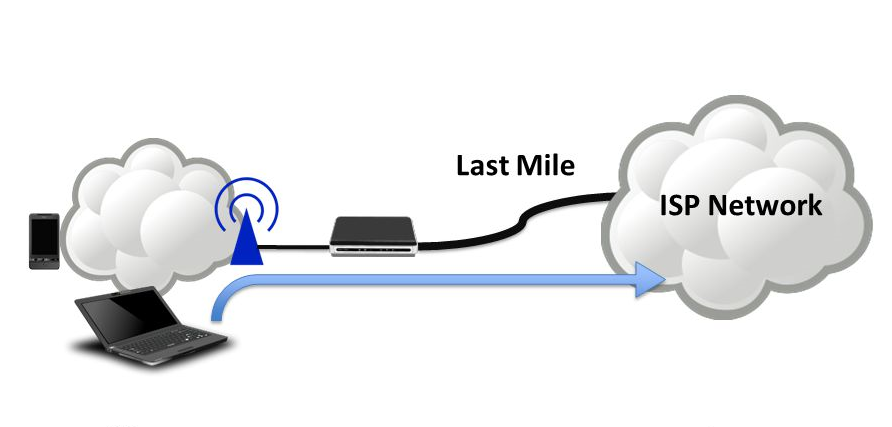
Internet access has changed radically in the past half decade. With greater availability of broadband service from cable providers, small and midsize businesses are no longer limited by legacy wide area network technologies offered by traditional telephone providers. The cost of service has also plummeted.  In our area, we have gone from paying $500 per month for a 1.5 Mbps circuit to paying $149 per month for 75 Mbps service. From $330 per Mpbs down to $2 Mbps in less than five years. The impact is profound and has spurred changes on how we use the Internet. We have moved from surfing web sites and email traffic to cloud computing, creating a new set of challenges for small and midsize businesses. High speed internet is not readily available in many rural, sub-rural, and urban areas. High speed internet is often built over aging infrastructure and lacks reliability. And, most importantly …

Many Broadband Services Fail to Meet the Needs of Small Business

Most business broadband services are asymmetrical, with different upload and download speeds. With uploads running at 10%-15% of download speeds, broadband fails to meet the needs of cloud users. Working with cloud systems, applications, and file services, as much data moves “up” to the cloud as “down” to user. Symmetric upload/download speeds are critical to reliable performance and productivity.

Fortunately, Solutions Exist.

By looking to other carriers and their agency networks, we can offer solutions that delivery bandwidth, reliability, access, and coverage.

For bandwidth, many carriers offer Fast Ethernet, Gig Ethernet, and other high speed fiber and coax services. These services deliver symmetrical service with a range of speeds, usually starting at 100 Mbps. Availability is generally good in urban and suburban areas. For buildings not pre-wired for service, installation may involve pulling new wires from the street network. In most cases, carriers will waive this construction cost, along with normal installation fees, when you sign a three (3) year agreement.

For reliability, a second, fail-over, Internet connection can provide business continuity when your primary service fails. As the failures are often on the last mile — the connection from the network to your business — alternate service should not be built over the same infrastructure as your primary connection. For many small businesses, cellular can provide reliable, affordable fail-over services with reasonable speeds. Solutions like the Datto Network Appliance connect to your local provider and offer automatic fail-over to the Verizon or AT&T cellular data networks for a low monthly fee.

For access and coverage in areas without high speed Internet service, broadband satellite is emerging as a viable solution, particularly in rural and sub-rural areas.  Speeds start at 20 Mbps. Service may not be symmetrical everywhere, but coverage areas continue to grow.

The solution you need for business will depend on your location, size, and use of cloud services. Taking time and picking the right Internet access will improve performance and productivity.


If you are interested in exploring options, contact us for a free consultation.