
“Deja Vu?” or “Have We Learned Our Lesson?”
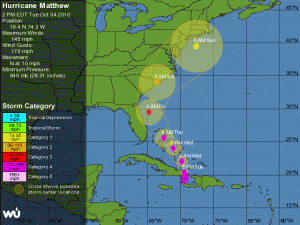
Hurricane Matthew as of 2pm on Oct 4th
As of this blog post, Hurricane Matthew is churning through the western Caribbean with a projected path eerily similar to Superstorm Sandy in 2012. In its wake, Sandy left a path of destruction up the East Coast and deep into New England with many families and businesses still in the process of rebuilding. Small and mid-size businesses (SMBs) up and down the eastern seacoast were crippled by flooding, loss of infrastructure, and extended Internet and power outages; many were unable to recover.
Could this be a devastating Deja Vu, or did we learn our lesson?
Have you ensured that your information services and data will survive the next storm? Do you know how quickly your business can recover if (more like when) the next storm hits?
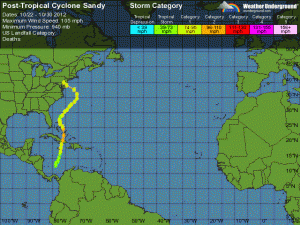
Path of Hurricane Sandy in 2012
These questions feel more pressing as our next potential big storm churns towards Florida.
Good. Better. Best.
Your “Better” strategy is Recovery. In addition to backups, ensure you have the ability to recovery quickly to new systems or to a temporary data center. When your Return to Operations (RTO) time lets you continue running your business without significant impact to you or your customers, your recovery plan is sound.
Your “Best” strategy is Resilience. Your business is resilient when you can continue running your business with minimal disruption and with little or no inconvenience to your customers, regardless of the weather outside. By placing key applications and services in the cloud, your business can continue to run whether or not your office is open. With Internet access and a browser, your team can connect and work. And while you still may have some aspects of your IT running on premise, a solid cloud strategy keeps critical systems available and operating.
Resiliency Roadmap
For most SMBs, you should consider having the following services hosted or in the cloud. Depending on your applications and needs, you can use Software-as-a-Service (SaaS) solutions or host your applications on cloud/hosted servers with virtual/remote desktops.
- Communications
- Email / Calendar / Contacts
- Telephony — cloud/hosted Voice over IP (VoIP)
- Messaging / Voice & Video Conferencing
- Collaboration
- File Storage & Sharing
- Productivity Tools (document, spreadsheet, presentation editors)
- Key Business Apps
- Customer Relationship Management (CRM)
- Account / Finance
- Service / Support
- Others …
Creating a Resilient business requires strategic thinking, advanced planning, and solid execution. This is especially true when you have integrated applications and systems that you cannot change in isolation. At a high level, the roadmap is:
- Identify the applications and services
- Prioritize all applications and services based on the impact in the event of a service outage. Look outward and inward, remembering to consider customer impact.
- Starting with your highest priority applications and systems, evaluate if your level or protection: Backup, Recovery, or Resilient protection.
- Identify and implement solutions that take you from Backup to Recovery, from Recovery to Resilience, or from Backup all the way to Resilience.
- Repeat as you move through your prioritized list.
While you may not have time to make your business Resilient before Hurricane Matthew works its way up the coast, you have options to improve your backups and your ability to recover that can be implemented within hours rather than days and weeks. Think about the value of keeping your business running and ensuring its survival. Act now.
Contact us immediately if you want assistance with your backup, recovery, or resiliency services.
 Just because you can see it and touch it, does not mean it is safe and secure. With the number of successful ransomware attacks up more than 400% in the past year, it is increasingly clear that on-premise systems are not inherently more secure than they would be in the cloud. Many companies are hacked and remain unaware for weeks or months, as the use by cyber criminals of advanced persistent threats continues to rise.
 New Names, Same Great Solutions
 Whereas most enterprise cloud strategies focus on building new line of business applications and rebuilding existing systems for the cloud, most small and midsize businesses are not building or customizing their own applications. When SMBs do use custom applications, they typically rely on outside firms for development and support. When SMBs move to the cloud, they normally start with “infrastructure” services like email and file services. Existing business applications are often replaced by SaaS (Software-as-a-Service) cloud solutions — either from the current vendor or as a replacement.
 As reported in
 On September 13, 2016, Apple will release iOS 10 and will stop providing updates for iOS 9. While iOS 10 is reported have some great new features, the real story for schools — particularly those with iPad programs — is the impact on existing devices and budgets.