• Link to Instagram
  • Link to LinkedIn
  • Link to Facebook
  • Support
  • Resource Center
  • News & Events
  • Blog
  • Pay Online
Cumulus Global
  • What We Do
    • Managed Cloud Services Provided by Cumulus Global
    • Cloud Computing Security, Privacy, Compliance, & Continuity
    • Collaboration, Productivity, & Transformation
    • Managed Infrastructure & Platforms
  • How We Do It
    • Understand & Assess
    • Cloud Computing Strategy & Planning
    • Cloud Migration & Deployment
    • Cloud Managed Services
    • Service & Support for Cloud and IT Solutions
    • Global Strategic Services
    • Guide, Educate, & Train
  • What We Offer
    • Managed Cloud Services
    • IT Admin, Service, and Support
    • Security CPR® Managed Security
    • Google Cloud Workspace / Education / Chrome / Voice
    • Google Cloud Platform Computing Services
    • Microsoft 365 and Office 365 Managed Services
    • Microsoft Azure
  • Who We Are
    • Our Mission
    • Our Team and Opportunities
    • Our Cloud Computing Partners
    • Our Reviews and Testimonials
    • Our Community
    • Our Sustainability
  • Click to open the search input field Click to open the search input field Search
  • Menu Menu

Archive for category: General

The First 3 Items on Your 2025 IT Checklist

February 4, 2025/in General

IT ChecklistAs we move into 2025, our businesses face a new set of challenges. Political and economic changes, rapidly emerging technologies, and increasing security threats will all demand our attention.  Where we focus, and the decisions we make, will impact our businesses, customers, and employees. Is your 2025 IT Checklist ready to help?

Your information technology services remain critical to your business operations. Pragmatic, thoughtful planning and decisions now, will empower your team and enable your business to address the coming challenges – and opportunities.  Here are the first three of six key areas to explore as you build your IT goals and objectives, and your 2025 IT checklist.

1 Navigate the Windows 10 End of Life Transition

As we approach 2025, one of the most pressing IT challenges for businesses is the transition away from 

Windows 10 reaches end of life on October 14, 2025. Microsoft will no longer provide updates, support, or free security patches. Now is the time to prepare. The move to Windows 11 will impact your IT planning, budget, and operations.

  • Inventory all devices running Windows 10, including laptops, desktops, and any embedded systems in manufacturing or distribution equipment.
  • Evaluate each device for Windows 11 compatibility and identify machines that require replacement.
  • Determine if compatible machines can/should be upgraded or replaced to ensure performance.
  • Subscribe to the Extended Security Update program for systems that cannot or will not be replaced in time.

As you assess your needs and plan replacements and upgrades, be mindful of potential supply chain issues. Expect the current political and economic climate, and increased demand for new devices, to impact pricing and availability.

2 Maximize Your Productivity Suite Utilization

Your productivity suite – Microsoft 365 or Google Workspace – is the backbone of your business operation. And yet, studies show that over 65% of small businesses leverage less than 40% of their productivity suite’s features. 

Unlocking the full potential of these tools can drive efficiency and collaboration.

  • Encourage a culture of continuous learning and sharing within your organization. Share shortcuts, tips, and best-practices.
  • Help your team explore, utilize, and gain comfort with new features.
  • Identify and share ways new features can streamline existing workflows and tasks.
  • Set expectations for team members to learn and use their systems more efficiently and effectively, and to adapt to updated workflows.

3 Integrate AI Effectively into Your Business Operations

Artificial Intelligence (AI) is becoming a cornerstone of modern business operations. Beyond the hype and hyperbole, AI can benefit your business when part of realistic, practical use cases.

In 2025, prioritize practical AI applications while safeguarding data security and managing costs.

  • Refine your data governance policies to protect sensitive information. 
  • Identify and prioritize use cases for AI, such as automating repetitive tasks or enhancing customer service. 
  • Explore AI capabilities in your existing systems before investing in new solutions. 
  • Provide thorough training to ensure employees understand AI tools and their role in streamlining workflows.

Next Steps

For help with any part of your 2025 IT checklist, or to tap into our expert guidance, book a complementary  intro  call with our Cloud Advisors.  Ask for an IT Assessment Referral Code and request your IT assessment. 

About the Author

Allen Falcon is the co-founder and CEO of Cumulus Global.  Allen co-founded Cumulus Global in 2006 to offer small businesses enterprise-grade email security and compliance using emerging cloud solutions. He has led the company’s growth into a managed cloud service provider with over 1,000 customers throughout North America. Starting his first business at age 12, Allen is a serial entrepreneur. He has launched strategic IT consulting, software, and service companies. An advocate for small and midsize businesses, Allen served on the board of the former Smaller Business Association of New England, local economic development committees, and industry advisory boards.

https://www.cumulusglobal.com/wp-content/uploads/2025/02/2025-IT-Checklist.ai_.jpg 1481 1643 Allen Falcon https://www.cumulusglobal.com/wp-content/uploads/2018/06/Cumulus-Global-logo-with-spacing.png Allen Falcon2025-02-04 16:00:562025-05-05 23:18:00The First 3 Items on Your 2025 IT Checklist

Picking the Right Google Workspace Subscription for Your Business

January 24, 2025/in General

Google Premier PartnerTo meet widely varying customer needs, Google offers five core subscription options spread over two tiers. For larger organizations with frontline and deskless information workers, Google offers additional, specialized license options. If you are looking at a Google Workspace subscription for the first time, considering an upgrade, or looking for Gemini AI features, you’ll want to choose the subscription and licensing that meets your needs without overpaying.

Subscription Tiers

Business Tier

Businesses with fewer than 300 employees typically select one of the Business Tier subscriptions– Workspace Starter, Standard, and Plus. These subscriptions limit the number of users and focus on the features and security most appropriate for smaller organizations.

Enterprise Tier

Larger businesses, as well as those requiring more advanced capabilities and security, often opt for the Enterprise Tier subscriptions– Standard and Plus. The Enterprise Tier also includes specialized license versions for frontline workers and knowledge workers with other email services.

Selection Criteria

When selecting a subscription, most businesses focus on a few key capabilities, such as:

  • Storage capacity and shared drives
  • Vault archiving/e-discovery
  • Google Meet features
  • Select security capabilities

With AI now integrated into all Google Workspace subscriptions, you should take time to understand the Gemini features included in each plan. A deeper review of security features can also help guide your selection.

Here is a deeper look at key selection criteria.

Storage

Since September 2024, all Google Workspace subscriptions use pooled storage.

Vault, the compliant archive/e-discovery service, covers Gmail, Drive, Groups, Chat, and Calendar, is available for all Enterprise Tier subscriptions and Business Plus.

The amount of storage, allocated per user and pooled, is as follows:

Business Tier

  • Starter = 30 GB
  • Standard = 2 TB
  • Plus = 5 TB

Enterprise Tier

  • Essentials = 1 TB
  • Standard = 5 TB
  • Plus = 5 TB

Meet

Google Meet is a robust meeting and collaboration system that generally negates the need for third party solutions.

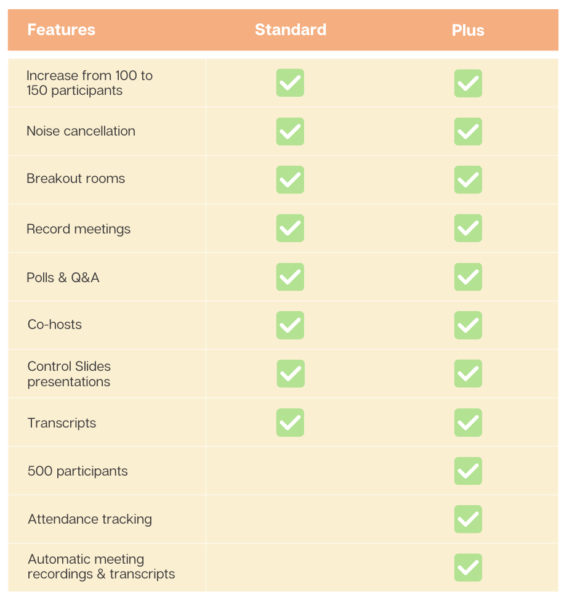
Google Meet with Business Standard and Plus

Meet Features in Business Standard and Plus Subscriptions

All Google Workspace licenses include a core set of features:

  • External participants
  • Secure meetings
  • Screen sharing
  • Mobile app
  • Dial-in (US & international)
  • Digital whiteboard
  • Hand raising
  • Reaction

At the Business Tier, Meet features scale up  as noted in the table.

The Enterprise Tier includes live streaming and additional security features with all licensees.

Participant limits increment as follows:

  • Essentials: 250
  • Standard: 500
  • Plus: 1000

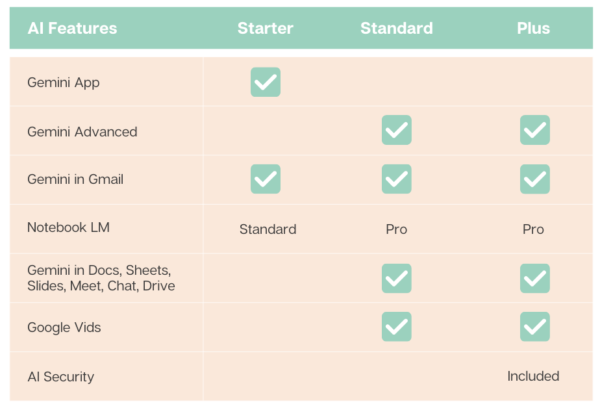
Gemini AI in Google Workspace

The following matrix summarizes the Gemini AI features in each of the core Google Workspace subscriptions.

Google Workspace Gemini AI Features

Security

Google Workspace provides a comprehensive set of security features and tools. With too many settings and options to list here, we published a Google Workspace Security Feature Matrix as an eBook. 

Review security features against your regulatory, industry, and business requirements.

Selection Process

When evaluating Google Workspace subscriptions, it’s essential to assess the details. Part of your selection process should include determining whether selecting a higher subscription tier or upgrading is more cost-effective than integrating third-party tools to provide the functionality you need.

For example, while Google Workspace’s Standard Data Protection includes email sandboxing, the feature does not offer the same capabilities– such as QR code analysis– as many third-party email threat protection services. 

In many cases, upgrading your Google Workspace subscription provides the needed capabilities at a lower cost than using a third-party tool. This is often true for Google Meet compared to third-party web meeting tools like Zoom.

For other capabilities, however, a third-party integrated solution may still be required.

Your Next Steps

For help assessing your needs and options, please contact us or schedule a brief intro call with a Cloud Advisor.

About the Author

Bill Seybolt bio pictureBill is a Senior Cloud Advisor responsible for helping small and midsize organizations with cloud forward solutions that meet their business needs, priorities, and budgets. Bill works with executives, leaders, and team members to understand workflows, identify strategic goals and tactical requirements, and design solutions and implementation phases. Having helped over 200 organizations successfully adopt cloud solutions, his expertise and working style ensure a comfortable experience effective change management.

https://www.cumulusglobal.com/wp-content/uploads/2024/01/GCPA_Premier_Badge_Sell_160x160.png 160 160 Allen Falcon https://www.cumulusglobal.com/wp-content/uploads/2018/06/Cumulus-Global-logo-with-spacing.png Allen Falcon2025-01-24 10:00:502025-01-24 10:36:58Picking the Right Google Workspace Subscription for Your Business

Google Workspace: Gemini AI Features and Pricing Changes

January 20, 2025/in AI in Google Workspace, General, News

Updated January 22, 2025, at 2:00 pm et: See the easier to read chart and text that is in bold italics.

Google Premier PartnerOn January 15, 2025, Google announced a major shift for Google Workspace. Going forward, all Google Workspace licenses will include Gemini AI features and functions. Specific capabilities will vary by license type.  

While customers will no longer need to pay as much as $30 per user per month for these capabilities, the cost for most Google Workspace subscriptions will increase by about 17%. This increase affects all subscriptions, even those opting not to use the newly embedded Gemini AI features.

For new customers purchasing directly from Google, the price increase took effect immediately.

For existing customers, Cumulus Global customers, and those working with other Google partners, the price increase takes effect on March 17, 2025.

  • If you have a Flexible Plan subscription, you will see the increase as of March 17, 2025.
  • If you have an Annual Plan subscription, or a multi-year agreement, you will see the increase at their next subscription renewal. You will not be charged for the additional Gemini AI functionality until this renewal (see below).

Product Update Highlights:

The product highlights, and caveats are as follows:

  • The Gemini App (gemini.google.com) remains
  • Gemini for Google Workspace is replaced by the embedded features based on your subscription.
  • All versions of Google Workspace will now include Gemini AI features. 
  • Google is deploying the Gemini AI features to existing customers in phases between January and March, 2026
    • The Gemini AI features will be enabled, by default, for all users
    • Enterprise Tier subscriptions can manage and disable Gemini AI features
    • Business Tier subscriptions must request access to Gemini AI admin controls

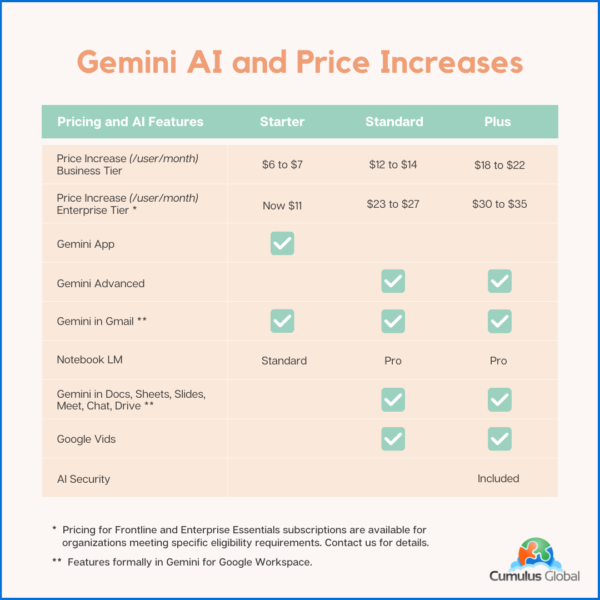
Pricing and AI Features Matrix

The following table summarizes the price increases and Gemini AI features for both the Google Workspace Business and Enterprise tiers with Annual Plan Pricing. Flexible Plan prices increase similarly, reflecting a 20% upcharge.

Google Workspace: New Pricing and Gemini AI Features

Note that your pricing for Archived Users, Vault, Pooled Storage, Voice, and other products will not change at this time.

Billing Changes

Google has indicated that it will cease billing for Gemini for Google Workspace licenses as of the end of January 2025.

As these services are billed in arrears, expect to see Gemini for Google Workspaces included on February 2025 invoices that cover January 2025.

If you have an existing single or multi-year agreement that includes Google Workspace and Gemini for Google Workspace, expect the Gemini for Google Workspace line item to be removed once service for January 2025 has been invoiced. If you prepaid for the year, you may be eligible for a credit or a refund.

We will update this blog post, and communicate with affected customers as we are able to confirm how these issues will be resolved.

Managing Gemini AI within Google Workspace

Admins with appropriate permissions can manage Gemini AI features. Users have limited ability to control AI options.

Admins

Admins have the following options to control AI settings:

  • Manage access to Gemini features in Workspace services (Enterprise editions only at this time)
  • Turn access to the Gemini app (gemini.google.com) on or off. (Note: this has no effect on other AI features in Google Workspace services.)
  • Turn NotebookLM on or off as an additional service.
  • Turn access to Google Vids on or off.
  • Control whether users can let Google AI take notes in meetings.
  • You can turn Google Workspace smart features on or off.
Users

Users can control the following AI options:

  • Smart features in Google products

Cumulus Global clients should contact our Service Team for assistance. If you are self-service with Google direct, or have licensing through another Google partner, schedule a call with one of our Cloud Advisors.

Time Sensitive Opportunities

If you have considered upgrading your Google Workspace subscription to a higher tier, we recommend doing so before March 15, 2025. 

  • We can upgrade your service with a one-year commitment. You still get the newly embedded Gemini AI features while locking in the current subscription price. We can also explore incentives for multi-year commitments.

If you are on a Flexible Plan, consider moving to an Annual Plan. 

  • While the Flexible Plan allows your monthly cost to directly reflect the number of active accounts, the vast majority of small businesses save money with an Annual Plan. 
  • Most businesses do not see the number of account removals needed to overcome the 20% surcharge on top of the price increase. 
  • Please schedule time with a Cloud Advisor to calculate which plan is best for you and your business. 
About the Author

Allen Falcon is the co-founder and CEO of Cumulus Global.  Allen co-founded Cumulus Global in 2006 to offer small businesses enterprise-grade email security and compliance using emerging cloud solutions. He has led the company’s growth into a managed cloud service provider with over 1,000 customers throughout North America. Starting his first business at age 12, Allen is a serial entrepreneur. He has launched strategic IT consulting, software, and service companies. An advocate for small and midsize businesses, Allen served on the board of the former Smaller Business Association of New England, local economic development committees, and industry advisory boards.

https://www.cumulusglobal.com/wp-content/uploads/2024/01/GCPA_Premier_Badge_Sell_160x160.png 160 160 Allen Falcon https://www.cumulusglobal.com/wp-content/uploads/2018/06/Cumulus-Global-logo-with-spacing.png Allen Falcon2025-01-20 14:59:472025-08-03 21:23:47Google Workspace: Gemini AI Features and Pricing Changes

Leadership Thoughts: Noteworthy Blog Posts – Jan ’25

January 7, 2025/in Blog, General

As small business owners and leaders, you carry the responsibility for the direction and success of your business.  And while Cumulus Global provides managed cloud services that help you thrive and grow, we understand your responsibilities are broader than just IT.  Here is a curated list of blog posts from trusted experts and thought leaders that we hope will inform and inspire.

Human Factors

  • 7 Tips for Identifying Talent During Job Interviews
    • The interview process is the perfect opportunity to weed out unfavorable candidates and, more effectively, identify those individuals with the most talent and promise for your organization. As the new year rolls around, here are helpful tips for customizing your interview process to make note of high-quality prospective employees.
    • Electra Govoni, The Alternative Board (TAB) Boston North West

Legal and Compliance

  • 2025 Employment Law Outlook
    • Explores critical employment law trends and topics to deliver important insights and forecast trends and challenges employers will likely encounter in 2025. It offers employers a forward-looking perspective to enhance their preparedness and ensure sustained success in an increasingly complex regulatory environment.
    • Chrystine Heier, Sullivan Benefits
  • FTC Finalizes Comprehensive Rule to Combat Fake Reviews and Misleading Testimonials
    • When it comes to reviews, businesses have a strong incentive push for 5 stars. For instance, an increase of one star on a Yelp review can lead to a 5-9% increase in business revenue, according to a Harvard Business School study. But what if the review is not a true reflection of the company? 
    • Nicholas Lipresti, Esq., Lipresti Law

Management

  • A Project Management Recipe for Internship Program Success
    • Just as projects start and stop, so do interns come and go. The key is to develop programmatic infrastructure to mitigate the impact of inevitable turnover.
    • Amy Mosher Berry, Visions Internships

Marketing

  • Top Apps for Creating Social Media Graphics
    • Visual social media posts such as photos, videos, and graphics tend to get more engagement, including a higher number of likes, comments, and shares. Here are some of the best free apps for creating social media graphics that do not require you to be a designer.
    • Mike Grossman, Mike Grossman Consulting, LLC

Productivity

  • Gen AI Prompts: A Primer
    • Like most IT solutions, the value of AI depends on when, why, and how you decide to use it. Better Gen AI prompts give you better results. This eBook provides a model, structure, and approach to building effective Gen AI prompts that save time and effort. 
    • Cumulus Global eBook, May 2024

Strategy and Leadership

  • Building a Foundation for AI Success: A Leader’s Guide
    • For AI success, you need a solid foundation. In this paper, Microsoft shares insights — from customers, partners, analysts, AI leaders inside and outside of the company, and from Microsoft’s own experience — about the five categories that, collectively, form a foundation for building sustainable value and AI success.
    • Microsoft Whitepaper

Wellness

  • Motivation is Not a Prerequisite for Action: Motivation Catches Up
    • We wait for the “right moment” or for that sudden burst of motivation to get us moving. But what if I told you that motivation isn’t a prerequisite for movement? In fact, motivation often catches up with action, rather than the other way around.
    • Linda Townsend, Release Well Being Center
  • 7 Tips for a Successful Workplace Wellness Program
    • In today’s fast-paced world of hybrid work, finding a balance between work and wellness is more important than ever. Prioritizing wellness at work is not only essential for individual health and happiness but fosters a positive and productive work environment with less absenteeism and lower healthcare costs. This post invites you to introduce Lifestyle Medicine’s seven innovative Pillars of Wellness to your work community today.
    • Michelle Grasso, Synergy Wellness Center

Technology and Security

  • Business Email Compromise: The Second Costliest Crime
    • Cyberattacks, specifically Business Email Compromise attacks are back in the national news. The FBI’s 2023 Internet Crime Report identifies BEC attacks as the second-costliest type of crime. The risks and your next steps.
    • Cumulus Global Blog, December 2024

Help us keep the ideas flowing. If you have any blog posts that are leadership thoughts you want to share, please let us know.h

https://www.cumulusglobal.com/wp-content/uploads/2018/06/Cumulus-Global-logo-with-spacing.png 0 0 Allen Falcon https://www.cumulusglobal.com/wp-content/uploads/2018/06/Cumulus-Global-logo-with-spacing.png Allen Falcon2025-01-07 08:00:132025-01-06 16:00:25Leadership Thoughts: Noteworthy Blog Posts – Jan ’25

Be Ready for 3 Things in 2025

December 27, 2024/in Cybersecurity, General

Be Ready for 3 Things in 2025As we head into the new year, we face an uncertain business landscape. Politics, the economy, and technology advances create new tech-related challenges and opportunities. As you make your plans, be ready for these 3 things in 2025.

Windows 10 End of Life

Windows 10 reaches its end-of-life on October 14, 2025. As of this date, Microsoft will stop releasing new features, free security updates, and support.  You must decide when and how you will transition to Windows 11. 

Staying on Windows 10 without subscribing to the Extended Security Updates (ESU) program exposes your systems to increased vulnerabilities, potentially impacting compliance with cybersecurity regulations.

While many devices currently running Windows 10 can support Windows 11, older machines may struggle with performance due to inadequate resources. You should expect to invest in some new hardware or upgrade existing components, such as memory, to ensure smooth operation. Given the anticipated surge in demand for new devices, early planning and procurement can mitigate potential cost hikes and supply chain delays.

More Info:

  • Prepare for Windows 10 End of Life and Windows 11 (Blog Post)
  • Windows 10 End of Life (Coffee & Clouds Webcast)

AI in 2025: From Hype to Practical Applications

The realm of artificial intelligence (AI) is poised to transition from theoretical enthusiasm to practical implementation. 2025 is the time to focus on AI’s tangible benefits, such as enhancing employee productivity and streamlining customer interactions. Rather than replacing human labor, use AI as a tool for augmenting capabilities and achieving efficiency gains.

Security remains a critical consideration as AI becomes more integrated into your business processes. Protecting your sensitive data and ensuring your compliance with regulatory standards is paramount, especially when using AI tools within Microsoft 365 or Google Workspace. 

Assess the cost-effectiveness of AI investments, ensuring they provide a clear return on investment without duplicating existing capabilities. As AI tools continue to evolve, balance cost, security, and practicality to leverage AI effectively.

Resources:

  • Building a Foundation for AI Success: A Leader’s Guide (eBook)
  • Gen AI Prompts: A Primer (eBook)

Heightened Security and Evolving Threat Landscape

In an era where cybersecurity threats are ever-evolving, small businesses like yours should adopt a robust security framework to safeguard your operations. A comprehensive approach—encompassing communication, prevention, and recovery—is critical as new threats emerge. With incidents like business email compromise posing significant financial risks, maintaining a strong security posture is non-negotiable.

For smaller businesses, Resilience becomes a key focus of your cybersecurity strategy. Ensuring your operational continuity, even during cyber incidents, is crucial for minimizing disruptions. Resilience is not only protecting data but also enabling swift recovery and business continuity. 

As cyber insurance requirements become more stringent, Compliance with evolving security benchmarks and standards will increase coverage and lower premiums. The savings is a bonus to improved protections against potential threats. Penetration testing, or Pen Testing, can be an affordable way to benchmark and track your security profile against relevant industry and regulatory standards.

Dive Deep: 

  • PC Continuity Means Business Continuity (Blog)
  • Business Email Compromise: The Second Costliest Crime (Blog)
  • Cyber Security Requirements for Cyber Insurance (eBook)
  • FBI 2023 Internet Crime Report (FBI Whitepaper)
  • Pen Test Primer: Security for Small Businesses (eBook)

Your Next Steps

If you are interested in planning your Windows 10 to Windows 11 upgrade, your use of AI, or your security improvements, book a free, no-obligation session with one of our Cloud Advisors. Or, send us a quick note and let us know how we can help.

About the Author

Allen Falcon is the co-founder and CEO of Cumulus Global.  Allen co-founded Cumulus Global in 2006 to offer small businesses enterprise-grade email security and compliance using emerging cloud solutions. He has led the company’s growth into a managed cloud service provider with over 1,000 customers throughout North America. Starting his first business at age 12, Allen is a serial entrepreneur. He has launched strategic IT consulting, software, and service companies. An advocate for small and midsize businesses, Allen served on the board of the former Smaller Business Association of New England, local economic development committees, and industry advisory boards.

* Discount RSA offer requests must be received prior to 3:00 PM EST on Dec. 31, 2024.

https://www.cumulusglobal.com/wp-content/uploads/2024/12/Be-Ready-for-3-Things-in-2025.png 1024 1792 Allen Falcon https://www.cumulusglobal.com/wp-content/uploads/2018/06/Cumulus-Global-logo-with-spacing.png Allen Falcon2024-12-27 13:00:452025-10-09 13:56:16Be Ready for 3 Things in 2025

Business Email Compromise: The Second Costliest Crime

December 16, 2024/in Cybersecurity, General

Originally Posted December 9, 2024.  Updated to add a link to a related article published by the Washington Post.

Cyberattacks, specifically Business Email Compromise attacks are back in the national news. This feature story on CNN.com covers the risk, nature, and impact of Business Email Compromise attacks on a national level.

Back in March of 2022, we blogged about Real Estate Cyber Security and the rapid increase in Business Email Compromise (BEC) attacks. We followed up in April of 2022, with a post Business Email Compromise – The Costliest Type of Cybercrime. The post explained how BEC attacks work and how you can prevent them.

Related Update: The latest housing scam: Using AI to impersonate your agent or lender, Washington Post, December 14, 2024.

Are YOU safe from Business Email Compromise Attacks?

A $2.9 Billion Problem

With 2023 adjusted losses exceeding $2.9 Billion, the FBI’s 2023 Internet Crime Report identifies BEC attacks as the second-costliest type of crime. In a recent survey by CertifID, more than half of the 650 homebuyers and sellers were not fully aware of these types of fraud risks.

While the victims in the CNN article believe the compromise was from the title company, these breaches often initiate with the real estate agent or brokerage. The fragmented system of real estate franchisors, franchises, brokers/groups, and agents, gaps in cybersecurity awareness and protections are common. Real estate is a rich target for these BEC attacks. Large dollar amount transactions and low security-vigilance among agents, buyers, and sellers attracts cyber attacks.

Your Business Email Compromise Risk

The scope of BEC attacks spans businesses of all sizes.  Your small business is a target because you are less likely to have adequate cybersecurity protections in place.  As a small business, you are also less likely to have procedural checks and balances in place. Your chance of identifying and thwarting a BEC attack is lower.

Business Email Compromise attacks may target payments you make, or those your customers make to you. In either case, a successful BEC can destroy your reputation, expose you to litigation and liability, and cost you tens of thousands of dollars.

Your Next Step

Your best next step is to evaluate how well you are protected from BEC attacks.  Use Referral Code 24RSA50 to request savings of at least 50% off our Rapid Security Assessment*. You can also schedule a brief, free call with one of our Cloud Advisors to discuss your cybersecurity risk and protections.

About the Author

Allen Falcon is the co-founder and CEO of Cumulus Global.  Allen co-founded Cumulus Global in 2006 to offer small businesses enterprise-grade email security and compliance using emerging cloud solutions. He has led the company’s growth into a managed cloud service provider with over 1,000 customers throughout North America. Starting his first business at age 12, Allen is a serial entrepreneur. He has launched strategic IT consulting, software, and service companies. An advocate for small and midsize businesses, Allen served on the board of the former Smaller Business Association of New England, local economic development committees, and industry advisory boards.

* Discount RSA offer requests must be received prior to 3:00 PM EST on Dec. 31, 2024.

https://www.cumulusglobal.com/wp-content/uploads/2024/08/Cybersecurity-Standards.AI-Gen.png 1536 1536 Allen Falcon https://www.cumulusglobal.com/wp-content/uploads/2018/06/Cumulus-Global-logo-with-spacing.png Allen Falcon2024-12-16 11:00:172025-10-09 13:56:16Business Email Compromise: The Second Costliest Crime

PC Continuity Means Business Continuity

December 12, 2024/in General

PC ContinuityIn today’s fast-paced business world, the ability to maintain continuous PC operations is crucial for your business. With limited resources and manpower, you cannot afford to lose data or prolonged downtime. A crashed laptop can take 4 or more days to repair (or replace) and rebuild. The impact on your ability to serve your clients, manage marketing and sales, and invoice will be operationally and financially disruptive.

Backup Covers the Basics

Backup solutions are foundational to business continuity, particularly for small enterprises. A reliable backup service ensures your critical data is secure and recoverable. Having backups off-premise, or in the cloud, extends your protection to physical hazards that can damage local backup systems.

Backups, while essential, come with challenges.  Before you restore, you need to repair or replace damaged equipment. This takes time. Restoring from the cloud is limited by bandwidth. This takes time.  Repair and restore gets you your data back, but slowly. Meanwhile, you will struggle to run your business.

Unique IT Challenges

As a sole practitioner or other very small business, you face unique IT challenges. With limited devices, a single computer failure can bring your business activities to an abrupt and extended halt.

Unlike larger businesses, you likely don’t have the budget to keep spare equipment on hand or to quickly purchase replacements.

As a small business leader, you want, and need, to strike a balance between risk, protection, and budget.


Connect with a Cloud Advisor

A Solution Set for Smaller Businesses

Fortunately, you have service options that help minimize your risk for business disruptions due to PC problems. 

PC Continuity

You can overcome the challenges and limitations of backup/recovery solutions without breaking the bank. PC Continuity solutions enable you to keep your business running while your PC is repaired or replaced and restored.

PC Continuity captures full images of your device multiple times per day. When needed, the image loads and runs on a virtual desktop in a cloud data center. You can access your system’s image from any device with a web browser or a thin client agent.

With PC Continuity, you can return to work quickly. For a small incremental fee above your backup/recovery service, your business keeps running.

Monitoring and Management

Ensuring your computers are current with respect to patches and updates helps ensure optimal performance and security.  Monitoring for system performance can also flag hardware issues before they cause damage or fail.

Remote monitoring and management services track the health of your computer and can alert your IT service team to issues and conditions before they become problems. The service allows for managing system and software updates and can provide remote access to your IT support team when needed.

Lifecycle Management

Larger companies use lifecycle management to manage their computer purchasing and upgrade cycles. For small businesses, lifecycle management focuses on extending the lifespan of your devices and understanding when it is best to upgrade or replace aging systems.

Besides tracking age and warranty status, these services can include extended warranty and accidental damage coverage plans.  These coverages provide repair or like-device replacement.  Having extended warranty and accidental damage coverage reduces the risk of maintaining older systems. In the event of an expected failure or accident, you can avoid early replacement costs.

Some lifecycle management services include certified electronics disposal, helping you avoid e-waste compliance issues and disposal fees.

Your Next Steps

Understanding the risks and impact of PC/Laptop problems, you should decide the value of the various levels of protections.  While protection and continuity services come at a cost, a single incident with your PC or Laptop can cost you in days of lost productivity, damaged or lost data, and thousands of dollars.

To assess your risks, protections, and business continuity needs, please contact us or schedule a brief intro call with a Cloud Advisor.  The assessment is free and without obligation.

About the Author

Bill Seybolt bio pictureBill is a Senior Cloud Advisor responsible for helping small and midsize organizations with cloud forward solutions that meet their business needs, priorities, and budgets. Bill works with executives, leaders, and team members to understand workflows, identify strategic goals and tactical requirements, and design solutions and implementation phases. Having helped over 200 organizations successfully adopt cloud solutions, his expertise and working style ensure a comfortable experience effective change management.

https://www.cumulusglobal.com/wp-content/uploads/2024/12/PC-Continuity.AI-Gen.jpg 2048 2048 Allen Falcon https://www.cumulusglobal.com/wp-content/uploads/2018/06/Cumulus-Global-logo-with-spacing.png Allen Falcon2024-12-12 08:30:192024-12-10 17:53:01PC Continuity Means Business Continuity

Prepare for Windows 10 End of Life and Windows 11

December 5, 2024/in General

Windows 11A Guide: From Windows 10 End of Life to Windows 11

Support for Windows 10 ends on October 14, 2025. After this date, Microsoft will no longer provide:

  • Free software updates, including updated or new features
  • Security patches and fixes
  • Technical assistance

Although you can continue to use Windows 10, doing so dramatically increases your risks of cyberattacks, security breaches, and other issues.

Know Your Windows 10 Options

Microsoft recommends that you upgrade all systems to Windows 11 before the deadline. While we generally agree, we understand that challenges such as software dependencies and costs may complicate this transition. Your current software may not function properly on Windows 11, and older PCs or laptops might not meet its requirements, potentially leading to significant expenses for hardware replacement.

You will need to assess whether your devices can run Windows 11 as-is or with upgrades. If they cannot, there are alternatives to purchasing new devices.

Plan your move to Windows 11 Free Consultation Schedule a free, no-obligation meeting with one of our Cloud Advisors.  

Microsoft recommends that you upgrade all systems to Windows 11 before the deadline. While we generally agree, we understand that challenges such as software dependencies and costs may complicate this transition. Your current software may not function properly on Windows 11, and older PCs or laptops might not meet its requirements, potentially leading to significant expenses for hardware replacement.

You will need to assess whether your devices can run Windows 11 as-is or with upgrades. If they cannot, there are alternatives to purchasing new devices.

  • Extended Security Updates (ESU): Microsoft will offer an ESU subscription providing critical security updates for Windows 10. While pricing details are not yet available, ESU programs for Windows 7 were more than $100 per device annually. We expect the ESU program for Windows 10 will be more expensive.
  • Virtual Desktop Services: You can also mitigate the cost of upgrading by moving to virtual desktop services. This option is best if you are facing multiple system replacements.

Determining the right path forward depends on your unique IT environment, budget, and business needs. 

Plan for Windows 11

Regardless of the strategy you choose, proactive planning is crucial. Follow these steps to ensure a smooth transition to Windows 11:

  1. Assess Your Current IT Environment:
    • Review your inventory of all devices running Windows 10. This includes computers, laptops, servers, and any embedded systems.
    • Identify which devices can run Windows 11, which can be upgraded, and which devices you should replace.
    • Identify the business-critical applications and tools you currently use and whether they are compatible with Windows 11. You may need to upgrade some of your software.
  2. Create Your Budget:
    • Budget the cost of upgrading and/or replacing devices that cannot run Windows 11. Keep in mind that older systems may require replacement soon, even if upgraded now.
    • Include the cost of any tech support or professional services you may need to transfer applications and data to the new devices.
  3. Develop a Transition Plan:
    • Plan on the timing for upgrades, purchases, and migrations.
    • Remember that you may need to test some of your software on Windows 11 before upgrading or replacing devices.
  4. Train Your Team:
    • Provide learning resources to help your team learn and become familiar with Windows 11.
    • If you need to upgrade any of your business software, consider providing training on new features and capabilities.
  5. Stay Informed:
    • Monitor Microsoft’s official updates and announcements to ensure you have the latest information about Windows 10 end of life.

Your Next Step

As with any major operating system upgrade, we expect demand for PCs and laptops to increase during 2025. Prices will likely increase and availability may become an issue. Plan now and execute soon.

For assistance, schedule a brief, free call with one of our Cloud Advisors to discuss your assessment, plan, and upgrade needs, priorities, and budget.

About the Author

Allen Falcon is the co-founder and CEO of Cumulus Global.  Allen co-founded Cumulus Global in 2006 to offer small businesses enterprise-grade email security and compliance using emerging cloud solutions. He has led the company’s growth into a managed cloud service provider with over 1,000 customers throughout North America. Starting his first business at age 12, Allen is a serial entrepreneur. He has launched strategic IT consulting, software, and service companies. An advocate for small and midsize businesses, Allen served on the board of the former Smaller Business Association of New England, local economic development committees, and industry advisory boards.

https://www.cumulusglobal.com/wp-content/uploads/2024/12/Win11-Background.jpg 533 800 Allen Falcon https://www.cumulusglobal.com/wp-content/uploads/2018/06/Cumulus-Global-logo-with-spacing.png Allen Falcon2024-12-05 11:00:482025-01-13 09:48:58Prepare for Windows 10 End of Life and Windows 11

Google Jamboard Shutdown – Save Your Jams

November 15, 2024/in General

JamboardAs previously announced, Google is shutting down Jamboard on December 31, 2024. Even if you never bought a physical Jamboard, the Jamboard app has bounced around the Google Workspace ecosystem for a while as both a stand-alone app (jamboard.google.com) and as the whiteboarding tool in Google Meet.

Jamboard’s end-of-life is December 31, 2024. This is the last day you can migrate any Jam files to a supported partner application. After this date, files will begin to be deleted, and you will lose access to your saved Jams.

If you have used Jamboard, this change is significant. If not, now is a good time to check out third-party whiteboarding collaboration tools to see if they can enhance your meetings, interactions, and collaboration.

Evaluating Alternative Whiteboard Applications

Choosing the right alternative whiteboard application requires thoughtful consideration of several factors:

  1. Assess Team Needs: Identify your team’s specific requirements. Are tool integrations essential, or is real-time collaboration across different devices a priority?
  2. Review Usability: Evaluate the usability and learning curve of each option to minimize disruption to workflows.
  3. Consider Costs and Scalability: Look at both costs and scalability limitations, especially if your organization is likely to grow.

Three Recommended Tools

Three popular alternatives to Jamboard include FigJam, Lucidspark, and Miro. Each offers unique features designed to support collaboration and creativity.

  1. FigJam: Known for its intuitive and user-friendly interface, FigJam is ideal for teams looking to brainstorm and ideate virtually. It integrates seamlessly with Figma, making it an attractive option for design-focused teams. FigJam supports real-time collaboration, sticky notes, and a variety of templates that can speed up the creative process.
  2. Lucidspark: Lucidspark is a versatile platform that emphasizes visual collaboration. It offers features like voting, commenting, and breakout boards, which can enhance team productivity. Lucidspark is designed to accommodate both small teams and large organizations, with robust integrations into various project management and productivity tools.
  3. Miro: Miro is renowned for its comprehensive set of tools aimed at enhancing team collaboration. It offers a wide array of templates, extensive integration capabilities, and supports interactive presentations. Miro’s strong emphasis on team management and project tracking makes it an ideal choice for larger teams or organizations looking for an all-in-one solution.

Your Action: Export or Migrate Your Jam Files

To preserve important Jamboard content, you can migrate your Jam files to one of these partner platforms. Each platform has an easy migration process, allowing you to continue your projects and activities with minimal disruption.

To move Jamboard files to a new whiteboard application, follow these steps:

  1. Educate and Train: Provide training sessions to help your team adapt to the new application. Many platforms offer tutorials and webinars for new users.
  2. Plan Ahead: Start the transition process soon to avoid the end-of-year rush. Allow time to address any challenges or questions.
  3. Leverage Support: Use the new product’s customer support services. They can provide valuable assistance to facilitate your migration.
  4. Monitor and Adjust: After migration, monitor how well the new platform meets your needs. Make adjustments as needed to optimize its use.

Following these steps, you can ensure that your transition from Jamboard is as seamless and efficient as possible, allowing your team to continue collaborating without interruption. As always, feel free to send an email or schedule time with one of our Cloud Advisors for assistance.

About the Author

Chris CaldwellChristopher Caldwell is the COO and a co-founder of Cumulus Global.  Chris is a successful Information Services executive with 40 years experience in information services operations, application development, management, and leadership. His expertise includes corporate information technology and service management; program and project management; strategic and project-specific business requirements analysis; system requirements analysis and specification; system, application, and database design; software engineering and development, data center management, network and systems administration, network and system security, and end-user technical support.

https://www.cumulusglobal.com/wp-content/uploads/2024/11/Jamboard.png 532 865 Allen Falcon https://www.cumulusglobal.com/wp-content/uploads/2018/06/Cumulus-Global-logo-with-spacing.png Allen Falcon2024-11-15 13:58:252024-12-03 10:25:58Google Jamboard Shutdown – Save Your Jams

What is Pen Testing and Why You Should Care

November 6, 2024/in Cybersecurity, General

Penetration TestingCyber threats are evolving at an alarming rate, posing significant risks to your business. Penetration testing, commonly referred to as “pen testing,” is becoming a vital, proactive tool for assessing your risks.

Pen testing simulates a cyber attack on a computer system aimed at identifying vulnerabilities and testing the security of IT systems. Pen testing goes beyond electronic systems; it encompasses the entire IT ecosystem, including human elements and physical security. 

As cyber threats diversify, pen testing has become an important cybersecurity practice and an emerging requirement for cyber insurance.

Types of Pen Testing

Pen testing falls into various categories, each targeting different aspects of your business’s IT infrastructure:

  • External Testing:
    Evaluates vulnerabilities in the systems that are visible from the outside, such as web applications, servers, and network devices. It simulates attacks attempting to breach your network from the Internet.
  • Internal Testing:
    Examines what could happen if an attacker gains access to the internal network. It highlights potential damage and data exposure risks from within your organization.
  • Targeted Testing:
    A collaborative effort between your IT team and the testers, providing real-time insights into the attacker’s perspective and your response.
  • Blind Testing:
    Testers receive limited information about the target, mirroring the knowledge an actual attacker might have. This helps assess your organization’s security posture from an outsider’s perspective.
  • Double-Blind Testing:
    An advanced form of blind testing where neither the testers nor the IT staff are aware of the test. It evaluates the effectiveness of the security monitoring and incident response processes.

Benefits of Pen Testing for Businesses

Investing in pen testing offers businesses several compelling advantages:

  • Identifying Vulnerabilities:
    Pen tests expose weaknesses in systems, applications, and networks, allowing you to address them before they are exploited.
  • Prioritizing Risks:
    Not all vulnerabilities carry the same weight. Pen tests help you prioritize risks based on their potential impact and likelihood, guiding you on where to focus your efforts and resources.
  • Enhancing Security Measures:
    Insights from pen tests can guide the implementation of stronger security controls, such as multi-factor authentication, data encryption, and improved access management.
  • Boosting Cyber Insurance Prospects:
    Many insurers require regular pen testing as part of their coverage criteria. Demonstrating proactive security measures can lead to better terms and premiums.
  • Regulatory Compliance:
    For industries with stringent regulatory requirements, pen testing can help you assess compliance with standards like HIPAA, PCI-DSS, and GDPR. It can also help you benchmark against cybersecurity frameworks, such as CIS, NIST, and CMMC.

Getting Started

The best way to get started with pen testing is to perform a basic, preliminary scan of your environment. Referred to as a “Level 1” test, this snapshot provides a baseline assessment. From this assessment, you can determine what, if any, mitigation efforts are needed to improve your security, meet compliance requirements, and/or secure cyber insurance.

Your Next Step

Cumulus Global offers a free Level 1 Pen Test to qualifying organizations. Click Here to Request your test and to access related resources.

About the Author

Bill Seybolt bio pictureBill is a Senior Cloud Advisor responsible for helping small and midsize organizations with cloud forward solutions that meet their business needs, priorities, and budgets. Bill works with executives, leaders, and team members to understand workflows, identify strategic goals and tactical requirements, and design solutions and implementation phases. Having helped over 200 organizations successfully adopt cloud solutions, his expertise and working style ensure a comfortable experience effective change management.

https://www.cumulusglobal.com/wp-content/uploads/2024/11/Pen-Testing-What-it-is-and-Why-you-should-care.AI-Gen.png 512 512 Allen Falcon https://www.cumulusglobal.com/wp-content/uploads/2018/06/Cumulus-Global-logo-with-spacing.png Allen Falcon2024-11-06 13:30:222025-10-09 13:56:16What is Pen Testing and Why You Should Care
Page 7 of 69«‹56789›»

Recent Posts

  • Secure Gemini AI in Google Workspace
  • Your Path to Full Cloud Adoption
  • How We Use AI for Data Enrichment

Featured Blog Topics

  • Artificial Intelligence / AI
  • Managed Cloud Services
  • Cybersecurity

Read

  • Blog
  • Newsletter
  • Microsoft Cloud Monday
  • Google Workspace Wednesday

Watch

  • 3T@3 Series
  • Coffee and Clouds
  • Event Recordings
  • Cumulus Global Channel

Explore

  • Library
  • Events Calendar

Phone / Fax / Email

  • 866-356-1202
  • 508-948-4070
  • info@cumulusglobal.com

Headquarters / Boston

  • Street Address

    4 Bellows Rd / 2nd Floor
    Westborough, MA 01581

  • Mailing Address

    PO Box 1129
    Westborough, MA 01581-6129

Regional Offices

  • Southeast Office

    120 W Trinity Pl
    Decatur, GA 30030

Copyright © 2026 - Cumulus Global | Privacy Policy | Terms of Service | Disclaimer | Website by Cold Spring
Scroll to top Scroll to top Scroll to top