• Link to Instagram
  • Link to LinkedIn
  • Link to Facebook
  • Support
  • Resource Center
  • News & Events
  • Blog
  • Pay Online
Cumulus Global
  • What We Do
    • Managed Cloud Services Provided by Cumulus Global
    • Cloud Computing Security, Privacy, Compliance, & Continuity
    • Collaboration, Productivity, & Transformation
    • Managed Infrastructure & Platforms
  • How We Do It
    • Understand & Assess
    • Cloud Computing Strategy & Planning
    • Cloud Migration & Deployment
    • Cloud Managed Services
    • Service & Support for Cloud and IT Solutions
    • Global Strategic Services
    • Guide, Educate, & Train
  • What We Offer
    • Managed Cloud Services
    • IT Admin, Service, and Support
    • Security CPR® Managed Security
    • Google Cloud Workspace / Education / Chrome / Voice
    • Google Cloud Platform Computing Services
    • Microsoft 365 and Office 365 Managed Services
    • Microsoft Azure
  • Who We Are
    • Our Mission
    • Our Team and Opportunities
    • Our Cloud Computing Partners
    • Our Reviews and Testimonials
    • Our Community
    • Our Sustainability
  • Click to open the search input field Click to open the search input field Search
  • Menu Menu

Tag Archive for: managed security

Posts

Email Cybersecurity Risks: 3 Things to Know

February 17, 2025/in Cybersecurity, General

Email Cybersecurity Risks

As we have shared in the past, cyber attacks constantly change and evolve. We face new attack vectors, or methods, and old methods reappear. Email remains the most common starting place for cyber attacks. These attacks may be direct, or they may be the first step of a larger attack.

Over the last few months, we have seen an increase in new and reappearing email-based cyber attacks. Here are three types of attacks that you may be unaware of, but should protect against.

1 Email Burst Attack.

As the name implies, an Email Burst Attack begins when the attackers send a burst of legitimate-looking, identical emails. To the victim, the attack appears to be a technical issue, as they may receive anywhere from 10 to more than 100 emails within 20 to 90 seconds. The attack continues with a phone call or email impersonating an IT employee or a vendor. The victim is asked to “reset” a password or download software to “fix the problem,” giving the attackers access to credentials and/or the computer.

Email Burst Attacks are difficult to detect and can result in significant breaches and loss.

2 An Old-School Cyber Attack Returns

An email-based cyber attack that uses Google Groups is back after several years in the shadows.  In this attack, the cyber attacker creates a Google Group, directly adds members, and sends emails to the group members. These emails range from basic spam to sophisticated phishing attacks.

The emails look legitimate because the email is from the Google Groups service, a trusted sender. As such, a Google Group attack is difficult to identify and defend against.

3 Visual Risks On The Rise 

Email-based cyber attacks often use images and “calls to actions” that appear to be from a trusted source or brand. 

Attackers will use images of, or from, legitimate websites to mimic the look and feel of stores, banks, and other trusted businesses. To detect these attacks, you need to compare the image and branding with the email header and meta data. This type of scanning is beyond the ability of most email threat protection services.

QR Codes pose a similar risk. In order to validate that a QR Code is safe, you need to scan the image and test the underlying URL. Because QR Codes are not a “link click”, most email scanners cannot validate they are safe.

Protecting Yourself

The newest generation of email threat protection services include the abilities to detect and mitigate these attacks. These services include:

  • Detecting and blocking email burst attacks
  • Letting administrators and users manage graymail, so that Google Group and similar attacks can be identified and blocked
  • Scanning emails using AI-empowered computer vision to verify branding and safely test QR codes.

Cumulus Global offers email threat protection services with these capabilities within our Managed Cloud Services and as a stand-alone service offering.  

Your Next Step

Get more information and assess your email threat protection services, or schedule a no-obligation meeting with one of our Cloud Advisors.

About the Author

Chris CaldwellChristopher Caldwell is the COO and a co-founder of Cumulus Global.  Chris is a successful Information Services executive with 40 years experience in information services operations, application development, management, and leadership. As COO, Chris overseas our Service Team, providing expert consulting, cloud migration, education, and support services.
https://www.cumulusglobal.com/wp-content/uploads/2025/02/Email-Cyber-Security-Risks.1980s-style.ai_.jpg 2048 2048 Allen Falcon https://www.cumulusglobal.com/wp-content/uploads/2018/06/Cumulus-Global-logo-with-spacing.png Allen Falcon2025-02-17 13:00:152025-10-09 13:56:15Email Cybersecurity Risks: 3 Things to Know

Your 2025 IT Checklist – The Next 3 Items

February 5, 2025/in Cybersecurity, General

IT Checklist

The Next 3 Items on Your 2025 IT Checklist

As we move into 2025, our businesses face a new set of challenges. Political and economic changes, rapidly emerging technologies, and increasing security threats will all demand our attention.  Where we focus, and the decisions we make, will impact our businesses, customers, and employees. Is your 2025 IT Checklist ready to help?

Your information technology services remain critical to your business operations. Pragmatic, thoughtful planning and decisions now, will empower your team and enable your business to address the coming challenges – and opportunities.  Here are the next three of six key areas to explore as you build your IT goals and objectives, and your 2025 IT checklist.

4 Enhance Security Measures and Compliance

Evolving threats and regulatory requirements keep cybersecurity a top priority for businesses. Beyond protection and prevention, focus on resilience. Ensure your business can maintain operations during and after a crisis.

  • Benchmark your security profile against recognized frameworks, like CIS or NIST, as well as industry standards and regulatory requirements. 
  • Conduct regular security assessments and penetration tests to identify vulnerabilities, scope risks, and prioritize solutions 
  • Implement a phased approach to security improvements; start with high-impact, low-cost changes. 
  • Educate employees on security protocols. Emphasize their role in maintaining a secure environment. 
  • Update your security profile, risks, and priorities over time with periodic assessments and penetration testing.

5 Streamlining IT Infrastructure for Efficiency 

As your IT environment becomes more complex, inefficiencies and costs will escalate. Simplify your IT systems and services to reduce redundancies and enhance productivity.

  • Identify and eliminate duplicate services to reduce license, admin, and support costs.
  • Focus on removing apps and tools that duplicate capabilities in your Google Workspace or Microsoft 365 services.
  • Identify and eliminate shadow IT services to lower costs and prevent data loss.
  • Address mismatched systems that may hinder productivity. Lack of integration between cloud and local applications, for example, requires extra time and effort to store, share, and secure files and information.

6 Prepare for the Future: Trends and Innovations

Stay ahead of technology trends to ensure your business remains competitive. 

  • Keep an eye on innovations in areas like cloud computing, artificial intelligence (AI), communications, and cybersecurity.
  • Invest some time to regularly assess how these trends might benefit your business – strategically or tactically.  
  • Invest in employee education and training so they can adapt quickly to technology and business changes. 
  • Prioritize building a flexible IT infrastructure and services that will adapt and incorporate future innovations. Ensure your business remains resilient and agile in an ever-evolving digital landscape.
  • Foster a forward-thinking culture. Anticipate challenges and capitalize on new or different opportunities.

Next Steps

For help with any part of your 2025 IT checklist, or to tap into our expert guidance, book a complementary  intro  call with our Cloud Advisors.  Ask for an IT Assessment Referral Code and request your IT assessment. 

About the Author

Allen Falcon is the co-founder and CEO of Cumulus Global.  Allen co-founded Cumulus Global in 2006 to offer small businesses enterprise-grade email security and compliance using emerging cloud solutions. He has led the company’s growth into a managed cloud service provider with over 1,000 customers throughout North America. Starting his first business at age 12, Allen is a serial entrepreneur. He has launched strategic IT consulting, software, and service companies. An advocate for small and midsize businesses, Allen served on the board of the former Smaller Business Association of New England, local economic development committees, and industry advisory boards.

https://www.cumulusglobal.com/wp-content/uploads/2025/02/2025-IT-Checklist.ai_.jpg 1481 1643 Allen Falcon https://www.cumulusglobal.com/wp-content/uploads/2018/06/Cumulus-Global-logo-with-spacing.png Allen Falcon2025-02-05 10:00:202025-10-09 13:56:16Your 2025 IT Checklist – The Next 3 Items

The First 3 Items on Your 2025 IT Checklist

February 4, 2025/in General

IT ChecklistAs we move into 2025, our businesses face a new set of challenges. Political and economic changes, rapidly emerging technologies, and increasing security threats will all demand our attention.  Where we focus, and the decisions we make, will impact our businesses, customers, and employees. Is your 2025 IT Checklist ready to help?

Your information technology services remain critical to your business operations. Pragmatic, thoughtful planning and decisions now, will empower your team and enable your business to address the coming challenges – and opportunities.  Here are the first three of six key areas to explore as you build your IT goals and objectives, and your 2025 IT checklist.

1 Navigate the Windows 10 End of Life Transition

As we approach 2025, one of the most pressing IT challenges for businesses is the transition away from 

Windows 10 reaches end of life on October 14, 2025. Microsoft will no longer provide updates, support, or free security patches. Now is the time to prepare. The move to Windows 11 will impact your IT planning, budget, and operations.

  • Inventory all devices running Windows 10, including laptops, desktops, and any embedded systems in manufacturing or distribution equipment.
  • Evaluate each device for Windows 11 compatibility and identify machines that require replacement.
  • Determine if compatible machines can/should be upgraded or replaced to ensure performance.
  • Subscribe to the Extended Security Update program for systems that cannot or will not be replaced in time.

As you assess your needs and plan replacements and upgrades, be mindful of potential supply chain issues. Expect the current political and economic climate, and increased demand for new devices, to impact pricing and availability.

2 Maximize Your Productivity Suite Utilization

Your productivity suite – Microsoft 365 or Google Workspace – is the backbone of your business operation. And yet, studies show that over 65% of small businesses leverage less than 40% of their productivity suite’s features. 

Unlocking the full potential of these tools can drive efficiency and collaboration.

  • Encourage a culture of continuous learning and sharing within your organization. Share shortcuts, tips, and best-practices.
  • Help your team explore, utilize, and gain comfort with new features.
  • Identify and share ways new features can streamline existing workflows and tasks.
  • Set expectations for team members to learn and use their systems more efficiently and effectively, and to adapt to updated workflows.

3 Integrate AI Effectively into Your Business Operations

Artificial Intelligence (AI) is becoming a cornerstone of modern business operations. Beyond the hype and hyperbole, AI can benefit your business when part of realistic, practical use cases.

In 2025, prioritize practical AI applications while safeguarding data security and managing costs.

  • Refine your data governance policies to protect sensitive information. 
  • Identify and prioritize use cases for AI, such as automating repetitive tasks or enhancing customer service. 
  • Explore AI capabilities in your existing systems before investing in new solutions. 
  • Provide thorough training to ensure employees understand AI tools and their role in streamlining workflows.

Next Steps

For help with any part of your 2025 IT checklist, or to tap into our expert guidance, book a complementary  intro  call with our Cloud Advisors.  Ask for an IT Assessment Referral Code and request your IT assessment. 

About the Author

Allen Falcon is the co-founder and CEO of Cumulus Global.  Allen co-founded Cumulus Global in 2006 to offer small businesses enterprise-grade email security and compliance using emerging cloud solutions. He has led the company’s growth into a managed cloud service provider with over 1,000 customers throughout North America. Starting his first business at age 12, Allen is a serial entrepreneur. He has launched strategic IT consulting, software, and service companies. An advocate for small and midsize businesses, Allen served on the board of the former Smaller Business Association of New England, local economic development committees, and industry advisory boards.

https://www.cumulusglobal.com/wp-content/uploads/2025/02/2025-IT-Checklist.ai_.jpg 1481 1643 Allen Falcon https://www.cumulusglobal.com/wp-content/uploads/2018/06/Cumulus-Global-logo-with-spacing.png Allen Falcon2025-02-04 16:00:562025-05-05 23:18:00The First 3 Items on Your 2025 IT Checklist

Google Workspace: Gemini AI Features and Pricing Changes

January 20, 2025/in AI in Google Workspace, General, News

Updated January 22, 2025, at 2:00 pm et: See the easier to read chart and text that is in bold italics.

Google Premier PartnerOn January 15, 2025, Google announced a major shift for Google Workspace. Going forward, all Google Workspace licenses will include Gemini AI features and functions. Specific capabilities will vary by license type.  
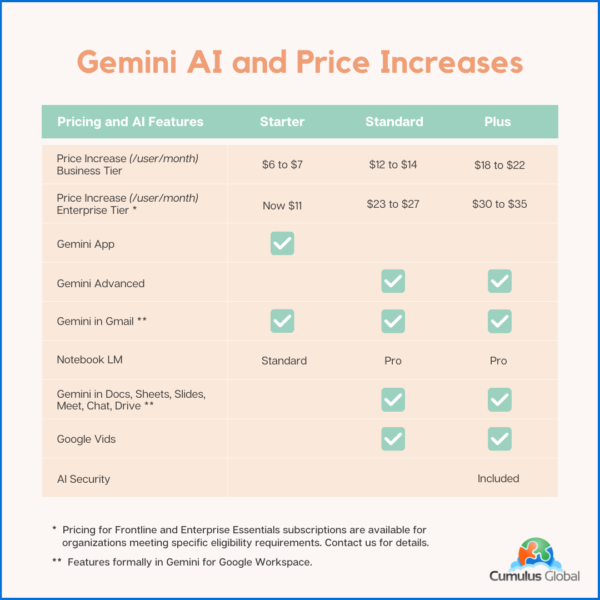
While customers will no longer need to pay as much as $30 per user per month for these capabilities, the cost for most Google Workspace subscriptions will increase by about 17%. This increase affects all subscriptions, even those opting not to use the newly embedded Gemini AI features.

For new customers purchasing directly from Google, the price increase took effect immediately.

For existing customers, Cumulus Global customers, and those working with other Google partners, the price increase takes effect on March 17, 2025.

  • If you have a Flexible Plan subscription, you will see the increase as of March 17, 2025.
  • If you have an Annual Plan subscription, or a multi-year agreement, you will see the increase at their next subscription renewal. You will not be charged for the additional Gemini AI functionality until this renewal (see below).

Product Update Highlights:

The product highlights, and caveats are as follows:

  • The Gemini App (gemini.google.com) remains
  • Gemini for Google Workspace is replaced by the embedded features based on your subscription.
  • All versions of Google Workspace will now include Gemini AI features. 
  • Google is deploying the Gemini AI features to existing customers in phases between January and March, 2026
    • The Gemini AI features will be enabled, by default, for all users
    • Enterprise Tier subscriptions can manage and disable Gemini AI features
    • Business Tier subscriptions must request access to Gemini AI admin controls

Pricing and AI Features Matrix

The following table summarizes the price increases and Gemini AI features for both the Google Workspace Business and Enterprise tiers with Annual Plan Pricing. Flexible Plan prices increase similarly, reflecting a 20% upcharge.

Google Workspace: New Pricing and Gemini AI Features

Note that your pricing for Archived Users, Vault, Pooled Storage, Voice, and other products will not change at this time.

Billing Changes

Google has indicated that it will cease billing for Gemini for Google Workspace licenses as of the end of January 2025.

As these services are billed in arrears, expect to see Gemini for Google Workspaces included on February 2025 invoices that cover January 2025.

If you have an existing single or multi-year agreement that includes Google Workspace and Gemini for Google Workspace, expect the Gemini for Google Workspace line item to be removed once service for January 2025 has been invoiced. If you prepaid for the year, you may be eligible for a credit or a refund.

We will update this blog post, and communicate with affected customers as we are able to confirm how these issues will be resolved.

Managing Gemini AI within Google Workspace

Admins with appropriate permissions can manage Gemini AI features. Users have limited ability to control AI options.

Admins

Admins have the following options to control AI settings:

  • Manage access to Gemini features in Workspace services (Enterprise editions only at this time)
  • Turn access to the Gemini app (gemini.google.com) on or off. (Note: this has no effect on other AI features in Google Workspace services.)
  • Turn NotebookLM on or off as an additional service.
  • Turn access to Google Vids on or off.
  • Control whether users can let Google AI take notes in meetings.
  • You can turn Google Workspace smart features on or off.
Users

Users can control the following AI options:

  • Smart features in Google products

Cumulus Global clients should contact our Service Team for assistance. If you are self-service with Google direct, or have licensing through another Google partner, schedule a call with one of our Cloud Advisors.

Time Sensitive Opportunities

If you have considered upgrading your Google Workspace subscription to a higher tier, we recommend doing so before March 15, 2025. 

  • We can upgrade your service with a one-year commitment. You still get the newly embedded Gemini AI features while locking in the current subscription price. We can also explore incentives for multi-year commitments.

If you are on a Flexible Plan, consider moving to an Annual Plan. 

  • While the Flexible Plan allows your monthly cost to directly reflect the number of active accounts, the vast majority of small businesses save money with an Annual Plan. 
  • Most businesses do not see the number of account removals needed to overcome the 20% surcharge on top of the price increase. 
  • Please schedule time with a Cloud Advisor to calculate which plan is best for you and your business. 
About the Author

Allen Falcon is the co-founder and CEO of Cumulus Global.  Allen co-founded Cumulus Global in 2006 to offer small businesses enterprise-grade email security and compliance using emerging cloud solutions. He has led the company’s growth into a managed cloud service provider with over 1,000 customers throughout North America. Starting his first business at age 12, Allen is a serial entrepreneur. He has launched strategic IT consulting, software, and service companies. An advocate for small and midsize businesses, Allen served on the board of the former Smaller Business Association of New England, local economic development committees, and industry advisory boards.

https://www.cumulusglobal.com/wp-content/uploads/2024/01/GCPA_Premier_Badge_Sell_160x160.png 160 160 Allen Falcon https://www.cumulusglobal.com/wp-content/uploads/2018/06/Cumulus-Global-logo-with-spacing.png Allen Falcon2025-01-20 14:59:472025-08-03 21:23:47Google Workspace: Gemini AI Features and Pricing Changes

Be Ready for 3 Things in 2025

December 27, 2024/in Cybersecurity, General

Be Ready for 3 Things in 2025As we head into the new year, we face an uncertain business landscape. Politics, the economy, and technology advances create new tech-related challenges and opportunities. As you make your plans, be ready for these 3 things in 2025.
Windows 10 End of Life

Windows 10 reaches its end-of-life on October 14, 2025. As of this date, Microsoft will stop releasing new features, free security updates, and support.  You must decide when and how you will transition to Windows 11. 

Staying on Windows 10 without subscribing to the Extended Security Updates (ESU) program exposes your systems to increased vulnerabilities, potentially impacting compliance with cybersecurity regulations.

While many devices currently running Windows 10 can support Windows 11, older machines may struggle with performance due to inadequate resources. You should expect to invest in some new hardware or upgrade existing components, such as memory, to ensure smooth operation. Given the anticipated surge in demand for new devices, early planning and procurement can mitigate potential cost hikes and supply chain delays.

More Info:

  • Prepare for Windows 10 End of Life and Windows 11 (Blog Post)
  • Windows 10 End of Life (Coffee & Clouds Webcast)

AI in 2025: From Hype to Practical Applications

The realm of artificial intelligence (AI) is poised to transition from theoretical enthusiasm to practical implementation. 2025 is the time to focus on AI’s tangible benefits, such as enhancing employee productivity and streamlining customer interactions. Rather than replacing human labor, use AI as a tool for augmenting capabilities and achieving efficiency gains.

Security remains a critical consideration as AI becomes more integrated into your business processes. Protecting your sensitive data and ensuring your compliance with regulatory standards is paramount, especially when using AI tools within Microsoft 365 or Google Workspace. 

Assess the cost-effectiveness of AI investments, ensuring they provide a clear return on investment without duplicating existing capabilities. As AI tools continue to evolve, balance cost, security, and practicality to leverage AI effectively.

Resources:

  • Building a Foundation for AI Success: A Leader’s Guide (eBook)
  • Gen AI Prompts: A Primer (eBook)

Heightened Security and Evolving Threat Landscape

In an era where cybersecurity threats are ever-evolving, small businesses like yours should adopt a robust security framework to safeguard your operations. A comprehensive approach—encompassing communication, prevention, and recovery—is critical as new threats emerge. With incidents like business email compromise posing significant financial risks, maintaining a strong security posture is non-negotiable.

For smaller businesses, Resilience becomes a key focus of your cybersecurity strategy. Ensuring your operational continuity, even during cyber incidents, is crucial for minimizing disruptions. Resilience is not only protecting data but also enabling swift recovery and business continuity. 

As cyber insurance requirements become more stringent, Compliance with evolving security benchmarks and standards will increase coverage and lower premiums. The savings is a bonus to improved protections against potential threats. Penetration testing, or Pen Testing, can be an affordable way to benchmark and track your security profile against relevant industry and regulatory standards.

Dive Deep: 

  • PC Continuity Means Business Continuity (Blog)
  • Business Email Compromise: The Second Costliest Crime (Blog)
  • Cyber Security Requirements for Cyber Insurance (eBook)
  • FBI 2023 Internet Crime Report (FBI Whitepaper)
  • Pen Test Primer: Security for Small Businesses (eBook)

Your Next Steps

If you are interested in planning your Windows 10 to Windows 11 upgrade, your use of AI, or your security improvements, book a free, no-obligation session with one of our Cloud Advisors. Or, send us a quick note and let us know how we can help.

About the Author

Allen Falcon is the co-founder and CEO of Cumulus Global.  Allen co-founded Cumulus Global in 2006 to offer small businesses enterprise-grade email security and compliance using emerging cloud solutions. He has led the company’s growth into a managed cloud service provider with over 1,000 customers throughout North America. Starting his first business at age 12, Allen is a serial entrepreneur. He has launched strategic IT consulting, software, and service companies. An advocate for small and midsize businesses, Allen served on the board of the former Smaller Business Association of New England, local economic development committees, and industry advisory boards.

* Discount RSA offer requests must be received prior to 3:00 PM EST on Dec. 31, 2024.

https://www.cumulusglobal.com/wp-content/uploads/2024/12/Be-Ready-for-3-Things-in-2025.png 1024 1792 Allen Falcon https://www.cumulusglobal.com/wp-content/uploads/2018/06/Cumulus-Global-logo-with-spacing.png Allen Falcon2024-12-27 13:00:452025-10-09 13:56:16Be Ready for 3 Things in 2025

Business Email Compromise: The Second Costliest Crime

December 16, 2024/in Cybersecurity, General

Originally Posted December 9, 2024.  Updated to add a link to a related article published by the Washington Post.

Cyberattacks, specifically Business Email Compromise attacks are back in the national news. This feature story on CNN.com covers the risk, nature, and impact of Business Email Compromise attacks on a national level.

Back in March of 2022, we blogged about Real Estate Cyber Security and the rapid increase in Business Email Compromise (BEC) attacks. We followed up in April of 2022, with a post Business Email Compromise – The Costliest Type of Cybercrime. The post explained how BEC attacks work and how you can prevent them.

Related Update: The latest housing scam: Using AI to impersonate your agent or lender, Washington Post, December 14, 2024.

Are YOU safe from Business Email Compromise Attacks?

A $2.9 Billion Problem

With 2023 adjusted losses exceeding $2.9 Billion, the FBI’s 2023 Internet Crime Report identifies BEC attacks as the second-costliest type of crime. In a recent survey by CertifID, more than half of the 650 homebuyers and sellers were not fully aware of these types of fraud risks.

While the victims in the CNN article believe the compromise was from the title company, these breaches often initiate with the real estate agent or brokerage. The fragmented system of real estate franchisors, franchises, brokers/groups, and agents, gaps in cybersecurity awareness and protections are common. Real estate is a rich target for these BEC attacks. Large dollar amount transactions and low security-vigilance among agents, buyers, and sellers attracts cyber attacks.

Your Business Email Compromise Risk

The scope of BEC attacks spans businesses of all sizes.  Your small business is a target because you are less likely to have adequate cybersecurity protections in place.  As a small business, you are also less likely to have procedural checks and balances in place. Your chance of identifying and thwarting a BEC attack is lower.

Business Email Compromise attacks may target payments you make, or those your customers make to you. In either case, a successful BEC can destroy your reputation, expose you to litigation and liability, and cost you tens of thousands of dollars.

Your Next Step

Your best next step is to evaluate how well you are protected from BEC attacks.  Use Referral Code 24RSA50 to request savings of at least 50% off our Rapid Security Assessment*. You can also schedule a brief, free call with one of our Cloud Advisors to discuss your cybersecurity risk and protections.

About the Author

Allen Falcon is the co-founder and CEO of Cumulus Global.  Allen co-founded Cumulus Global in 2006 to offer small businesses enterprise-grade email security and compliance using emerging cloud solutions. He has led the company’s growth into a managed cloud service provider with over 1,000 customers throughout North America. Starting his first business at age 12, Allen is a serial entrepreneur. He has launched strategic IT consulting, software, and service companies. An advocate for small and midsize businesses, Allen served on the board of the former Smaller Business Association of New England, local economic development committees, and industry advisory boards.

* Discount RSA offer requests must be received prior to 3:00 PM EST on Dec. 31, 2024.

https://www.cumulusglobal.com/wp-content/uploads/2024/08/Cybersecurity-Standards.AI-Gen.png 1536 1536 Allen Falcon https://www.cumulusglobal.com/wp-content/uploads/2018/06/Cumulus-Global-logo-with-spacing.png Allen Falcon2024-12-16 11:00:172025-10-09 13:56:16Business Email Compromise: The Second Costliest Crime

Prepare for Windows 10 End of Life and Windows 11

December 5, 2024/in General

Windows 11A Guide: From Windows 10 End of Life to Windows 11
Support for Windows 10 ends on October 14, 2025. After this date, Microsoft will no longer provide:

  • Free software updates, including updated or new features
  • Security patches and fixes
  • Technical assistance

Although you can continue to use Windows 10, doing so dramatically increases your risks of cyberattacks, security breaches, and other issues.

Know Your Windows 10 Options

Microsoft recommends that you upgrade all systems to Windows 11 before the deadline. While we generally agree, we understand that challenges such as software dependencies and costs may complicate this transition. Your current software may not function properly on Windows 11, and older PCs or laptops might not meet its requirements, potentially leading to significant expenses for hardware replacement.

You will need to assess whether your devices can run Windows 11 as-is or with upgrades. If they cannot, there are alternatives to purchasing new devices.

Plan your move to Windows 11 Free Consultation Schedule a free, no-obligation meeting with one of our Cloud Advisors.  

Microsoft recommends that you upgrade all systems to Windows 11 before the deadline. While we generally agree, we understand that challenges such as software dependencies and costs may complicate this transition. Your current software may not function properly on Windows 11, and older PCs or laptops might not meet its requirements, potentially leading to significant expenses for hardware replacement.

You will need to assess whether your devices can run Windows 11 as-is or with upgrades. If they cannot, there are alternatives to purchasing new devices.

  • Extended Security Updates (ESU): Microsoft will offer an ESU subscription providing critical security updates for Windows 10. While pricing details are not yet available, ESU programs for Windows 7 were more than $100 per device annually. We expect the ESU program for Windows 10 will be more expensive.
  • Virtual Desktop Services: You can also mitigate the cost of upgrading by moving to virtual desktop services. This option is best if you are facing multiple system replacements.

Determining the right path forward depends on your unique IT environment, budget, and business needs. 

Plan for Windows 11

Regardless of the strategy you choose, proactive planning is crucial. Follow these steps to ensure a smooth transition to Windows 11:

  1. Assess Your Current IT Environment:
    • Review your inventory of all devices running Windows 10. This includes computers, laptops, servers, and any embedded systems.
    • Identify which devices can run Windows 11, which can be upgraded, and which devices you should replace.
    • Identify the business-critical applications and tools you currently use and whether they are compatible with Windows 11. You may need to upgrade some of your software.
  2. Create Your Budget:
    • Budget the cost of upgrading and/or replacing devices that cannot run Windows 11. Keep in mind that older systems may require replacement soon, even if upgraded now.
    • Include the cost of any tech support or professional services you may need to transfer applications and data to the new devices.
  3. Develop a Transition Plan:
    • Plan on the timing for upgrades, purchases, and migrations.
    • Remember that you may need to test some of your software on Windows 11 before upgrading or replacing devices.
  4. Train Your Team:
    • Provide learning resources to help your team learn and become familiar with Windows 11.
    • If you need to upgrade any of your business software, consider providing training on new features and capabilities.
  5. Stay Informed:
    • Monitor Microsoft’s official updates and announcements to ensure you have the latest information about Windows 10 end of life.

Your Next Step

As with any major operating system upgrade, we expect demand for PCs and laptops to increase during 2025. Prices will likely increase and availability may become an issue. Plan now and execute soon.

For assistance, schedule a brief, free call with one of our Cloud Advisors to discuss your assessment, plan, and upgrade needs, priorities, and budget.

About the Author

Allen Falcon is the co-founder and CEO of Cumulus Global.  Allen co-founded Cumulus Global in 2006 to offer small businesses enterprise-grade email security and compliance using emerging cloud solutions. He has led the company’s growth into a managed cloud service provider with over 1,000 customers throughout North America. Starting his first business at age 12, Allen is a serial entrepreneur. He has launched strategic IT consulting, software, and service companies. An advocate for small and midsize businesses, Allen served on the board of the former Smaller Business Association of New England, local economic development committees, and industry advisory boards.

https://www.cumulusglobal.com/wp-content/uploads/2024/12/Win11-Background.jpg 533 800 Allen Falcon https://www.cumulusglobal.com/wp-content/uploads/2018/06/Cumulus-Global-logo-with-spacing.png Allen Falcon2024-12-05 11:00:482025-01-13 09:48:58Prepare for Windows 10 End of Life and Windows 11

Google Jamboard Shutdown – Save Your Jams

November 15, 2024/in General

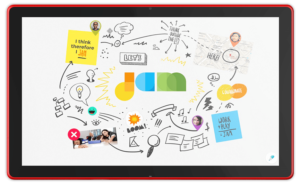
JamboardAs previously announced, Google is shutting down Jamboard on December 31, 2024. Even if you never bought a physical Jamboard, the Jamboard app has bounced around the Google Workspace ecosystem for a while as both a stand-alone app (jamboard.google.com) and as the whiteboarding tool in Google Meet.

Jamboard’s end-of-life is December 31, 2024. This is the last day you can migrate any Jam files to a supported partner application. After this date, files will begin to be deleted, and you will lose access to your saved Jams.

If you have used Jamboard, this change is significant. If not, now is a good time to check out third-party whiteboarding collaboration tools to see if they can enhance your meetings, interactions, and collaboration.

Evaluating Alternative Whiteboard Applications

Choosing the right alternative whiteboard application requires thoughtful consideration of several factors:

  1. Assess Team Needs: Identify your team’s specific requirements. Are tool integrations essential, or is real-time collaboration across different devices a priority?
  2. Review Usability: Evaluate the usability and learning curve of each option to minimize disruption to workflows.
  3. Consider Costs and Scalability: Look at both costs and scalability limitations, especially if your organization is likely to grow.

Three Recommended Tools

Three popular alternatives to Jamboard include FigJam, Lucidspark, and Miro. Each offers unique features designed to support collaboration and creativity.

  1. FigJam: Known for its intuitive and user-friendly interface, FigJam is ideal for teams looking to brainstorm and ideate virtually. It integrates seamlessly with Figma, making it an attractive option for design-focused teams. FigJam supports real-time collaboration, sticky notes, and a variety of templates that can speed up the creative process.
  2. Lucidspark: Lucidspark is a versatile platform that emphasizes visual collaboration. It offers features like voting, commenting, and breakout boards, which can enhance team productivity. Lucidspark is designed to accommodate both small teams and large organizations, with robust integrations into various project management and productivity tools.
  3. Miro: Miro is renowned for its comprehensive set of tools aimed at enhancing team collaboration. It offers a wide array of templates, extensive integration capabilities, and supports interactive presentations. Miro’s strong emphasis on team management and project tracking makes it an ideal choice for larger teams or organizations looking for an all-in-one solution.

Your Action: Export or Migrate Your Jam Files

To preserve important Jamboard content, you can migrate your Jam files to one of these partner platforms. Each platform has an easy migration process, allowing you to continue your projects and activities with minimal disruption.

To move Jamboard files to a new whiteboard application, follow these steps:

  1. Educate and Train: Provide training sessions to help your team adapt to the new application. Many platforms offer tutorials and webinars for new users.
  2. Plan Ahead: Start the transition process soon to avoid the end-of-year rush. Allow time to address any challenges or questions.
  3. Leverage Support: Use the new product’s customer support services. They can provide valuable assistance to facilitate your migration.
  4. Monitor and Adjust: After migration, monitor how well the new platform meets your needs. Make adjustments as needed to optimize its use.

Following these steps, you can ensure that your transition from Jamboard is as seamless and efficient as possible, allowing your team to continue collaborating without interruption. As always, feel free to send an email or schedule time with one of our Cloud Advisors for assistance.

About the Author

Chris CaldwellChristopher Caldwell is the COO and a co-founder of Cumulus Global.  Chris is a successful Information Services executive with 40 years experience in information services operations, application development, management, and leadership. His expertise includes corporate information technology and service management; program and project management; strategic and project-specific business requirements analysis; system requirements analysis and specification; system, application, and database design; software engineering and development, data center management, network and systems administration, network and system security, and end-user technical support.

https://www.cumulusglobal.com/wp-content/uploads/2024/11/Jamboard.png 532 865 Allen Falcon https://www.cumulusglobal.com/wp-content/uploads/2018/06/Cumulus-Global-logo-with-spacing.png Allen Falcon2024-11-15 13:58:252024-12-03 10:25:58Google Jamboard Shutdown – Save Your Jams

Google Gemini Licensing Explained

October 31, 2024/in General

Gemini Licensing Explained

Google’s recent announcement that Google Gemini is now a core service within Google Workspace has led to some confusion regarding the distinction between the Gemini App and Gemini for Google Workspace and your Gemini licensing options.

This blog post provides clarity on the products and their pricing.

The Gemini App

The Gemini App runs at gemini.google.com. There are two versions of the Gemini App: Gemini and Gemini Advanced.

Gemini is free and runs as a web app and a Chrome extension. It offers a range of features, including: 

  • Summarization
  • Translation
  • Q&A
  • Brainstorming
  • Writing suggestions

Gemini integrates with other Google apps and is free to use.

Gemini Advanced is a stand-alone paid service, and it is included as a core service in most Google Workspace subscriptions. It offers all of the features of Gemini, plus:

  • Access to a larger language model
  • The ability to create custom models
  • More robust image generation
  • Priority support

If you have Google Workspace, Gemini Advanced is included as a core service at no additional cost. Stand-alone access to Gemini Advanced costs $19.99 per month and requires a Google One account for security.

Gemini for Google Workspace

Gemini for Google Workspace is an add-on to Google Workspace that brings Gemini directly into Gmail, Drive, Docs, Sheets, and Meets.  Integrations into Chat and other Google Workspace apps are expected in the near future.

Pricing depends on your Google Workspace subscription tier. With an annual commitment, Gemini for Google Workspace pricing is as follows:

  • Business Tier: $20/user/month 
  • Enterprise Tier: $30/user/month

You can subscribe on a month-to-month basis for $24 and $36 per user, respectively.

Gemini for Google Workspace for Education has two pricing options with an annual commitment:

  • Gemini Education: $16/user/month
  • Gemini Education Premium: $24/user/month

Your Next Step:

Give Gemini a try. For a limited time, we are offering a Gemini $10 Trial for Google Workspace clients that includes Gemini Advanced, Gemini for Google Workspace, and learning tools.

Google occasionally offers free trials and incentive discounts. Schedule a quick consultation to discuss your specific Gemini licensing options. Our Cloud Advisors will help you navigate offers, options, and pricing.

About the Author

Allen Falcon is the co-founder and CEO of Cumulus Global.  Allen co-founded Cumulus Global in 2006 to offer small businesses enterprise-grade email security and compliance using emerging cloud solutions. He has led the company’s growth into a managed cloud service provider with over 1,000 customers throughout North America. Starting his first business at age 12, Allen is a serial entrepreneur. He has launched strategic IT consulting, software, and service companies. An advocate for small and midsize businesses, Allen served on the board of the former Smaller Business Association of New England, local economic development committees, and industry advisory boards.

https://www.cumulusglobal.com/wp-content/uploads/2024/10/Gemini-Licensing-Explained.AI-Gen.png 2048 2048 Allen Falcon https://www.cumulusglobal.com/wp-content/uploads/2018/06/Cumulus-Global-logo-with-spacing.png Allen Falcon2024-10-31 13:45:012024-10-31 13:45:36Google Gemini Licensing Explained

Preparing for Your Cyber Insurance Renewal

October 17, 2024/in Cybersecurity, General

5 Cybersecurity Standards

As you approach your annual cyber insurance renewal, you can take specific steps to ensure you have appropriate coverage and reasonable premiums.

The cyber insurance market has matured greatly over the past two years and continues to evolve rapidly. Insurers have become significantly more savvy regarding risks, protections, recovery costs, and potential liabilities. As a result, carriers are more precise in their underwriting practices.

Reviewing your cybersecurity risks and protections is a wise investment of time and resources. In a recent blog post, for example, we outlined 5 minimum cybersecurity standards that – if in place – can significantly reduce your premiums.

Here is a roadmap:

Review Your Original Application and Security Declarations

When you first applied for cyber insurance, you completed an application and, in most cases, a security survey/questionnaire. If you have not formally asked to complete a new questionnaire, take the initiative to review and update your answers.

As a part of the review, document any changes in your cybersecurity protections. Make note if you added new protections or updated procedures.

If you’ve removed or replaced any cybersecurity tools, specify which ones and the reasons for the change. It’s important to track modifications as your needs and environment evolve.

Reassess your Cybersecurity Protections

Policy renewal is a great time to step back and reassess your cybersecurity. Compare your protections to industry, regulatory, and compliance standards relevant to your business.

Our eBook, Cyber Security Requirements for Cyber Insurance, outlines basic, preferred, and best-practice protections to consider before getting or renewing your policy.

As part of your analysis, consider completing new assessments, such as Penetration Testing and Security Audits of your Microsoft 365 or Google Workspace tenant. These evaluations can offer valuable insights, helping to inform decisions and set priorities for future cybersecurity improvements.

Deploy Additional Protections

Based on your review and assessments, determine if you should modify your cybersecurity protections. As you consider changes, prioritize your choices and efforts. hYou can make low-effort changes, as well as changes that address higher-level, critical risks.

You do not need to address every risk and gap. Instead, focus on demonstrating improvements and prioritizing the most likely and impactful risks for your business.

Put Your Policy Out to Bid

Finally, put your policy out to bid. Avoid simply adding coverage or riders to your general liability business coverage.

Cyber insurance is a specialized coverage, and the industry has become more adept at evaluating risks and potential liabilities.  Partner with a broker who specializes in Cyber Insurance to market your coverage to multiple, specialty carriers. This will help you find the best balance between coverage and price.

Your Next Steps

If you are ready to move forward, here are four steps you can take today:

  1. Schedule time with one of our Cloud Advisors.
  2. Ask your Cloud Advisor about discounted and free Security Assessments.
  3. Evaluate options and deploy additional protections, if needed and appropriate.
  4. Shop your policy for the best plan and price with our partner, DataStream.

As always, our Cloud Advisors are ready to help. Contact us or schedule time for a quick online consultation.

About the Author

Allen Falcon is the co-founder and CEO of Cumulus Global.  Allen co-founded Cumulus Global in 2006 to offer small businesses enterprise-grade email security and compliance using emerging cloud solutions. He has led the company’s growth into a managed cloud service provider with over 1,000 customers throughout North America. Starting his first business at age 12, Allen is a serial entrepreneur. He has launched strategic IT consulting, software, and service companies. An advocate for small and midsize businesses, Allen served on the board of the former Smaller Business Association of New England, local economic development committees, and industry advisory boards.

https://www.cumulusglobal.com/wp-content/uploads/2024/08/Cybersecurity-Standards.AI-Gen.png 1536 1536 Allen Falcon https://www.cumulusglobal.com/wp-content/uploads/2018/06/Cumulus-Global-logo-with-spacing.png Allen Falcon2024-10-17 14:00:502025-10-09 13:56:16Preparing for Your Cyber Insurance Renewal
Page 6 of 8«‹45678›»

Recent Posts

  • New Phishing Emails Now Evade Spam Filters
  • Where Have All the Google Workspace Discounts Gone?
  • Why AI Agents Never “Go Rogue”

Featured Blog Topics

  • Artificial Intelligence / AI
  • Managed Cloud Services
  • Cybersecurity

Read

  • Blog
  • Newsletter
  • Microsoft Cloud Monday
  • Google Workspace Wednesday

Watch

  • 3T@3 Series
  • Coffee and Clouds
  • Event Recordings
  • Cumulus Global Channel

Explore

  • Library
  • Events Calendar

Phone / Fax / Email

  • 866-356-1202
  • 508-948-4070
  • info@cumulusglobal.com

Headquarters / Boston

  • Street Address

    4 Bellows Rd / 2nd Floor
    Westborough, MA 01581

  • Mailing Address

    PO Box 1129
    Westborough, MA 01581-6129

Regional Offices

  • Southeast Office

    120 W Trinity Pl
    Decatur, GA 30030

Copyright © 2026 - Cumulus Global | Privacy Policy | Terms of Service | Disclaimer | Website by Cold Spring
Scroll to top Scroll to top Scroll to top