Cloud Computing Services in Decatur, Georgia

Cloud Computing Services in Decatur, Georgia

Responding to the continued increasing demand for business-effective cloud solutions and professional services, Cumulus Global (www.cumulusglobal.com) has opened an Atlanta-area office. Our cloud computing services in Decatur, Georgia will be adding to our Boston area headquarters and regional office in New York. The regional office located in Decatur, GA will focus on the Southeast and Southern regions, in addition to supporting Cumulus Global’s sales and service efforts throughout the US and Canada.

“While the nature of cloud computing enables us to work with businesses regardless of geography,” notes Allen Falcon, CEO of Cumulus Global, “our Atlanta area office brings us closer to our customers and the business communities we serve with our managed cloud services.”

Growing Cloud Adoption Drives Southern Expansion for Cumulus Global in Decatur, Georgia

Cumulus Global has seen rapid growth over the past few years, landing at #349 on the 2014 Inc. 500 list of Fastest Growing Private Companies in America. A Google (GOOG) Premier Partner, Cumulus Global helps small and mid-size businesses leverage Google for Work and other cloud solutions to achieve their business goals and objectives.

“We always start with our clients’ needs and priorities,” stated Falcon. “We then research, design, and build the cloud solution that fits best. In addition to offering standard packages for basic needs, we mix-and-match products and services to create custom solutions — even if that means referring a client to a solution we do not sell. We’re really looking forward to offering our cloud computing services in Decatur, Georgia”

This level of service has helped Cumulus Global maintain some of the best customer satisfaction and retention rates in the industry. Give our cloud experts a call in Decatur, Georgia today, and take advantage of a free cloud computing consultation.

Top Cloud Services to Take Advantage of in Decatur, GA

In IT, Every Season is Hurricane Season

Hurricane
June 1st is the official start of Hurricane Season for North America. Every year, we hear predictions for the number of storms and the number of major storms expected to hit landfall here in the U.S. And yet, every year we seem to over-prepare for storms that never become a major problem and under-prepare for storms that become truly dangerous.

Such is the life for IT Hurricanes

Unlike physical hurricanes that can cause power and system outages, IT “Hurricanes” are climate changes that impact your business, and its IT needs and priorities.

As with physical hurricanes, IT Hurricanes often start out as smaller disturbances that are seen and identified well in advance. Some lose their energy and dissipate, some get carried off by changing currents, and some turn into storms.

Even with the advanced notification, dare I say warning, we often struggle to assess the size, scope, and impact of IT Hurricanes until just before they are about to hit. All too often, IT Hurricanes gain unexpected power and momentum as they approach landfall. Decisions on how best to prepare are often made too late for effective planning and execution, leaving IT staff scrambling to mitigate the impact and repair the damage.

For many businesses, our infrastructure and systems are not well-prepared to withstand IT Hurricanes. They are too rigid to adapt to changing winds and tides, too difficult to move to a safer place, and/or unable to withstand the tidal surge of change forced upon us.

Look to the Cloud for a Better Way

Rather than just focusing on improving our warning time and how well we can predict the direction, size, and strength of IT Hurricanes, we should create IT infrastructure and systems that can adapt to changing conditions more easily, with less time required.

Moving to cloud solutions can …

  • Simplify your IT infrastructure — your network and systems — making it easier and less expensive to adapt to changing currents
  • Reduce the amount of capital captured in physical assets with sunken costs that resist change
  • Let you raise or lower you capacity and utilization as needed to ebb and flow with the tide of your business
  • Add, or modernize, applications and systems without having to airlift in a solution
  • Improve mobility, so your team members are never displaced by geography or device
  • Provide a platform, that lets you create an IT ecosystem for your business focused on the future and not the past

While cloud computing cannot prevent IT Hurricanes, cloud solutions can help mitigate the impact and make it easier for you and your business to adapt and respond. After all, staying ahead of the storm is better than having to pick up the pieces.


Using the Google Apps for Work ecosystem, our CumuluSuite packages provide cloud computing platforms that are easily customized to keep you out of the storm.  Contact us to learn more.


Atmosphere | The Anatomy of Innovation

Chrome Live
Join us on June 2 for Google’s
biggest digital work event

Atmosphere | The Anatomy of Innovation


What do innovators all have in common? A drive to disrupt the ordinary. At Atmosphere, Google and IT industry experts will reveal what sparks innovation, what kinds of tools truly support it, and how you, your team, and your entire organization can bring a greater level of innovation to your work. Discover how to make it happen.

Register today to take part in our digital event on June 2 at Noon ET.

First, we’ll dissect the current state of work to understand motivations and driving factors of innovation, then we’ll pinpoint ways you, your team and your business can truly become innovators.

After, we’ll let you can choose between 2 instructional tracks:

  • How to collaborate better and build and inspire innovative teams
  • How to give employees the tools to innovate while keeping your company safe

Know anyone else who would be interested in tuning in? Let them know about Atmosphere.


Changing the Focus on Backup Protection

Recovery-Point-Objective-RPO
As we’ve stated before, “Backup is easy; Recovery is hard”.  Every business should, at this point, understand the risks of poor data backup and protection. The risks come from the types and amount of data that is lost and, if it can be recovered, how long that recovery takes. And remember, recovery often takes more effort than simply restoring files from a backup set.

Perspective = Priority

When looking at how well your backup system is protecting your business, two factors should be top of mind:

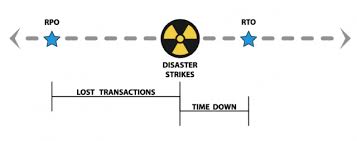
RTO: Recovery Time Objectives — How long will it take to return to normal operations. RTO is not just the time it takes to load your data back onto your systems, RTO includes the time it takes to repair and recreate damaged information and data created or modified since the last backup.

RPO: Restore Point Objectives — Your RPO determines how much data you are willing to lose, or can afford to lose. Most small and mid-size businesses backup daily. On average, a system failure will result in half a day of lost data. For an office worker editing a report, this is traumatic and inconvenient. For a manufacturer or retail business, half a day can represent hundreds or even thousands of orders and financial transactions.

As always, quicker RTOs and smaller RPOs come with trade-offs.  Recovery methods like image snapshots, for example, can provide rapid RTOs and small RPOs. In exchange, you are likely losing granularity — the ability to recovery individual files.

Understand the reasons  you are protecting your data.  Protection from system failure, in which you need to recovery a full server, lends itself to imaging and other snapshot methods.  Recovery of files or data lost to program error, malware, or user activity, needs a solution with granularity.

Start with an understanding of the type of protection you need and your RPOs and RTOs.  From there, you can pick the solutions (yes, you may want or need more than one method) for recovering data and your business.


We offer  a range data protection solutions, with a range of products, for on-premise and cloud-based data. Contact us for a free assessment of which type of solution is best for you.


Security Alert: New Malware Wipes Hard Drives to Prevent Detection

computerkey
As first published on ZDnet’s Zero Day Blog, Cisco System’s Talos Group has identified a new strain of malware that will render systems useless to avoid detection and analysis.

Named as the Rombertick strain, the spyware collects data on everything a victim does online, indiscriminately, without focusing on specific areas such as online banking or social media.

Most concerning, however, is the Rombertick’s built in defenses. If the virus detects that it is being analyzed it will attempt to overwrite the Master Boot Record, rendering the PC inoperable. If that fails, the virus will destroy all files in a user’s home folder by encrypting each file with random keys.

In short, once infected, it is nearly impossible to remove without rendering you PC useless.

As Rombertick infection rates are still low, the best protection is good security practices:

  • Make sure you anti-virus software is up to date and switch to (or add) a cloud-based AV solution with continuous updates.
  • Do not click on attachments from unknown senders
  • Block email attachments that include executable scripts or code

While these steps are helpful, a defense-in-depth approach is best at identifying and preventing malware, particularly for viruses that are designed to evade detection.


If you would like to verify the robustness of your anti-virus protection, we can add a cloud-based layer of protection at no cost for a month and help you analyze your results. Contact us for additional information.

Click these links to learn more about our Webroot solutions and additional data protection and security solutions.


Share Your Selfie in #MyClassContest by Edutopia

National Teacher Day
In honor of National Teacher Day, Edutopia launched a contest in which you can win a new tablet.

Upload a selfie of you, in a scene from your education world, and tag it with “#MyClassContest”. The click here and claim your photo to enter the contest.

A Better Cloud Admin Solution

BetterCloud Logo
With over 200 new features add yearly, the capability of Google Apps is growing in features and capabilities. Across our customer base, we see adoption and use of these features by individuals and teams growing as well.

You want and need to understand how Google Apps is being used, and working, for your business. With more collaboration and data in the cloud, you want to ensure that documents are properly shared, with appropriate privacy and protections. At the same time, we want to keep administration simple and efficient.

We have a solution:

BetterCloud recently release a new tiered service designed to solve each of these issues, and you can try it for free.

BetterCloud Basic is a Domain Health Center for your Google Apps domain, letting you monitor activity, define alerts, and analyze usage.

BetterCloud Pro is a robust suite of administration and management tools for Google Apps that simply admin tasks with an expanded set of controls that save you time and effort.

BetterCloud Enterprise adds auditing, discovery, compliance, and data loss prevention features, giving you the ability to monitor, manage, and mitigate data permissions and exposures in real time.


You can try BetterCloud for free, and without obligation.  Here’s our offer:

We will …

  • Install BetterCloud Basic for free in your Google Apps domain
  • Activate a no-obligation, 30 day trial of the BetterCloud Enterprise and Pro Features
  • Over the course of the free trial, we will highlight and demonstrate key features, including running a basic data security audit report for your review

At the end of the the trial, you decide if the cost/benefit of BetterCloud Pro or Enterprise is appropriate for your domain, and we will keep you subscribed. If not, you can keep using BetterCloud Basic for free.

To keep it simple, you can request the trial with two clicks.  Click here* to open a request email, then click Send.  Our team will promptly respond and activate your free trial.


*If you purchased Google Apps directly from Google, or another partner, we can still provide the trial. We also offer license discounts and other incentives for moving your account over to us. Contact us if you are interested in the savings and/or our services.


Reconsider Your File Sync-and-Share Services

File sync share
It is no wonder why file sync-and-share services are so popular. They are easy to setup and use, particularly with people outside your company or organization. And, most people you want to share with have, or are willing to create, a free account to see your shared files.

As a business, government, school, or non-profit, however, you may want to reconsider how you let your team use file sync-and-share services.  Here’s why:

Who “Controls” the Data?
  • Do you know if individuals are sharing information inappropriately?
  • Could you recover files deleted by a user from their account?

File sync-and-share services create de facto peer-to-peer networks. Files are “owned” by the person that created or uploaded them. Permissions are controlled by each user, not by any central policy. As such, you have little ability to monitor or manage access to your data, which puts your business at risk for data breaches, as well as policy and regulatory violations.

Can You “Find” the File?
  • Are you comfortable with a peer-to-peer file service with little central control?
  • Are folks wasting time figuring out in which folder files are stored?

With each user creating folders and files to meet their own organizational needs, finding files shared with you can be challenging. As users create similarly named folders, locating files can be a challenge. You should never need to call a person for help locating a shared file.

Where, “Exactly”, is the File?
  • Would a lost or stolen laptop or phone give somebody easy access locally saved files?
  • Is locally saved data as secure as data on your server?

Chances are, your team is syncing files to/from laptops and mobile devices. So even if you are using a secure file sync-and-share service, your data is likely at risk. File sync-and-share services create local directories for storage and most services rely on your local security to protect those files. In other words, your data may be on a laptop or mobile device with no (or trivial) password protection. Adding drive-level encryption is an option, but adds money, complexity, and support costs to your environment.


Fortunately, solutions exist.

Secure, enterprise file sync-and-share solutions provide centralized control of what data can be synced to local devices, and by whom. These solutions also require login verification before accessing information on the local devices. Managed cloud file services let employees use locally installed apps with cloud-stored data, while providing centralized ownership and permissions management. Each solution has its limitations and benefits; understanding how your users need and prefer to work is key to making the picking the best solution.


Contact us for more information about available cloud file service options.


4 Questions to Ask When Selecting an Email Encryption Solution

Email Lock
Once you determine who within your organization should be using email encryption to secure sensitive and protected information, you need to select from sea of vendors all claiming to be the “leading” provider.

Here are four (4) questions to ask when selecting an email encryption solution

1) Does the solution include a hosted, shared email encryption network?

Encrypting every email is hard, expensive, and does not accommodate the way most of us work. Using passwords and accessing portals are extra steps that take time and can create frustration. A shared email encryption network ensures that 100% of emails sent within the network are secured without any additional actions required by the sender or the recipient.

2) Does the solution offer policy-based encryption filters?

Most encryption solutions relying on users to trigger encryption by clicking a button or putting a tag into the subject line.  Even if users understand every scenario that warrants encryption, they are likely to miss a few along the way. Solutions with policy-based encryption filters scan and automatically encrypt messages that contain sensitive information. The best solutions provide standard heuristics for common regulatory requirements and let you create custom policies to meet your business’ specific needs.

3) Is the solution easy to use?

Email is a business tool, and email encryption is no different. Ideally, the solution should be easy to use for sender and recipient. Difficult processes result in mistakes, compliance breaches, lost productivity, and users circumventing the system. Easy to use solutions foster adoption and compliance by automatically encrypting message, decrypting inbound messages at the gateway, and ensuring that replies and forwards get encrypted as well.

4) Is the solution provider awesome?

Choosing an email encryption provider is a long-term commitment and the lowest price is not always the best deal. Make sure your provider is trusted by others in your industry. Check to ensure their infrastructure has certifications and accreditations, such as SysTrust/SOC 3 or PCI Level 1. Make sure the solution can be deployed quickly and that your provider supports your deployment technically and with user training. Verify that your provider will support you on an on-going basis and minimize the resources required from you and your team.


 We offer multiple email encryption solutions. Contact us to discuss your needs and explore the solution best for you and your business.


Take Another Look at ASUS

ASUS Chromebook
When we started providing Chrome devices to schools, options were limited. Today, nearly every major and secondary workstation manufacturer has at least a small line of Chrome devices. While this gives you more options, the choices can be overwhelming.

Recently, we took a fresh look at ASUS, and we think you should as well. Here are 4 reasons why:

1) Quality
When ASUS entered the Chromebook market, they did so with a low-cost, low-end unit that had a spinning disk drive. The brand was perceived as not having the quality to survive the K-12 environment. Since then, however, ASUS has led the market with advances in the Chromebox and has released models like the C200 and C300 that are proving themselves in the real world.

2) Service and Support
ASUS is standing by its products. ASUS is the only brand that includes accidental damage in its standard 1 year warranty. The coverage covers one repair during the year, but can be customized to extend the number of years and/or incidents covered.  The need for 3rd party coverage is gone.

3) Creativity
Looking at ASUS’s line of Android Tablets and in their Windows products, we see ASUS bringing many of the same creative form factors (advanced touch screen, flip, and “2 in 1”) to the Chrome device market. And we reasonably expect these new devices to be price competitive with the bigger players on the market.

4) Market Position
While not a small company by any stretch of the imagination, ASUS is still a relatively small player in the Chrome device market. ASUS is eager to grow and makes it easier for resellers to create custom solutions for you, our customers.


Interested enough to kick the tires, contact us to arrange a free evaluation kit.