Posts

AI in Google Workspace – Docs

AI in Google Docs

Google Workspace is a comprehensive and secure platform that empowers organizations to be more productive, collaborative, and creative. This series explores the power of AI built within Google Workspace across each of the workspace apps. In this post, we cover AI in Docs

AI in Docs

Google Docs is an editor built for collaboration. Using simple prompts, Gemini AI in Docs helps you create professional, stylized, and structured documents with images, tables, and more. Get help refining your content, see the latest summary of your work, and ask questions to improve and finalize your document. Gemini in Docs can help you build better docs.

Here are 3 Gemini features in Docs you should know:

Create Your Doc

Gemini in Docs lets you build a stylized, structured document using content in Drive from a single prompt. Gemini in Docs helps you transform your long-form document with cover images, in-line images, stylized text, tables, and more.

Create an Image

Create unique inline and cover images with Gemini in Docs. Personalize your documents, add your branding, or elevate promotional content. With Gemini in Docs, you can also apply different styles, such as photography or watercolor.

Help You Write

Gemini in Docs can help you write. Use Gemini in Docs to:

  • Brainstorm
  • Create an outline
  • Build your first draft
  • Fix grammar and punctuation
  • Help adjust the length and/or tone of your content.

And More …

Gemini in Docs can reference files from your Drive and Shared Drives when generating responses in Docs. You can also summarize files from Drive and emails from Gmails. Access to your content empowers Gemini to help you create and refine. 

We Will Help

At Cumulus Global, our priority is ensuring that you have productive, secure, and affordable managed cloud services. We work to ensure that you get the most value from the IT and cloud services you need and want, without overspending, to best support your business objectives.

Unsure of where to start? Check out our IT Assessment or schedule a meeting with a Cloud AdvisorWe will help you adapt while keeping your IT services secure and cost-effective.

About the Author

Allen Falcon is the co-founder and CEO of Cumulus Global.  Allen co-founded Cumulus Global in 2006 to offer small businesses enterprise-grade email security and compliance using emerging cloud solutions. He has led the company’s growth into a managed cloud service provider with over 1,000 customers throughout North America.

AI in Google Workspace – Meet

AI in Meet

Google Workspace is a comprehensive and secure platform that empowers organizations to be more productive, collaborative, and creative. This series explores the power of AI built within Google Workspace across each of the workspace apps. In this post, we cover AI in Meet.

AI in Meet

Google Meet offers business-grade video and voice conferencing designed to enhance collaboration. Gemini AI in Meet takes care of the details, enabling you to focus on participating instead of meeting management and logistics. Beyond providing a smarter meeting experience, Gemini in Met can help you look and sound your best.

Here are 4 Gemini features in Meet you should know:

Take Notes
  • In addition to generating a transcript, Gemini in Meet will automatically take notes during a meeting.
  • While a transcript captures every word spoken, notes provide a summary of discussions, highlight key points, and identify action items.
  • Notes offer a great way to share information from meetings with others and to help create minutes. Notes are placed in a Doc and save it to your Drive. Gemini also notifies you on Gmail for quick access to your notes.
Captions with Real-Time Translation
  • Gemini in Meet provides real-time captions and can translate captions into more than 65 languages, breaking down language barriers and helping everyone feel included.
Adaptive Audio
  • You can join hybrid meetings without conferencing hardware or rooms.
  • Attendees can use their laptops in any space. Gemini AI in Meet will synchronize microphones and speakers to avoid echoes, feedback, or distortion.
Show and Tell
  • Gemini in Meet includes tools to enhance your appearance and audio, with lighting and look adjustments and audio filtering/noise cancellation.

After the Meeting …

  • Gemini in Meet can create summaries of key points and identify action items. You can create custom summaries to identify information such as most discussed or “best of” topics.

We Will Help

At Cumulus Global, our priority is ensuring that you have productive, secure, and affordable managed cloud services. We work to ensure that you get the most value from the IT and cloud services you need and want, without overspending, to best support your business objectives.

Unsure of where to start? Check out our IT Assessment or schedule a meeting with a Cloud AdvisorWe will help you adapt while keeping your IT services secure and cost-effective.

About the Author

Allen Falcon is the co-founder and CEO of Cumulus Global.  Allen co-founded Cumulus Global in 2006 to offer small businesses enterprise-grade email security and compliance using emerging cloud solutions. He has led the company’s growth into a managed cloud service provider with over 1,000 customers throughout North America.

AI in Google Workspace – Drive

AI in Workspace: DriveGoogle Workspace is a comprehensive and secure platform that empowers organizations to be more productive, collaborative, and creative. This series explores the power of AI built within Google Workspace across each of the workspace apps. In this post, we cover AI in Drive.

AI in Drive 

Gemini in Drive helps you quickly find answers and insights from across your files. Catch up with summaries of long documents, query project folders, and automatically classify your most sensitive content.

Features you should know when using the Gemini Drive

The Gemini Side Panel is available when you are looking Drive. In general, you can:

  • Specifically direct Gemini to analyze a particular folder by typing “@” followed by the folder name in your prompt (e.g., “Summarize files in @Marketing Reports”).
  • Explicitly select a folder as a source for Gemini to focus on when you ask a question or request a summary.
  • Use Gemini’s ability to understand folder content is currently focused on non-media file types like text documents, PDFs, spreadsheets, and presentations.
  • Use or modify “nudges”, or suggested prompts, which are provided based on your content in Drive.
Q&A for Understanding Folder Content
  • Gemini can analyze the files within a folder (including documents, PDFs, spreadsheets, and presentations) and provide a concise summary of the main points or themes. This allows you to quickly understand the content of a folder without opening each file individually.
  • Gemini can answer specific questions about the information contained within a folder. Gemini can synthesize information from multiple files in the folder to provide an answer. For instance, you could ask, “What are the main risks identified in the documents within the ‘Q3 Planning’ folder?”
  • Find specific pieces of information or quick facts related to a project or topic by analyzing the files within a designated folder.
  • Identify the overarching theme or topic of the content within a folder.
AI Classification
  • Automatically identify, classify, and protect your organization’s sensitive content with precision and scale.
PDF File Support
  • Get the gist of a long document with Gemini’s help, summarizing it, or ask Gemini complex questions about any PDF in your Drive.

File and Folder Management

  • You can instruct it to “Create a new folder” or “Create a new folder named ‘Meeting Minutes’.
  • Use Gemini to create new Google Docs, Sheets, and Slides within your Drive. Specify the name, for example, “Create a new Google Doc titled ‘Project Proposal Draft’.

We Will Help

At Cumulus Global, our priority is ensuring that you have productive, secure, and affordable managed cloud services. We work to ensure that you get the most value from the IT and cloud services you need and want, without overspending, to best support your business objectives.

Unsure of where to start? Check out our IT Assessment or schedule a meeting with a Cloud Advisor.

We will help you adapt while keeping your IT services secure and cost-effective.

About the Author

Allen Falcon is the co-founder and CEO of Cumulus Global.  Allen co-founded Cumulus Global in 2006 to offer small businesses enterprise-grade email security and compliance using emerging cloud solutions. He has led the company’s growth into a managed cloud service provider with over 1,000 customers throughout North America.

AI in Google Workspace – Gmail

AI in Workspace: GmailGoogle Workspace is a comprehensive and secure platform that empowers organizations to be more productive, collaborative, and creative. This series explores the power of AI built within Google Workspace across each of the workspace apps. In this post, we cover AI in Gmail.

AI in Gmail

AI in Gmail lives in the Gemini Side Panel.  Gemini in Gmail is your productivity partner that can help draft, reply, sift through, and summarize your emails to save you time at your desk or on the go.

Features you should know when using the Gemini Side Panel in Gmail

The Gemini Side Panel is available when you are looking at your inbox and when you have opened an email or email thread. From the inbox, or at any time, you can:

  • Find specific messages or information in your inbox
  • Identify trends and topics
Draft Emails and Respond
  • Summarize an email thread. You can ask for a more or less detailed summary than the initial response
  • Draft an email based on keywords and the context of your inbox
  • Edit emails to polish your tone or change the length of your message
  • Ask Gemini to suggest a response to the email
Access Calendars and Events
  • Create events using your natural language requests
  • Search for calendar events by dates, participants, or subject
  • Request details about specific upcoming events
Access Files and Drive
  • Search Drive for documents related to the topic of an email thread
  • Use the “@” prompt to search for and add specific documents to your query

The “One-Click” features you should know when working in an email message

  • When viewing, the “Summarize this email” link gets you an instant summary of the message and thread
  • When composing a new email message, the “Write an email for me” link prompts you for information and drafts your message

We Will Help

At Cumulus Global, our priority is ensuring that you have productive, secure, and affordable managed cloud services. We work to ensure that you get the most value from the IT and cloud services you need and want, without overspending, to best support your business objectives.

Unsure of where to start? Check out our IT Assessment or schedule a meeting with a Cloud Advisor.

We will help you adapt while keeping your IT services secure and cost-effective.

About the Author

Allen Falcon is the co-founder and CEO of Cumulus Global.  Allen co-founded Cumulus Global in 2006 to offer small businesses enterprise-grade email security and compliance using emerging cloud solutions. He has led the company’s growth into a managed cloud service provider with over 1,000 customers throughout North America.

AI in Google Workspace – Gemini App

AI in Google Workspace - Gemini AppGoogle Workspace is a comprehensive and secure platform that empowers organizations to be more productive, collaborative, and creative. This series explores the power of AI built within Google Workspace across each of the workspace apps. We begin with the Gemini App in Google Workspace.

The Gemini App

The Gemini App is a Large Language Model (LMM) service built to help you get more done in less time. It’s great for brainstorming ideas, researching topics, and improving your writing. Use Gemini to pressure-test your work against target personas, with enterprise-grade data protections. 

Choose from multiple versions specifically designed for advanced reasoning, complex tasks, deep research, and everyday queries.

Three features you should know

Deep Research

Explore complex topics and get findings from different sources across the web in a comprehensive, easy-to-read report that brings hours of research to your fingertips in mere minutes. The reports can also be exported into Google Docs to easily share with your teams, allowing you to dive into industry trends, understand the competitive landscape, or even research customers ahead of a sales meeting.

Gems

Gems are customizable versions of Gemini that help with specialized or repetitive tasks. It’s like having an expert to help craft compelling marketing copy, prepare for job interviews, brainstorm new ideas, and so much more. You can even feed Gems your documents and other information, making them smarter and more tailored to your needs.

Integrations

Gemini seamlessly connects to other Google Workspace apps. Pull schedules from Gmail, PDFs from Drive, and content from Docs into the Gemini app without switching tabs or windows, so you can stay focused and get quality work done faster.

We Will Help

At Cumulus Global, our priority is ensuring that you have productive, secure, and affordable managed cloud services. We work to ensure that you get the most value from the IT and cloud services you need and want, without overspending, to best support your business objectives.

Unsure of where to start? Check out our IT Assessment or schedule a meeting with a Cloud Advisor.

We will help you adapt while keeping your IT services secure and cost-effective.

About the Author

Allen Falcon is the co-founder and CEO of Cumulus Global.  Allen co-founded Cumulus Global in 2006 to offer small businesses enterprise-grade email security and compliance using emerging cloud solutions. He has led the company’s growth into a managed cloud service provider with over 1,000 customers throughout North America.

Google Workspace: Gemini AI Features and Pricing Changes

Updated January 22, 2025, at 2:00 pm et: See the easier to read chart and text that is in bold italics.

Google Premier PartnerOn January 15, 2025, Google announced a major shift for Google Workspace. Going forward, all Google Workspace licenses will include Gemini AI features and functions. Specific capabilities will vary by license type.  

While customers will no longer need to pay as much as $30 per user per month for these capabilities, the cost for most Google Workspace subscriptions will increase by about 17%. This increase affects all subscriptions, even those opting not to use the newly embedded Gemini AI features.

For new customers purchasing directly from Google, the price increase took effect immediately.

For existing customers, Cumulus Global customers, and those working with other Google partners, the price increase takes effect on March 17, 2025.

  • If you have a Flexible Plan subscription, you will see the increase as of March 17, 2025.
  • If you have an Annual Plan subscription, or a multi-year agreement, you will see the increase at their next subscription renewal. You will not be charged for the additional Gemini AI functionality until this renewal (see below).

Product Update Highlights:

The product highlights, and caveats are as follows:

  • The Gemini App (gemini.google.com) remains
  • Gemini for Google Workspace is replaced by the embedded features based on your subscription.
  • All versions of Google Workspace will now include Gemini AI features. 
  • Google is deploying the Gemini AI features to existing customers in phases between January and March, 2026
    • The Gemini AI features will be enabled, by default, for all users
    • Enterprise Tier subscriptions can manage and disable Gemini AI features
    • Business Tier subscriptions must request access to Gemini AI admin controls

Pricing and AI Features Matrix

The following table summarizes the price increases and Gemini AI features for both the Google Workspace Business and Enterprise tiers with Annual Plan Pricing. Flexible Plan prices increase similarly, reflecting a 20% upcharge.
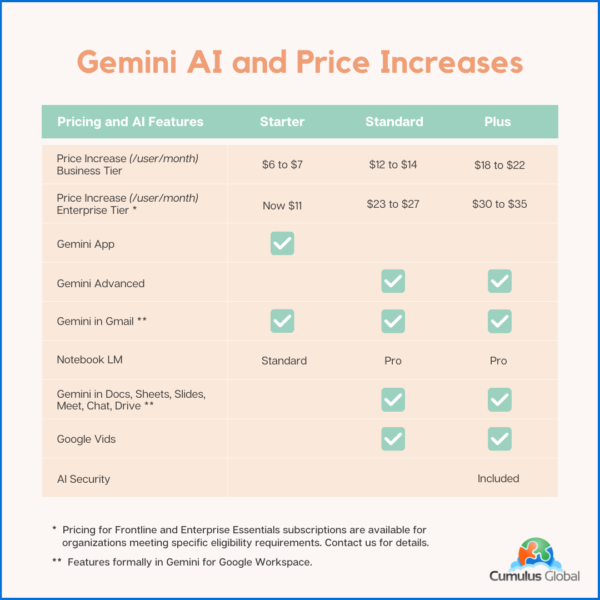
Google Workspace: New Pricing and Gemini AI Features

Note that your pricing for Archived Users, Vault, Pooled Storage, Voice, and other products will not change at this time.

Billing Changes

Google has indicated that it will cease billing for Gemini for Google Workspace licenses as of the end of January 2025.

As these services are billed in arrears, expect to see Gemini for Google Workspaces included on February 2025 invoices that cover January 2025.

If you have an existing single or multi-year agreement that includes Google Workspace and Gemini for Google Workspace, expect the Gemini for Google Workspace line item to be removed once service for January 2025 has been invoiced. If you prepaid for the year, you may be eligible for a credit or a refund.

We will update this blog post, and communicate with affected customers as we are able to confirm how these issues will be resolved.

Managing Gemini AI within Google Workspace

Admins with appropriate permissions can manage Gemini AI features. Users have limited ability to control AI options.

Admins

Admins have the following options to control AI settings:

  • Manage access to Gemini features in Workspace services (Enterprise editions only at this time)
  • Turn access to the Gemini app (gemini.google.com) on or off. (Note: this has no effect on other AI features in Google Workspace services.)
  • Turn NotebookLM on or off as an additional service.
  • Turn access to Google Vids on or off.
  • Control whether users can let Google AI take notes in meetings.
  • You can turn Google Workspace smart features on or off.
Users

Users can control the following AI options:

  • Smart features in Google products

Cumulus Global clients should contact our Service Team for assistance. If you are self-service with Google direct, or have licensing through another Google partner, schedule a call with one of our Cloud Advisors.

Time Sensitive Opportunities

If you have considered upgrading your Google Workspace subscription to a higher tier, we recommend doing so before March 15, 2025. 

  • We can upgrade your service with a one-year commitment. You still get the newly embedded Gemini AI features while locking in the current subscription price. We can also explore incentives for multi-year commitments.

If you are on a Flexible Plan, consider moving to an Annual Plan. 

  • While the Flexible Plan allows your monthly cost to directly reflect the number of active accounts, the vast majority of small businesses save money with an Annual Plan. 
  • Most businesses do not see the number of account removals needed to overcome the 20% surcharge on top of the price increase. 
  • Please schedule time with a Cloud Advisor to calculate which plan is best for you and your business. 
About the Author

Allen Falcon is the co-founder and CEO of Cumulus Global.  Allen co-founded Cumulus Global in 2006 to offer small businesses enterprise-grade email security and compliance using emerging cloud solutions. He has led the company’s growth into a managed cloud service provider with over 1,000 customers throughout North America. Starting his first business at age 12, Allen is a serial entrepreneur. He has launched strategic IT consulting, software, and service companies. An advocate for small and midsize businesses, Allen served on the board of the former Smaller Business Association of New England, local economic development committees, and industry advisory boards.

Be Ready for 3 Things in 2025

Be Ready for 3 Things in 2025As we head into the new year, we face an uncertain business landscape. Politics, the economy, and technology advances create new tech-related challenges and opportunities. As you make your plans, be ready for these 3 things in 2025.

Windows 10 End of Life

Windows 10 reaches its end-of-life on October 14, 2025. As of this date, Microsoft will stop releasing new features, free security updates, and support.  You must decide when and how you will transition to Windows 11. 

Staying on Windows 10 without subscribing to the Extended Security Updates (ESU) program exposes your systems to increased vulnerabilities, potentially impacting compliance with cybersecurity regulations.

While many devices currently running Windows 10 can support Windows 11, older machines may struggle with performance due to inadequate resources. You should expect to invest in some new hardware or upgrade existing components, such as memory, to ensure smooth operation. Given the anticipated surge in demand for new devices, early planning and procurement can mitigate potential cost hikes and supply chain delays.

More Info:

AI in 2025: From Hype to Practical Applications

The realm of artificial intelligence (AI) is poised to transition from theoretical enthusiasm to practical implementation. 2025 is the time to focus on AI’s tangible benefits, such as enhancing employee productivity and streamlining customer interactions. Rather than replacing human labor, use AI as a tool for augmenting capabilities and achieving efficiency gains.

Security remains a critical consideration as AI becomes more integrated into your business processes. Protecting your sensitive data and ensuring your compliance with regulatory standards is paramount, especially when using AI tools within Microsoft 365 or Google Workspace. 

Assess the cost-effectiveness of AI investments, ensuring they provide a clear return on investment without duplicating existing capabilities. As AI tools continue to evolve, balance cost, security, and practicality to leverage AI effectively.

Resources:

Heightened Security and Evolving Threat Landscape

In an era where cybersecurity threats are ever-evolving, small businesses like yours should adopt a robust security framework to safeguard your operations. A comprehensive approach—encompassing communication, prevention, and recovery—is critical as new threats emerge. With incidents like business email compromise posing significant financial risks, maintaining a strong security posture is non-negotiable.

For smaller businesses, Resilience becomes a key focus of your cybersecurity strategy. Ensuring your operational continuity, even during cyber incidents, is crucial for minimizing disruptions. Resilience is not only protecting data but also enabling swift recovery and business continuity. 

As cyber insurance requirements become more stringent, Compliance with evolving security benchmarks and standards will increase coverage and lower premiums. The savings is a bonus to improved protections against potential threats. Penetration testing, or Pen Testing, can be an affordable way to benchmark and track your security profile against relevant industry and regulatory standards.

Dive Deep

Your Next Steps

If you are interested in planning your Windows 10 to Windows 11 upgrade, your use of AI, or your security improvements, book a free, no-obligation session with one of our Cloud Advisors. Or, send us a quick note and let us know how we can help.

About the Author

Allen Falcon is the co-founder and CEO of Cumulus Global.  Allen co-founded Cumulus Global in 2006 to offer small businesses enterprise-grade email security and compliance using emerging cloud solutions. He has led the company’s growth into a managed cloud service provider with over 1,000 customers throughout North America. Starting his first business at age 12, Allen is a serial entrepreneur. He has launched strategic IT consulting, software, and service companies. An advocate for small and midsize businesses, Allen served on the board of the former Smaller Business Association of New England, local economic development committees, and industry advisory boards.

* Discount RSA offer requests must be received prior to 3:00 PM EST on Dec. 31, 2024.

Google Gemini Licensing Explained

Gemini Licensing Explained

Google’s recent announcement that Google Gemini is now a core service within Google Workspace has led to some confusion regarding the distinction between the Gemini App and Gemini for Google Workspace and your Gemini licensing options.

This blog post provides clarity on the products and their pricing.

The Gemini App

The Gemini App runs at gemini.google.com. There are two versions of the Gemini App: Gemini and Gemini Advanced.

Gemini is free and runs as a web app and a Chrome extension. It offers a range of features, including: 

  • Summarization
  • Translation
  • Q&A
  • Brainstorming
  • Writing suggestions

Gemini integrates with other Google apps and is free to use.

Gemini Advanced is a stand-alone paid service, and it is included as a core service in most Google Workspace subscriptions. It offers all of the features of Gemini, plus:

  • Access to a larger language model
  • The ability to create custom models
  • More robust image generation
  • Priority support

If you have Google Workspace, Gemini Advanced is included as a core service at no additional cost. Stand-alone access to Gemini Advanced costs $19.99 per month and requires a Google One account for security.

Gemini for Google Workspace

Gemini for Google Workspace is an add-on to Google Workspace that brings Gemini directly into Gmail, Drive, Docs, Sheets, and Meets.  Integrations into Chat and other Google Workspace apps are expected in the near future.

Pricing depends on your Google Workspace subscription tier. With an annual commitment, Gemini for Google Workspace pricing is as follows:

  • Business Tier: $20/user/month 
  • Enterprise Tier: $30/user/month

You can subscribe on a month-to-month basis for $24 and $36 per user, respectively.

Gemini for Google Workspace for Education has two pricing options with an annual commitment:

  • Gemini Education: $16/user/month
  • Gemini Education Premium: $24/user/month

Your Next Step:

Give Gemini a try. For a limited time, we are offering a Gemini $10 Trial for Google Workspace clients that includes Gemini Advanced, Gemini for Google Workspace, and learning tools.

Google occasionally offers free trials and incentive discounts. Schedule a quick consultation to discuss your specific Gemini licensing options. Our Cloud Advisors will help you navigate offers, options, and pricing.

About the Author

Allen Falcon is the co-founder and CEO of Cumulus Global.  Allen co-founded Cumulus Global in 2006 to offer small businesses enterprise-grade email security and compliance using emerging cloud solutions. He has led the company’s growth into a managed cloud service provider with over 1,000 customers throughout North America. Starting his first business at age 12, Allen is a serial entrepreneur. He has launched strategic IT consulting, software, and service companies. An advocate for small and midsize businesses, Allen served on the board of the former Smaller Business Association of New England, local economic development committees, and industry advisory boards.

Pragmatic Security: Balancing Security Measures for Small Businesses

Security vs UsabilityWhile on vacation recently, I did something that I did not think has been possible since July 1970. I boarded a commercial airline flight without having to go through security. No ID check. No metal detectors. The gate agent scanned the barcode on my ticket and I walked on board. The experience was, at first, confusing as I went from curb to gate with no security checks. I asked the gate agent why there was no security check; the answer was pragmatic security.

Pragmatic Security in Action

Airport security intends to prevent hijackings. I was traveling in New Zealand, which you know is an island country.  The nearest country, Australia, is at least a 3½  hour flight by jet. My plane was a dual engine turboprop with about 70 seats with and a range of 930 miles. It is impossible for the plane to leave the country.

Hijacking a regional flight in New Zealand is pointless, as you cannot escape the country. The security risk is miniscule.

In New Zealand, flights on regional planes do not have (or need) security checks. To board a jet, however, you will board at a “jet gate” having passed through all of the common security and ID checks.

Pragmatic Security for Your Small Business

The concept of pragmatic security also applies to IT and cybersecurity. Not every business needs every security measure. We can, and should, scale our IT and cyber security to meet our needs and priorities.

That said, the baseline has changed. In New Zealand, the baseline security for flights is that the customer has a ticket.  For smaller businesses, the historical baseline has been “a secure firewall/router, antivirus software, and email filters for spam.”

As we have discussed in other Security Update Series blog posts, we face new security demands from customers, insurance providers, and regulators. As cybersecurity risks increase, so do the solutions we need to implement.

Pragmatically: How Much Security is Enough?

While the answer varies based on your business needs, risks, and priorities, our Security CPR® managed security model and services provide a solid baseline. We are also proponents of understanding risks. As we discussed in this blog post, focusing on the most prevalent risks and the most damaging risks is the best place to start.  Designing your security solutions from these two angles provides a solid baseline of protections. Additional measures can be added as needed to meet industry or regulatory requirements.

Call to Action:

If you have not done so already, a baseline security assessment is a good place to start. Our Rapid Security Assessment provides a quick review of core security services. And our Cloud Advisors are ready to assist with any questions or concerns.

Contact us or schedule time with one of our Cloud Advisors

About the Author

Allen Falcon is the co-founder and CEO of Cumulus Global.  Allen co-founded Cumulus Global in 2006 to offer small businesses enterprise-grade email security and compliance using emerging cloud solutions. He has led the company’s growth into a managed cloud service provider with over 1,000 customers throughout North America. Starting his first business at age 12, Allen is a serial entrepreneur. He has launched strategic IT consulting, software, and service companies. An advocate for small and midsize businesses, Allen served on the board of the former Smaller Business Association of New England, local economic development committees, and industry advisory boards.

IT Solutions: 3 You Can Live Without

Business Continuity & Protection

With continued, rapid change and evolution of the cloud services and capabilities, we hear that we “need” many things. The reality, however, is that many of the “solutions” being hyped are not really needed. In our recent blog post, we offered three IT solutions you need. But in this blog post, we will share three solutions you can do without.

1 3rd Party Conference Tools

Both Microsoft and Google Workspace, with Teams and Meet, include robust audio and video conferencing services. There was a time when third-party services like Zoom offered unique features. However, capabilities such as transcription, translation, break-out rooms, and Q&A panels are now a part of Teams and Meet.

Notably, some of the advanced features of Teams and Meet, such as streaming, come with upgraded Microsoft 365 and Google Workspace licenses. These upgrades are generally less expensive than third-party services.

2 Physical Desk Phones

While some of us may have an emotional attachment to the physical phone on our desks, for many, these devices feel like clutter. The way we make and receive calls has changed. Our devices should change as well.

Features like hot links, click-to-dial, and voice dialing are available within the apps and browsers on our computers and phones. Smartphone apps let us make and receive business calls without sharing our personal phone numbers and maintaining separation between personal and business text messaging and voicemail.

Headsets and speaker/microphones give us hands-free access to our phone systems at our desks, from our smartphones, and in our cars and trucks.

3 Unsecure Artificial Intelligence

You do not need unsecure AI. Even so, you and your team likely want to use it.

Chances are, you and members of your team may already be using Chat-GPT, AI meeting assistants, and other AI-powered tools.

The challenge is that most public AI tools are not secure. Using them likely violates confidentiality and nondisclosure clauses in contracts. Using them may also put you in violation of HIPAA, PCI, and other data privacy laws and regulations.

Before jumping into AI as a company, and before “Shadow AI” (unvetted tools) gets out of hand, develop an AI strategy and plan. Begin with identifying use cases and understanding how to ensure data security, privacy, and compliance. Pilot solutions and educate/train your team.

Copilot and Gemini AI both offer artificial intelligence tools that integrate with Microsoft 365 and Google Workspace, respectively. These are secure tools that use the permissions capabilities of the ecosystems. 

What to Do:

Contact us or schedule time with one of our Cloud Advisors. Without obligation, we are happy to discuss your business and IT services. We can also map out opportunities to save money and leverage AI, along with other emerging technologies.

If you are interested in three solutions you need, jump over to this post.

About the Author

Allen Falcon is the co-founder and CEO of Cumulus Global.  Allen co-founded Cumulus Global in 2006 to offer small businesses enterprise-grade email security and compliance using emerging cloud solutions. He has led the company’s growth into a managed cloud service provider with over 1,000 customers throughout North America. Starting his first business at age 12, Allen is a serial entrepreneur. He has launched strategic IT consulting, software, and service companies. An advocate for small and midsize businesses, Allen served on the board of the former Smaller Business Association of New England, local economic development committees, and industry advisory boards.

library

The Total Economic Impact of Google Workspace (Forrester)

Whitepaper | Source: Forrester Consulting — A Forrester Total Economic Impact™ study, commissioned by Google, estimates that Google Workspace’s secure and collaborative environment can result in a 336% return on investment over three years.