• Link to Instagram
  • Link to LinkedIn
  • Link to Facebook
  • Support
  • Resource Center
  • News & Events
  • Blog
  • Pay Online
Cumulus Global
  • What We Do
    • Managed Cloud Services Provided by Cumulus Global
    • Cloud Computing Security, Privacy, Compliance, & Continuity
    • Collaboration, Productivity, & Transformation
    • Managed Infrastructure & Platforms
  • How We Do It
    • Understand & Assess
    • Cloud Computing Strategy & Planning
    • Cloud Migration & Deployment
    • Cloud Managed Services
    • Service & Support for Cloud and IT Solutions
    • Global Strategic Services
    • Guide, Educate, & Train
  • What We Offer
    • Managed Cloud Services
    • IT Admin, Service, and Support
    • Security CPR® Managed Security
    • Google Cloud Workspace / Education / Chrome / Voice
    • Google Cloud Platform Computing Services
    • Microsoft 365 and Office 365 Managed Services
    • Microsoft Azure
  • Who We Are
    • Our Mission
    • Our Team and Opportunities
    • Our Cloud Computing Partners
    • Our Reviews and Testimonials
    • Our Community
    • Our Sustainability
  • Click to open the search input field Click to open the search input field Search
  • Menu Menu

Tag Archive for: Google Apps

Posts

Google Docs & Drive: Small New Features Make a Big Difference

August 15, 2013/in General

docsGoogle continues to enhance the Google Apps suite with updates to Google Docs and Drive.

In Google Docs:

  • A new spell checker runs in real-time.  Marking misspelled words, the checker lets you review spelling via a traditional style tool, see spelling suggestions as you type, and setup automatic correction.   You can learn more here.
  • New presets for numbered and bullet lists provide more formatting options in Documents.  You can now also change the color, size, and style of individual bullets, as well as customize your own bullet styles.  See this Google+ post for an animated demo.

google driveIn Google Drive, the current release (1.11) of Google Drive for Mac or PC includes two new features:

  • On Windows, you can now have shortcuts to Documents, Sheets, and Slides on the desktop or in the Start Menu — making it easier to use Google Docs as a primary (or strong secondary) productivity suite.
  • You may now also select where your Google Drive sync folder is located and choose your own name for the folder.

While major in scope, these updates reflect Google’s process of continuous improvement based on user feedback and requests.  These changes improve ease of use and the end user experience.

https://www.cumulusglobal.com/wp-content/uploads/2018/06/Cumulus-Global-logo-with-spacing.png 0 0 Allen Falcon https://www.cumulusglobal.com/wp-content/uploads/2018/06/Cumulus-Global-logo-with-spacing.png Allen Falcon2013-08-15 08:00:562013-08-15 08:00:56Google Docs & Drive: Small New Features Make a Big Difference

New Alerts Help Admins Manage Google Apps

August 14, 2013/in General

We Can HelpOne of the challenges of managing any computing service is tracking changes made to user accounts and services.  The same holds true for Google Apps

Now, Google Apps Administrators can receive email alert notifications when changes are made to user accounts or services settings.

User Alerts include:

  • User suspended (by an administrator)
  • New user added
  • Suspended user made active
  • User deleted
  • User’s password changed (by an administrator)
  • User granted Admin privilege
  • User’s Admin privilege revoked

Service Alerts include:

  • Drive settings changed
  • Calendar settings changed
  • Gmail settings changed
  • Mobile settings changed

Access to the alerts is within the newly redesign Admin Panel for Google Apps. This help article provides a few additional details, or ask us for help.

https://www.cumulusglobal.com/wp-content/uploads/2018/06/Cumulus-Global-logo-with-spacing.png 0 0 Allen Falcon https://www.cumulusglobal.com/wp-content/uploads/2018/06/Cumulus-Global-logo-with-spacing.png Allen Falcon2013-08-14 09:55:402013-08-14 09:55:40New Alerts Help Admins Manage Google Apps

Users Ask; Gmail Delivers New Features

August 12, 2013/in General

GmailOne of the benefits of Cloud Computing, is that user-requested features can be developed and released quickly and efficiently.  Over the past few weeks, Google has done just that with the Gmail component of Google Apps for Business, Government, and Education.

Full Screen Compose

For those of us who like a  bit more room when organizing our thoughts, the Gmail compose box/window can now be made full screen by clicking the “maximize” or “pop-out” button.   From within a compose box/window, you can also make full screen compose your default setting via the drop down arrow at the bottom right of the box/window.

Quick Action RSVP

One of the aspects of Google Apps that we love, is the integration between Gmail and Calendar.  The Quick Action RSVP shows up to the right of the email subject line for calendar invites.  Click on the button and you get an event card with RSVP options.

More than allowing you to RSVP to meeting requests from within the invitation (without going to your calendar screen), now you can RSVP from the inbox without opening the invitation.

One More Reason

And, of course, these types of integration snippets are some of the reasons we strongly encourage use of the web interface to Google Apps, rather than Outlook or Thunderbird.

https://www.cumulusglobal.com/wp-content/uploads/2018/06/Cumulus-Global-logo-with-spacing.png 0 0 Allen Falcon https://www.cumulusglobal.com/wp-content/uploads/2018/06/Cumulus-Global-logo-with-spacing.png Allen Falcon2013-08-12 14:30:152013-08-12 14:30:15Users Ask; Gmail Delivers New Features

Google Apps Gets Modern Admin Account Recovery

August 1, 2013/in General

AdminPanel

Up until now, recovering a Google Apps administrative account password required setting a fixed secondary, off-domain, email address in the Google Apps Admin Console.

Earlier this week, Google announced an upgrade to the capability, giving every super administrator the ability to recover their account password via email or mobile phone.

For more information on adding recovery options to your administration accounts, review this video.

https://www.cumulusglobal.com/wp-content/uploads/2018/06/Cumulus-Global-logo-with-spacing.png 0 0 Allen Falcon https://www.cumulusglobal.com/wp-content/uploads/2018/06/Cumulus-Global-logo-with-spacing.png Allen Falcon2013-08-01 15:39:572013-08-01 15:39:57Google Apps Gets Modern Admin Account Recovery

Cloud Guru Joins Cumulus Global in New York Expansion

July 11, 2013/in General

profilepicNew York, NY, July 11, 2013 – Cumulus Global today announced that David Watts is joining Cumulus Global as a Senior Cloud Consultant, leading Cumulus Global’s expansion into the Metro New York area. Watts brings a consultative approach to matching businesses, non-profits, local governments, and schools with the right cloud solutions. The addition of Watts to the Cumulus Global team coincides with the opening of a new office in Manhattan.

“As one of the largest Google Apps partners in New England, expansion into the New York area is a logical step for us,” stated Allen Falcon, CEO of Cumulus Global. “David’s expertise and our local office in New York helps us meet the cloud solution needs of small and mid-size businesses (SMBs) in the New York City area.”

Watts comes to Cumulus Global from White Stratus, a Google Enterprise Partner, and Cloud Guru, a Google Apps SMB partner Watts co-founded. Watts is a Google Apps Certified Sales Professional, a member of Agile Equity’s Cloud Computing Advisory Board, and has led many Google Apps for Business deployments. His experience helps companies better understand the process and results as he consults with clients to create comprehensive cloud solutions.

“Cloud for cloud’s sake is not the answer”, noted Falcon. “David expands our ability to leverage Google Apps and Drive as core components of broader solutions designed to meet business goals and priorities.”

Watts has experience looking beyond Google Apps as an email and calendar service. Google Apps is a platform for collaboration and managed file services. By integrating Google Apps for Business with legacy applications, integrating line of business applications, and providing virtual desktop infrastructure (VDI) services, Watts and the team at Cumulus Global deliver solutions that organizations need to compete in today’s business climate.


https://www.cumulusglobal.com/wp-content/uploads/2018/06/Cumulus-Global-logo-with-spacing.png 0 0 Allen Falcon https://www.cumulusglobal.com/wp-content/uploads/2018/06/Cumulus-Global-logo-with-spacing.png Allen Falcon2013-07-11 13:30:072013-07-11 13:30:07Cloud Guru Joins Cumulus Global in New York Expansion

Google Apps cPanel Gets and Upgrade (Part 2)

July 5, 2013/in General

This is the second of a two-part series covering the new look and features in the Google Apps Admin Panel.

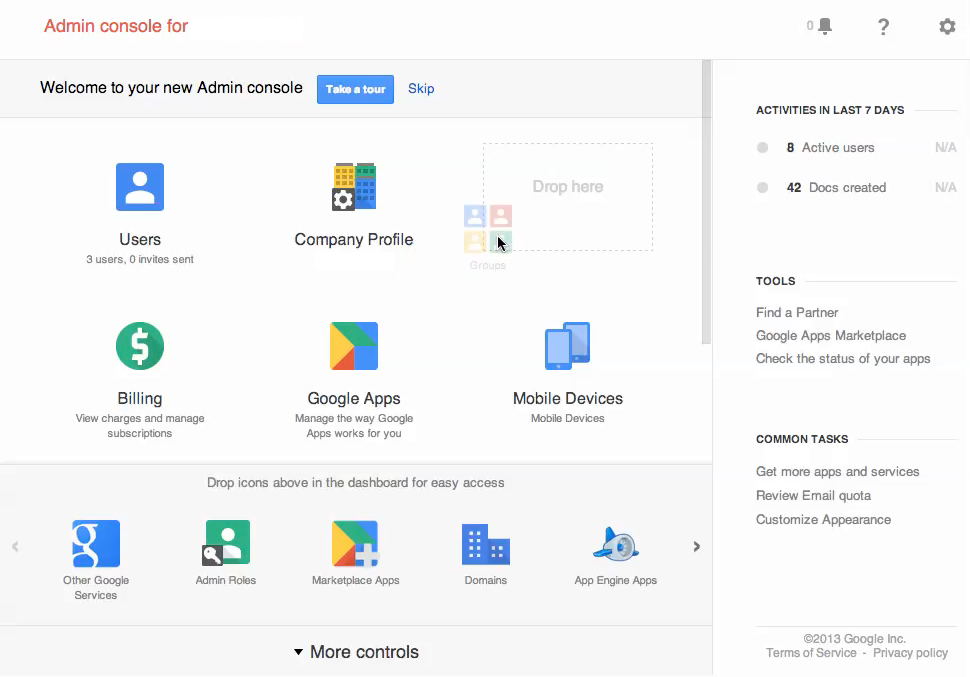
In addition to being a more uncluttered dashboard, the new and improved Google Admin Console will now make it easier than ever to customize the panel to your benefit.  The panel can now be readjusted to however you so desire by simply dragging and dropping icons onto the main screen, allowing you to access the services and management components you use most often.

You already know what the new interface looks like (see Part 1).  So what else can you do with the new admin panel?

Google Apps Admin Panel (Click to Enlarge)

You can access the other icons and applications by clicking the “More controls” button at the bottom of the screen.

This will provide you with another row of accessible icons.

Additionally, there are even more controls that are available, which can be exposed by using the “>” arrow at the bottom of the screen.

(Click on the image at the right to enlarge)

Let’s say that you want to add the Google “Groups” to your main panel, and more specifically, between the icons for “Company Profile” and “Billing.”  Doing this is as easy as just dragging the icon right up to the main dashboard.

After you drop any icon, it becomes present on the predominant Dashboard.  Just as you can easily add icons to the panel, you can comfortably do the reverse in order to conceal those icons that you do not need front and center.

Want to learn more?

Still looking for more information?

Here is a video that demonstrates the new setup.  The full Console Guide is also available.  The Feature Map is an easy way to see how to perform common tasks.


https://www.cumulusglobal.com/wp-content/uploads/2018/06/Cumulus-Global-logo-with-spacing.png 0 0 Allen Falcon https://www.cumulusglobal.com/wp-content/uploads/2018/06/Cumulus-Global-logo-with-spacing.png Allen Falcon2013-07-05 09:30:212013-07-05 09:30:21Google Apps cPanel Gets and Upgrade (Part 2)

Google Apps cPanel Gets and Upgrade (Part 1)

July 1, 2013/in General

This is the first of a two-part series covering the new look and features in the Google Apps Admin Panel.

Most interface changes are dreaded by users and implemented with reluctance. However, instead of updating the Google Apps Control Panel to a more complex setup with less or equal function to its predecessor, this new panel is sleek, simple, and user-friendly. It was designed to make your day easier.

Want proof? Let’s go through some of the new features.

Now called the “Google Admin Console,” it has expanded to allow to administer other enterprise features from the panel, including Chromebooks and Map Coordinate, unifying administration and management.  The Admin Console is also available through a simple link: admin.google.com.

dashboard

As you can see, there is a similarity between the panel and the Google+ dashboard. The right section shows user activities, tools, and tasks, and the upper right has icons for alerts/notifications, help, and support.

The icons are pretty self-explanatory. When you open an icon, however, a drop-down appears in the upper left. When you open an icon such as “Company Profile,” the drop-down menu gives options for the profile, communication settings, personalization, custom URLs, and more.

By clicking the “Company Profile” with the drop-down arrow next to it, you can see your other icons from the home dashboard.

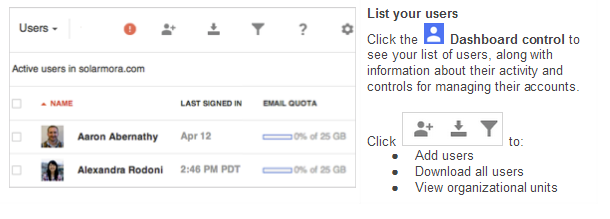
If you access “User” from the main menu, you  see the scree, above.

Additionally the new interface allows you personalize which details show underneath the column. You can also use filters to display users by a specific category. Whether assigning them into groups individually or in bulk, all you need to do is check the box next to each one and choose the appropriate action.is:

Profile information appears when opening up a specific user. From there you can reset the user’s password, add the user to groups, rename the user, and more. Hovering over certain areas will make more data appear. For example, when you hover over “Google Apps Enabled” to see what applications are enabled, it might show Google Drive, Google Calendar, Google Contacts, and more.

Whereas back on the dashboard, you can see your available services by clicking “Google Apps.” To manage the usages and settings, click on the app.

There are many useful features in the new Google Admin Console. From managing specific users to navigating the dashboard, all systems have been reworked and improved upon. We are excited to introduce this new chapter in the Google Apps Control Panel and look forward to using it.


https://www.cumulusglobal.com/wp-content/uploads/2018/06/Cumulus-Global-logo-with-spacing.png 0 0 Allen Falcon https://www.cumulusglobal.com/wp-content/uploads/2018/06/Cumulus-Global-logo-with-spacing.png Allen Falcon2013-07-01 10:55:282013-07-01 10:55:28Google Apps cPanel Gets and Upgrade (Part 1)

Google Apps, PRISM, and the NSA

June 19, 2013/in General

With media attention and hype, leaked documents, Congressional hearings, and a great deal of explanation and back-peddling, the world now knows that the United States government spies on people.

Okay, we already knew that.

So, we learned that about a secret “FISA” court that can issue secret subpoenas letting the government look at information about us.

Okay, we already knew that, too (many of us just did not pay attention or really seem to care very much).

So, we learned that the Government had issued subpoenas for huge amounts of data about phone calls from Verizon as part of secret program called PRISM.

Now must be the time to panic?

As our 24-hour, instant, news machine struggled to find alleged experts on this top-secret program, we began hearing reports that the National Security Agency has direct, unfettered, complete access to all of the data on all of the servers of all of the major public cloud providers, and that they were capturing, recording, and saving all of this information.

Unfortunately, the cloud service providers are prohibited by law from disclosing the the number of FISA subpoenas and/or the number of users subject to those subpoenas.  We do know, however, that all of the service providers deny any direct connection between their systems and the NSA.

Without accurate information, myths become ‘facts’.

For those of us that promote and rely on the cloud, including those of us running Google Apps for Business, Education, or Government, we want assurances that our data remains private.

Google Apps and Your Privacy

On June 7th, Google posted this statement on the Official Google Blog regarding the matter.  In short:

  1. The NSA and other agencies do not have unfettered access to customer data
  2. Google was not participating in, nor aware of the PRISM program
  3. Google actively works to limit the number and scope of FISA requests

Coincidentally, CIO Magazine reported on June 4th (before the FISA/PRISM revelations in the media) about Google’s efforts to modify or restrict FISA subpoenas.  You can see the article here.

Media reports have been largely inaccurate about the scope of the PRISM program and FISA warrants and its use on American citizens on US soil.

Google is not allowed to release the numbers and scope of the requests by law.  On June 11th, Google made public an official request to release that information so that Google customers will have a more accurate picture and will understand that their data remains secure.

Conclusion

The Terms of Service and Privacy Policy for Google Apps for Business, Education, and Government have very specific rules for how private Google keeps your data and how Google responds (and lets you respond) to subpoenas Google receives for customer data.

There is no evidence, or any indication, that Google has acted outside the bounds of these terms and conditions, even as Google vigorously defends the privacy of customer data in court.


https://www.cumulusglobal.com/wp-content/uploads/2018/06/Cumulus-Global-logo-with-spacing.png 0 0 Allen Falcon https://www.cumulusglobal.com/wp-content/uploads/2018/06/Cumulus-Global-logo-with-spacing.png Allen Falcon2013-06-19 08:00:332013-06-19 08:00:33Google Apps, PRISM, and the NSA

Moving to the Cloud: Too Many Choices?

June 10, 2013/in General


Green_GaugeThis post is the ninth, and final, post in a series addressing concerns organizations may have that prevent them from moving the cloud-based solutions.

Good News; Bad News.

The Good News:  Organizations can choose from a rapidly growing myriad of cloud computing services and solutions.

The Bad News:  Organizations can choose from a rapidly growing myriad of cloud computing services and solutions.

When looking to move into the cloud, organizations have an abundant set of choices and options that offer similar functions and services.  Even more challenging, many cloud solutions offer features that overlap, creating redundancy at the intersection (i.e., the Google Drive component of Google Apps versus Dropbox).

For many organizations, the marketplace is confusing and full of claims that may be hard to verify.  Too often, the decision falls to price, not business value, and organizations end up getting what they pay for.

Start at the Beginning

Organizations looking to move into the cloud should start at the beginning step of any successful IT project — business requirements.  What are the business reasons for moving into the cloud?  These could be a simple as “keep the same functionality as in-house systems, but at a lower cost” or as sophisticated as “expand into international markets”.

The business requirements drive the technical requirements.  The technical requirements guide the selection of the solution.  Evaluate how well the solution meets your technical requirements and how well it supports your business requirements first.  Include relevant issues of customization, management, and support.   Then, look at the cost.

Vet the Vendor

While the concept of cloud computing dates back to mainframe time-sharing services in the 1970s and 1980s, today’s marketplace is new.  Every cloud vendor is new to the market as their services are relatively (no more than 5 years old) new.   Do not assume “name brand” companies are best.  Microsoft, for example, is a well-established mature business.  And yet, they have proven they are very capable of failing when it comes to providing a reliable cloud computing service.

Look at prospective vendors for their track record (as limited as it may be) with respect to performance, availability, reliability, support, innovation, and customer service.  Talk with customers and see out organizations that have dropped the service.

Understand where the vendor is financially.  Are they profitable?  Are they running on venture funds, and will they be sustainable before the funds run out?  Is the vendor’s financial position improving as their sales grow?

Use a Trusted Partner

Find a partner that knows cloud computing and can help you find your way through the myriad of options.  Work with cloud solution providers that do not push you only to what they currently sell.  Better CSPs will direct you to other resources and will either contract with them on your behalf or hand off the relationship.

If your current IT firm or your internal IT team cannot navigate the cloud computing territory, look for a partner that will work with, and will help educate, your current IT staff and/or team.  As with your cloud solutions selection, choosing a cloud solutions provider is about business value.

A good CSP can help you find, vet, select, and implement the right solution.


https://www.cumulusglobal.com/wp-content/uploads/2018/06/Cumulus-Global-logo-with-spacing.png 0 0 Allen Falcon https://www.cumulusglobal.com/wp-content/uploads/2018/06/Cumulus-Global-logo-with-spacing.png Allen Falcon2013-06-10 10:00:482013-06-10 10:00:48Moving to the Cloud: Too Many Choices?

Google+ Hangouts and Google Apps: OFF for a Reason

May 24, 2013/in General

As Google prepares to replace Google Talk with Google+ Hangouts, customers expect to benefit from the improved audio/video quality and features that Hangouts offer over Talk.

There are very good reasons why Google+ Hangouts are OFF by default in Google Apps for Business (Gov and Edu, too).  Before you turn on Google+ Hangouts, understand the current ramifications.

  • Preview Mode:  Google+ Hangouts are not yet officially released and, as such, get “best effort” support as opposed the technical support under the Terms of Service.
  • Incompatibility:  Google+ Hangouts are not compatible with Google Apps Vault.  Any organization that plan on using Vault, or that may need to use Vault, should not opt-in to Google+ Hangouts.
  • Data Location:  Google Apps customers under data location restrictions cannot opt-in to Vault.
  • No Enterprise Controls:  These controls are not yet available for Google+ Hangouts at this time.  As such, there are no warnings for users when chatting outside the domain and there is no way to block users’ chat status outside of the domain.

Google advises enterprise environments to continue using Google Talk for instant messaging, voice, and video conferencing.

Cumulus Global shares this recommendation, as the implications of adding Google+ Hangouts is not fully understood.  Organizations interested in a test domain may contact us for assistance.


https://www.cumulusglobal.com/wp-content/uploads/2018/06/Cumulus-Global-logo-with-spacing.png 0 0 Allen Falcon https://www.cumulusglobal.com/wp-content/uploads/2018/06/Cumulus-Global-logo-with-spacing.png Allen Falcon2013-05-24 10:00:462013-05-24 10:00:46Google+ Hangouts and Google Apps: OFF for a Reason
Page 10 of 18«‹89101112›»

Recent Posts

  • Three Pillars of AI Security for SMBs and Schools
  • Secure Gemini AI in Google Workspace
  • Your Path to Full Cloud Adoption

Featured Blog Topics

  • Artificial Intelligence / AI
  • Managed Cloud Services
  • Cybersecurity

Read

  • Blog
  • Newsletter
  • Microsoft Cloud Monday
  • Google Workspace Wednesday

Watch

  • 3T@3 Series
  • Coffee and Clouds
  • Event Recordings
  • Cumulus Global Channel

Explore

  • Library
  • Events Calendar

Phone / Fax / Email

  • 866-356-1202
  • 508-948-4070
  • info@cumulusglobal.com

Headquarters / Boston

  • Street Address

    4 Bellows Rd / 2nd Floor
    Westborough, MA 01581

  • Mailing Address

    PO Box 1129
    Westborough, MA 01581-6129

Regional Offices

  • Southeast Office

    120 W Trinity Pl
    Decatur, GA 30030

Copyright © 2026 - Cumulus Global | Privacy Policy | Terms of Service | Disclaimer | Website by Cold Spring
Scroll to top Scroll to top Scroll to top