How eBay Can Destroy Your Business


eBay is putting your business at risk … and not in the way you might think.

This is not about lost productivity, eBay stores, or your merchant account. This is about eBay letting hackers attack your computers.  This is about hackers using eBay to steal usernames and passwords, employee data, and customer data.

As reported by ComputerWorld, eBay is under attack by security professionals for allowing “active content” in ads, which allows hackers to create listings and fake pages with malicious code.  Over 100 eBay listings have already been found to include malicious code designed to steal usernames and passwords.  Many of these listings were hijacked from sellers with 100% ratings and years of successful sales, creating a false sense of trust.

Employees shopping during their lunch break can unwittingly open up your corporate network to hackers, enabling theft of personal and customer information.

While eBay promises to monitor and assess the situation, one simple fact remains:

Even trusted web sites from major corporations can be compromised and pose a threat to your data … and your business.

While preventing people from using the Internet is an option, it is not a realistic option in today’s world.  Active protection is your best option.  Web filtering solutions not only block known malware sites, these services examine the code, content, and behavior of sites for malicious activities like those embedded in the corrupted eBay listings.  Combined with solid endpoint/user protection, you can defend your staff, your data, and your business from attack and data loss.


Web filtering solutions cost less than $3.50 per user per month with an annual contract. Please contact us to learn more or request a quote.

Click these links to learn more about Security Threats and Web-based Malware.



Beware of Marketplace Apps on the Move


Last week, Google announced that the Google Apps Marketplace was open for business to all Google Apps users, not just administrators.

While this move opens up a wide range of personal productivity applications to Google Apps users, it is not without risks.

  • Your users can now commit you to paid apps and services that you may not want as part of your environment.
  • Apps may require permissions to data in your Google Apps environment that needs to be, or you want to be, private and secure.
  • Not all apps are from well-known vendors.

As we have written in the past, third party apps can present a risk to your data and your business.  And while Bring-Your-Own-App (BYOA) can be beneficial to staff efficiency and effectiveness, Google Apps administrators should careful and should understand the security health of the domain.

As such, consider turning off marketplace access to all users.  (Customers with a support plan: Ask us and we will do this for you).

We also recommend that you consider a Google Apps Security Health Check (special offer through Sept 30th) to ensure that Marketplace, mobile, and other third party apps are not already posing a risk.


If your current Google Apps reseller is not providing guidance on best practices, security and other important issues, contact us.  We would love to have you join us as a client. 


The Google Apps / Gmail Breach That Isn’t

News over the past few days that hackers have posted almost 5 million email addresses and passwords on an online forum has caught the media’s attention in large part because about 4.7 million of the addresses appear to be gmail accounts.

This is NOT, however, a breach of Gmail or Google Apps.  

The information appears to be from other sites and sources for which users provide their email address as their login.  In fact, several people that have found their address on the list report that the information is not their login information for Gmail or Google Apps.  As reported by Mashable, your risk is low.

Given it is not a Google Apps or Gmail breach, are you at risk?

Maybe!  Google has already analyzed the list and found some users that may be using their Google account password for other sites.  Google has notified these users and is forcing them to change their passwords. For the bigger picture:

If you use the same username/email address and password for all of your services, and one service is breached, then you are at risk of hackers gaining access to some or all of your services.

If a service is breached and you have granted the service access to your Google Apps environment, your data may be at risk.

Recommended Actions

Step One:  It is not easy, but avoid using the same password for multiple services, sites, or accounts.  And don’t write passwords down to remember them.

Step Two:  Be careful when and how you allow services to connect with one another.  For example, LinkedIn needs your gmail.com password if you are going to import contacts. While this may be safe to do, other services may not be as trustworthy.

Step Three:  Read and understand security permissions when you install apps on your mobile devices.  Many apps recognize and request access to other apps and services already on your phone.  Human nature is to say “grant” or “allow” without reading or fully understanding the implications, risks, or the trustworthiness of the app’s creators.


Note for Businesses, Governments, and Schools running Google Apps: Users installing 3rd party apps, particularly on cell phones, may be granting access to data stored in Google Apps.  To see if you have a risk, we offer a Google Apps Security Health Check that will document access rights and evaluate your level or risk, if any.  

Click Here for Information


5 Security Threats SMBs Should Not Overlook: Malicious Web Sites

Security Puzzle
As more services move into the cloud, users bring their own apps to their work environment, and we see more integration and interconnect between systems, the nature security risks and threats are changing.  

This blog series looks at some of these threats, why the should be of concern to SMBs, and how SMBs can mitigate the risks.


Many small and mid-size business owners look past security threats in the belief that their businesses do not have trade secrets or other information coveted by hackers.  This view is naive.  Small businesses are ripe for attack because they often have personal, credit, or medical information about their customers and their employees.

Your business may at risk even if you are not a deliberate target. Hackers and thieves cast wide nets to capture personal information for identity theft. For identity theft, your business IT is no different than home computers.

Many businesses respond that they have security in place.  A well managed firewall, a big name malware suite that updates periodically, and spam/virus protection for their email service.

Unfortunately, users are 20 times more likely to suffer a malware attack from a corrupted web site or a phishing attempt then through the “traditional” means of email and file transfers. While traditional malware tools may catch these types of attacks, web-based malware often behaves more like acceptable code.  The recent outbreak of “crypto locker” malware, which encrypts your data and holds it for ransom, is an example of just how ineffective traditional malware prevention alone can be.

The overlooked solution to closing the web-enabled malware threat is known and simple: web filtering.  Web filters not only track sites known to be risky, insecure, or containing malware, they analyze web traffic and behavior in real-time, identifying sites that may be compromised, including those hacked without the site owner’s knowledge.

For most SMBs, adding web filtering to the ecosystem is an affordable increase in IT spending, typically less than $3.00 per employee per month.   Given that a single malware event can take 20 to 60 hours to mitigate at a cost of thousands of dollars, web filtering is a value-add component for most IT ecosystems.


Cumulus Global can assist in selecting a web filtering solution for your business.  Please contact us, or complete the form below, for more information.

Cumulus Global Named to Inc. 500 List of Fastest Growing Companies


Westborough, MA, August 20, 2014
Cumulus Global, the innovative cloud solutions provider to small and midsize businesses, local governments, and K-12 schools announced today that it has been named to the 2014 Inc. 500|5000, an exclusive ranking of the fastest growing private companies in America. Landing at #349 overall, Cumulus Global was honored for its unique ability to help small and mid-size organizations gain more value from cloud computing and hosted IT solutions, including Google Apps for Business, Education, and Government. As a Google Apps Premier SMB Reseller, Cumulus Global offers a wide range of communication, collaboration, productivity, security, and compliance solutions, that leverage the security, accessibility, and scalability of cloud computing.

“We are incredibly honored to be recognized as part of the Inc. 500|5000,” stated Allen Falcon, Cumulus Global CEO. “Our rapid and continuing growth would not be possible without the efforts and dedication of our team, the support of our industry partners, and the earned trust of our customers.”

From 2010 to 2013, Cumulus Global grew by 1,350%, with sales surpassing $7.5 million in 2013. During this time, Cumulus Global grew its range of cloud computing and hosted IT services, expanded from its Boston-area headquarters with an office in New York, and added K-12 Education and local governments to the markets it serves. Cumulus Global is ranked 38th among ”IT Services” firms nationally and is ranked 11th among “Top Companies in Massachusetts”.

“Our mission is to help the organizations we serve attain greater value from their information technology and services by leveraging the benefits of cloud computing and hosted services,” added Falcon. “Our growth reflects our commitment to this mission, to building customer value.”

The 2014 Inc. 500|5000 is ranked according to percentage growth from 2010 through 2013. To qualify, companies must be independent, privately-owned businesses based in the United States that started generating revenue prior to March 31, 2010 with revenues exceeding $2 million in 2013.

2014 Inc. 500|5000 winners will be honored at the 33rd annual Inc. 500|5000 Conference and Awards Ceremony on October 15-17 in Phoenix, AZ. To see the full list of winners, please visit http://www.inc.com/inc5000/list/2014.

7 Reasons Outlook Users Learn to Love Gmail

Gmail
One hesitation that business leaders have when deciding to move to Google Apps is how their staff will react.  People can feel attached to Outlook, as it is likely the work email client they have know for years.

While many employees already use Gmail personally, they may hesitate when it comes to work email.

Share these 7 Reasons why Outlook users learn to love Gmail and help your users make the transition.

  • Filters. Gmail has a thorough automatic spam filter. Employees can also set up individual filters that will opt out, unsubscribe from, and label superfluous messages, as well as organize emails that help individual productivity.  Unlike in Outlook, filters are not “local” to any system; they work regardless of the device used to access Gmail.
  • Instant IM. Google maintains the user’s most recent email recipients on a chat list, which is on the same screen as the inbox. With one click, Gmail users can start secure IM chats or initiate Google Hangouts.  Hangouts gives instant access to voice and video conferencing between individuals and with groups of up to 15 people.
  • Priority inbox. Gmail predicts which emails are most important based on what your employees have read in the past or have selected as important. Employees can also flag emails with a star as they go through them, which helps identify which messages are most urgent.
  • Labels. Instead of organizing emails into just one folder, labels allow employees to tag emails that fit into more than one category.  Labels work with Filters and Search, from any device.
  • Search.  Google is good at search.  Gmail leverages Google’s outstanding search functionality, allowing users to find emails with a quick keyword search.  While Outlook requires you remember where you saved your emails or use the clumsy advanced search window, Gmail searches across all Labels automatically, or refine your search to one or more labels.
     
  • Performance. Gmail doesn’t have the service hiccups that Outlook often has. Outgoing emails are sent quickly, incoming emails appear instantaneously, and inbox management requires no waiting.
     
  • Mobile. Employees can easily check Gmail when they’re on the go! Gmail has a dedicated mobile app that makes email messages easy to access on Android devices and iPhones.


Hangouts and Chromebox for Meetings Grow Up


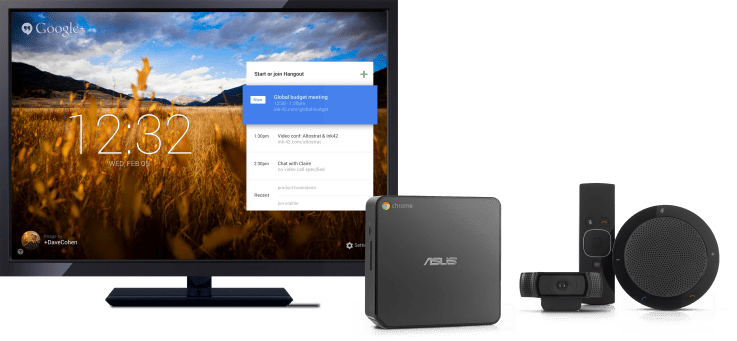
Based on customer and user feedback, Google announced today a set of major improvements for both Hangouts within Google Apps and Chromebox for Meetings.

Hangout Updates

  • Hangouts is now a core Google Apps for Business product, covered under the full Terms of Service that supports Gmail, Drive, Sites, and other core services.  This means that Hangouts are eligible for Google’s support, 99.9% uptime guarantee, and is ISO 270001, SSAE 16/ISAE 4302, and SOC-2 certified.
  • Google Apps account users can now include up to 15 full participants without creating a Google+ Profile.
  • New partners, like Blue Jeans, enable people on traditional video conferencing systems to join video meetings.

Chromebox for Meetings

  • You can now connect two displays to one Chromebox for Meetings device, so you can see your audience and your projected presentation/screen at the same time.
  • From the Google Apps Admin Console, IT admins can better manage meetings, including: remotely starting meetings, muting, and hanging up meetings.

You can learn more about these features on Google’s Official Enterprise Blog post.

If you want to better understand how Hangouts and Chromebox for Meetings can help your business, please send us a note.


Security Breach? There are Apps for That


security-checkHere’s a Story …

Emily tells Dan about a cool app on her iPhone that helps her stay organized when she is out of the office.  Dan looks it up and downloads it to his Android phone.  The App is cheap and has great reviews.  When Dan installs the app, he gets a screen about permissions with only a few items listed.  He scans the list.  Dan is not a techie and the list seems reasonable; he clicks “Allow” and the installation finishes.  Dan uses the app and is happy.  Over the next few weeks, Dan has trouble finding docs he saved in Google Drive.  Some were uploaded Word and PDF files, while others were created in Google Docs and Sheets. Asking IT for help, they find some documents in the trash, others appear gone for ever.

Here’s the Lesson …

When Dan installed his cool new app, he granted the app full access to the content of his Google Drive account and to other content in Google Apps.  The app had a bug (we do not want to assume malice) that set all of Dan’s files to public on a periodic basis.

Third party applications, including mobile apps, create a security and privacy risk for your Google Apps environment.

Here’s the Offer …

Partnering with CloudLock, we will conduct a Google Apps Security Health Check for your Google Apps for Business or Government Domain.  Normally costing $1,000 to $5,000 (or more!), through September 30, 2014, we will perform the check for $300 (or less!).

Please click here for more information or to request your Google Apps Security Health Check.

Edit MS Office Docs using MS Office from Google Drive

Watch the Demo

Click on the image for the demo!


One of the hurdles many face when moving to Google Apps is how to deal with MS Office. Some users feel they cannot live without some of the advanced formatting and features; others are concerned that they receive and work on MS Office documents received from others.

Until now, in order to edit MS Office documents in their native format, users had to download or sync files to their local disk or use the limited editing capabilities of the Chrome browser extension.   Both are less than ideals.

Can you click on a Word doc saved in Drive, have it open in Microsoft Word, and have the file save to Drive?  … YES!  Yes, you can!

With AODocs File Server and the AODocs SmartBar Extension for Chrome, you can use Drive in your Chrome browser, select and edit MS Office files, and have them save directly within Drive.  You can effectively replace Windows Explorer with Drive + AODocs.

Click Here to see a quick demo with Word.  The solution works for Excel and Powerpoint files, too.

Want to know more? Contact Us for a 1:1 demo of the full AODocs File Server solution.

Chromebook SSO Eases Access Administration

Single Sign-On (SSO) enables users to access multiple systems and applications with a single username and password, and a single login screen.  And while many schools and businesses use SSO for Google Apps and related solutions, Chrome devices have always required a separate login.

To easy access administration and simplify user logins, Google has launched SAML-based SSO login for Chrome devices.   Organizations running current versions of Chrome on devices registered via Chrome Management licenses can now extend their Google Apps SSO login to the registered Chrome devices.

Feel free to contact us if you would like more information or assistance with your setup.