Data Breaches are Still a Thing

As we speak with small and midsize business executives, we sometimes hear that cyber attacks and the risk of data breaches are no longer seen as a threat serious enough to warrant attention and spending.  We understand this hesitancy. Even with the level of media visibility, the prevalence of security solutions and a weariness of the constant focus on security can lead to the conclusion that we can let our guard down.

The reality, however, is that the rate of cyber attacks jumped about 600% in 2020.  More businesses are getting attacked and more attacks are successful.

A List of Breaches

For perspective, in the last 4 weeks, the cyber security experts at ID Agent have published data on these major breaches. Many are likely to be familiar to you or represent a major government entity.

  • Metropolitan Police Department of the District of Columbia
  • Pennsylvania Department of Health
  • The Resort Municipality of Whistler
  • CNA Financial
  • OfficeDepot
  • Personal Touch Holding Corp
  • Facebook
  • Hobby Lobby
  • Illinois Office of the Attorney General
  • Wyoming Department of Health
  • Eversource Energy
  • California State Controller
  • LinkedIn
  • The New York Foundling
  • University of Maryland Baltimore
  • CareFirst BlueCross BlueShield Community Health Plan District of Columbia (CHPDC)

The Case for Concern

The list, above, is only a sample and only represents larger breaches.  Cyber attacks hit small and midsize businesses on a daily basis. Even so, we often view protection and recovery services as insurance.  We do not want to pay for coverage; we hope we never need to use it; and we do not see the value until we are a victim.

A Model for Success

Cyber security differs from insurance. We can reduce the risk of successful attacks with foresight, planning, and protections. Our Security CPR® Managed Security model and services balance awareness, prevention, and response.

Communicate and Educate

Involve everybody in the solution. Communicate the risks and your commitment to protecting the business and your employees. Educate your team on the risks, how to spot and report attacks, and how their behavior can prevent or help an attack.

Protect and Prevent

Implement multi-layer, multi-vector protections that focuses on your people (identities), data, applications, and systems. Use “next gen” solutions that analyze behaviors and that can learn as risks evolve.

Respond and Recovery

No defense is perfect. Have services in solutions in place that let you recover and return to operations within a time frame that protects the health of your business. More than getting data and systems back on line, we recommend that you put in place the forensics, legal, public relations, and customer service resources you will need in a cyber attack emergency.

Want to learn more?  Want to assess your cyber security protections and risks? We can help.  Email us or complete our contact form to schedule a complimentary meeting with one of our Cloud Advisors.


Work From Home – Office Ergonomic Checklist

Even with the pandemic and the shift to work from home (“WFH”), business owners remain responsible for making sure employees’ home work spaces are safe, comfortable, and effective.  For employees working at a computer most of the day, bad ergonomics can lead to musculoskeletal disorders (MSDs) such as tendonitis, carpal tunnel syndrome, and sciatica.  MSDs can be uncomfortable or painful for employees.  Beyond the impact on productivity and job satisfaction, MSDs often require medical treatment and can result in longer term disabilities.

When employees work from home, the are unlikely to have the same chair and workstation options as they do at the office.  Businesses should do what they can to help employees maintain good posture and relieve strain.

This short checklist can help you evaluate work from home environments. Have employees answer these questions to determine if any changes are needed and appropriate. Often, small adjustments to the work space can improve ergonomics and reduce the risk of injury.

General

  • Are items that you frequently use located close by?
  • Are items positioned equally on both sides, i.e., not all on the dominant side of your body?

Chair

  • Are feet resting flat on the floor, with hips slightly higher than knees?
  • Does the chair fit the contour of your back? If you can, adjust the back rest up or down to fit the
    natural curve of your lower back with the curve of the chair.
  • Is there a two-finger gap between the back of your lower legs and the seat of your chair? If
    possible, adjust the seat pan forward or backward to correctly fit it to the length of your legs.
  • Are both chair arms are at the same height to prevent you from leaning one way throughout the
    day?
  • Can you use your keyboard and mouse without twisting or reaching? Note: If you can’t get the
    keyboard or monitor low enough for your body type then raise your chair and use a footrest to
    obtain the ideal height for the chair, keyboard, and monitor.

Keyboard

  • Is the keyboard close to elbow level to help keep the wrists straight? Note: Don’t use high force to
    type on your keyboard as force can put strain on your muscles and ligaments.
  • Is the mouse located right next to the keyboard so it can be operated without reaching?
  • Can you move your mouse cursor from one end of your screen(s) to the other without picking it
    up? (Adjust mouse/pointer settings as needed in your software)

Computer monitor(s)

  • Can you see the display of both monitors without looking downward or to either side?
  • Does the distance from your monitor(s) to your eyes allow you to read the screen without leaning
    your head, neck, or trunk forward or backward?
  • Is the monitor positioned so the top line of the screen is no higher than eye level? Note: If you
    wear bifocals and you feel like you’re always looking down, you should adjust your monitors lower
    than the normal height to use the bifocal part of your glasses.

Varying positions

  • When possible, do you make small adjustments to your chair or backrest to keep from staying in
    the same posture for long periods of time?
  • Do you stretch your fingers, hands, arms, and torso throughout the day?
  • At least hourly, do you stand up and walk around for a few minutes periodically?
  • If possible, do you perform some of your tasks in a standing position? Note: When adjusting height of your
    desk or monitor, ensure it is on a sturdy surface with proper adjustment of your mouse also.

If you cannot answer “Yes” to most, if not all, of these questions, we can help.  Cumulus Global can provide ergonomic aids — from keyboards and wrist supports to monitor arms and sit/stand desks. Email us or complete our contact form for information and solutions.


Remote Workforce Security: Tips, Challenges & Lessons Learned

As part of its Global Year in Breach – 2021 report, security firm ID Agent found that remote workforce security is more difficult than generally thought. With many of the changes in how we work expected to continue, as business leaders we need to embrace hybrid work as the way of the future.

What Exactly is Remote Work Security?

Remote workforce security is a subset of IT cybersecurity that focuses on protecting corporate data and other assets when employees work outside of a physical office. Implementing strong security protocols and technologies for remote access, educating employees on how to identify security risks and stay safe, and strengthening your overall business data protection and security are some of the best ways to secure your remote workforce.

What to Know When Developing Security Procedures for a Remote Workforce

Pandemic Triggers Panic

2020 and the onset of the global COVID-19 pandemic presented new challenges. The biggest challenge was cybercrime. The mix of understaffed IT departments, maintenance failures, unpreparedness, record-breaking cybercrime, and employee stress taxed IT teams and services. Cybercriminals took advantage of this golden opportunity, and businesses were hit hard.

Businesses needed to rapidly shift to remote operations. For those with older technology, this shift was especially difficult. Everybody became a remote worker. IT teams needed to become instant experts in remote workforce security, including knowing the four pillars of cloud security. For too many businesses, it was a mad scramble to to get their teams remotely or face shutting down entirely. Many employees lacked training in remote work; many IT teams had never managed remote security at scale. A barrage of unintentional, insider threats assaulted IT teams daily.

Stress Creates Vulnerabilities

Why was the massive shift to Work from Home such a boon to cybercrime?

IT departments were unprepared and understaffed.  Only 39% of IT executives polled felt they have adequate IT expertise on staff to assist with remote work issues. Only 45% of organizations reported having and adequate budget to support remote work.

At the same time, employees were dealing with unexpected stress at home and more likely to make cybersecurity mistakes. Over 50% of respondents admitted they were more error-prone while stressed. 40% said they made more mistakes when tired or distracted. Altogether, 43% of workers surveyed acknowledged mistakes resulting in cybersecurity repercussions for themselves or their company while working remotely.

Cybercrime Complications

Chaos and confusion created opportunities for cybercriminals. Experts estimate that overall cybercrime was up by 80% in 2020. Much of that increase was from phishing attacks. Cybercriminals took advantage distracted, stressed workers, with limited IT support, and immense numbers of email. In 2020, phishing attacks skyrocketed by more than 650%. Attacks hit 75% of companies and accounted for almost 80% of all cybercrime.

Successful ransomware also jumped more than 145%. In 2020, 51% of all businesses and 40% of small and midsize businesses experienced a ransomware attack. 50% of attacks on SMBs used vicious double extortion ransomware. Ransomware will continue to top the list of cybercrime trends in 2021.

FAQs About Remote Workforce Security

Next Steps for How to Secure Your Remote Workforce

Stopping ransomware and decreasing your company’s risk of a successful cyberattack against remote and hybrid workers starts with stopping phishing and its destructive effects. We have tools that help your IT team support and protect your people and your business, while also protecting your budget.

To learn more about you cyber risks, and solutions to fit your needs and budget, contact us and schedule a complimentary Cloud Advisor Session.


Cumulus Global takes AIM with Manufacturers

www.aimnet.orgApril 27 2021 – Westborough, MA – Cumulus Global is pleased to announce its Corporate Membership in the Associated Industries of Massachusetts (AIM). Through its membership, Cumulus Global will better understand the issues and challenges facing manufacturers. As a member, Cumulus Global will help support manufacturing as a key component of a diverse, healthy economy.
“By joining AIM, we gain access to information and ideas,” stated Allen Falcon, CEO. “A better understanding of the business issues — challenges and opportunities — facing manufactures is key. This knowledge improves our ability to design, deploy, and manage technology solutions that deliver tangible business results.”

Manufacturers, like most businesses, are adopting cloud computing as a mainstream component of their technology infrastructure.  CIO magazine reports that over 90% of all businesses use some form of cloud computing.  According to IDG’s 2020 Cloud Computing Survey, investment in cloud computing jumped 59% from 2018 to 2020.

Smart strategies, investments, and management are critical.  Cumulus Global helps small and mid-size manufacturers leverage secure, public cloud services to maximize results and value. Done properly, cloud solutions help manufactures adapt and compete in our rapidly changing economy.

“A diversified, healthy economy depends on a healthy, diverse manufacturing sector,” noted Falcon. “Our AIM membership supports advocacy for public policies that enable manufacturers to adapt and thrive. This as essential for our community and our nation.”

Cumulus Global believes that manufacturing will continue to play a critical role in our local, regional, and national economies. The company shares AIM’s commitment to innovation and sound economic policy.

About Associated Industries of Massachusetts

AIM (www.aimnet.org) is a forward-looking organization of dedicated, focused, and experienced business leaders. The association works to support public policy and provide services that enable jobs creation and economic opportunity. AIM focuses on public policy advocacy, employer services delivery, business community development, and best practice guidance for, and on behalf, of its members.

Business Email Compromise: 10 Stats; 5 Solutions

Business Email Compromise (BEC) is a type of phishing-related fraud with far-reaching consequences. Not only can BEC attacks hurt your business, companies you work with can be damaged as well. BEC threats are hard to detect and mitigate, given the a byzantine structure of the attack.

Here are 10 statistics that demonstrate the increasing risk of BEC attacks, along with 5 solutions that reduce the chance of your business becoming a victim.

10 BEC Statistics

1Business email compromise rose by 14% overall in 2020 and up to 80% in some sectors
265% of organizations faced BEC attacks in 2020

3In 2020, BEC costs increased rapidly, from $54,000 in Q1 2020 to $80,183 in Q2.
4The energy and infrastructure sector topped the 2020 list with 93% of attacks
560% of the information on the dark web could potentially damage businesses

6In 2020, 80% of firms experienced an increase in cyberattacks

762% of BEC scams involve the cybercriminal asking for gift or money cards.
8The most common type of BEC scam is invoice or payment fraud
9Payment/invoice/billing scams skyrocketed by 155%, in 2020

10The average amount requested in wire transfer-based BEC attacks nearly doubled to $75,000 in the fourth quarter.

Protecting Against BEC Attacks

The most effective way to prevent business email compromise attacks is a strong, multifaceted defense against the primary delivery system: phishing email.  Here are 5 solutions that help you mitigate threats and the risk of successful cyber attacks.

1 Phishing Resistance Training

An absolute must-have for any organization in today’s tumultuous world is a strong cybersecurity culture. Too many employees are still clicking on dangerous messages. Strengthen your security culture and reduce your risk of suffering email-based cyberattacks by up to 70%.

2 Advanced Threat Protection

Go beyond attack profiles and blacklist lookups. Take advantage of next-gen protections that assess content and context, leverage machine learning, and analyze the behavior of links and attachments.

3 DNS / Web Protection

Secure your DNS traffic to help prevent cyber attacks that spoof or use your identity.  Block known, dangerous web sites. Block malicious web content and downloads, even from trusted sites that have been hacked.

4 Identity Access Management

Secure your user identities over time with a comprehensive approach. Include multi-factor authentication, password vaults, and single-sign on for your best protection.

5 Dark Web Monitoring

Your team probably uses their work email address (identity) to log into third party services. Breaches in these services put your business at risk. Monitor you domain for potential breaches so you can take action before you become a victim.

To learn more about these Business Email Compromise, other cyber threats, and solutions to fit your needs and budget, contact us and schedule a complimentary Cloud Advisor Session.


Microsoft 365 Enhances Meetings and the User Experience

One of the benefits of Cloud is the ability to add features and capabilities without complex, technical rollouts.  To enhance collaboration, communications, and the user experience, Microsoft is adding features to Microsoft 365.  Here are a few new features you should know about.

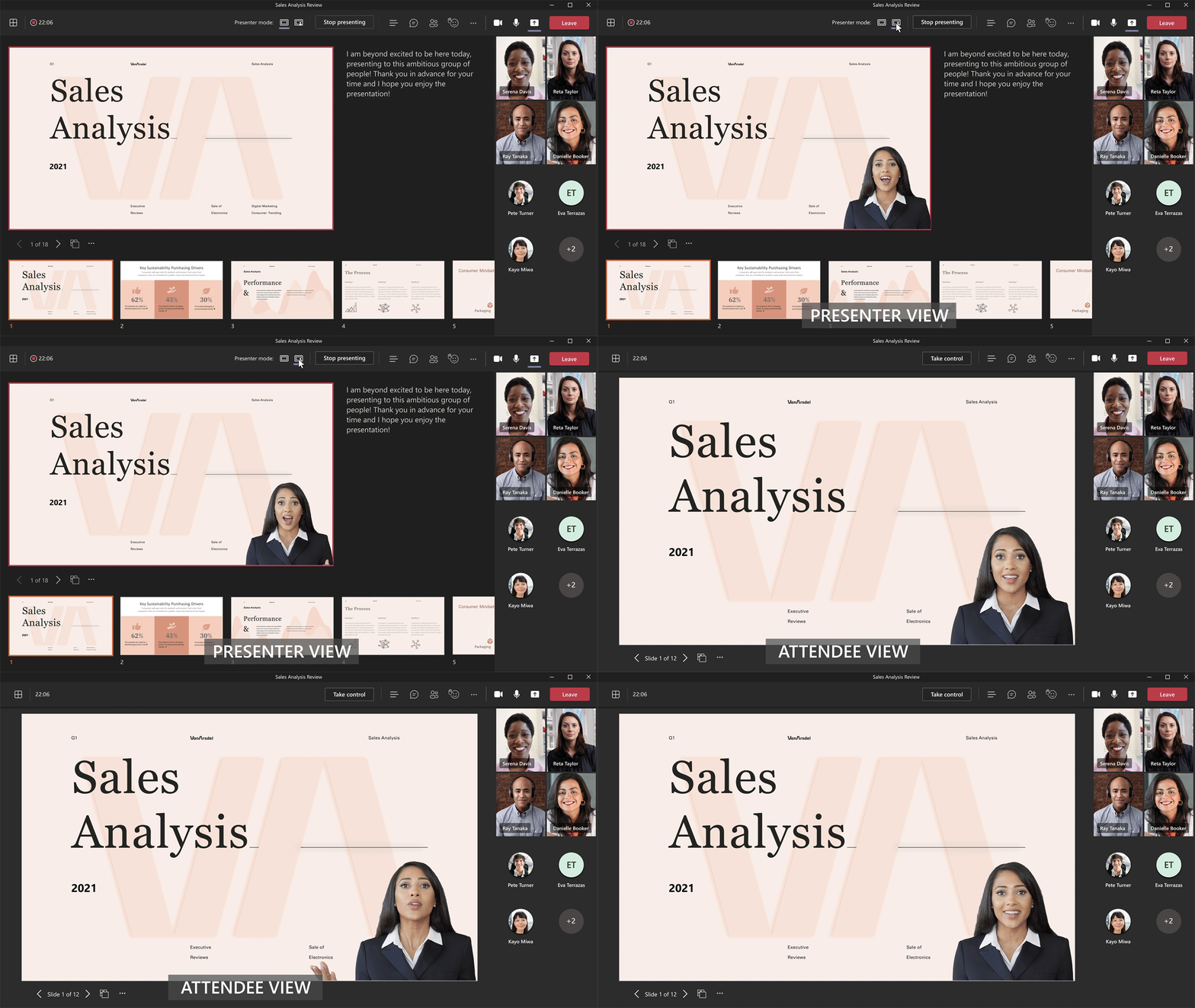
PowerPoint Live in Microsoft Teamssales analysis

Enhance your ability to present and collaborate in Teams meetings.  In addition to a robust presenter view and tools, PowerPoint Live supports co-presenters with seamless transitions.

Customize how your video feed and content appear to your audience, including the ability for the audience to see you in front of your presentation. Create interactive presentations with hyperlinks and videos. Interactive presentations improve attention and allow attendees to move at their own pace.

Learn more about PowerPoint Live in Microsoft Teams

Microsoft Whiteboard in Teams Meetings365 enhancement

Sometimes a picture is worth a thousand words. Participants in your Teams meetings can collaborate on a shared digital canvas with Whiteboard. Whiteboard integration in Microsoft Teams meetings is powered by Whiteboard for the web. Participants of Teams meetings collaborate with text, graphics, notes, videos, and other content.

Learn More About How to Use Whiteboard in Microsoft Teams

Microsoft Viva Insights

Microsoft Viva Insights provides personalized recommendations to change how you work to do your best work. Get insights to build better work habits. Improve follow-through on commitments made to collaborators. Protect your focus time for uninterrupted, individual work. Insights summarize your Microsoft 365 data – data that you already have access to – about emails, meetings, calls, and chats.

Insights for individuals are completely personal and private. Personal insights are for your eyes only; neither your manager nor system administrators can see them.

Larger File Size Upload Limits

Gain more flexibility with 250 GB file size support.  Optimized file upload performance helps reduce upload times for files moving into SharePoint, Teams, and OneDrive.

Insights to Improve Your User Experience

Microsoft Productivity Score can help you improve your user experience with better endpoint boot times, app reliability, networking, and Microsoft 365 Apps health.

To learn more about these new features, to arrange an immersive, hands-on, demo experience, or to discuss how Microsoft 365 might help you achieve your business goals, contact us and schedule a complimentary Cloud Advisor Session.

Google Workspace Storage Policy Changes Impact Business Subscribers

Earlier today (April 15, 2021), Google announced changes to Google Workspace storage policies for Google Photos and the suite of collaboration apps.  For Google Workspace subscribers on the Business Starter, Standard, and Enterprise licenses, these changes will impact how your data counts against your storage limits.

Policy Changes:

Effective June 1, 2021

  • All new high-quality photos and videos uploaded to Google Photos will count towards your storage limit. Any photos or videos uploaded prior to June 1, 2021 will not count towards your storage limit.

Effective February 1, 2022

  • Any new files created in Google Docs, Sheets, Slides, Drawings, Forms, or Jamboard will count towards your storage limit.
  • Existing files that you modify after this date will also count towards your storage limit.
  • Existing files that are not modified will not count towards your storage limit.

Impact

Depending on your use of Google Photos and the suite of collaboration apps, these changes to the storage policies means more of your files will count towards the storage limits in the Google Workspace Business tier licenses.

Business Starter

Storage limit: 30 GB per individual user

  • Prior to June 1, 2021: If you have users that regularly use Google Photos, review their usage and determine if/when they might reach the limit.
  • Prior to Feb 1, 2022: Review usage reports to assess how quickly individual users may reach the individual 30GB limit.

Action: Upgrade specific users to Business Standard or Business Plus, as needed to ensure they have the capacity they need.

Business Standard

Storage limit: 2TB per user, aggregated across the domain.

  • Understand your storage limit. Storage is aggregated, calculate your limit by multiplying the number of Business Standard users by 2TB and the number of Business Plus users by 5TB.  As an example, if you have 10 Business Standard users, your storage limit is 10 x 2TB = 20TB.
  • Prior to June 1, 2021: Review your use of the Google Photos in the aggregate across your domain. Project the rate of growth over the coming year to assess if or when the use of Google Photos may cause you to hit your storage limit.
  • Prior to February 1, 2022: Review your use of the collaboration apps (Docs, Sheets, Slides, etc.) to estimate your rate of growth and file modifications.  With this estimate, you can project if/when you might approach your storage limit.

Actions: Running Business Standard licenses, you have options: (1) You can upgrade specific (higher activity) users to Business Plus, giving those users higher aggregated storage; (2) You can upgrade your entire domain to Business Plus, increasing your storage available to all users at the 5TB per user level; or (3) You can upgrade your service to a Google Workspace Enterprise license, giving your team unlimited storage.

Business Plus

Storage limit: 5TB per user, aggregated across the domain.

  • Understand your storage limit. Storage is aggregated, calculate your limit by multiplying the number of Business Plus users by 5TB.
  • Prior to June 1, 2021: Review your use of the Google Photos in the aggregate across your domain. Project the rate of growth over the coming year to assess if or when the use of Google Photos may cause you to hit your storage limit.
  • Prior to February 1, 2022: Review your use of the collaboration apps (Docs, Sheets, Slides, etc.) to estimate your rate of growth and file modifications.  With this estimate, you can project if/when you might approach your storage limit.

Actions: As you cannot mix Business and Enterprise tier licenses, you will need to upgrade your service (all users) to an Enterprise subscription. This change will provide unlimited storage.

Next Steps

Contact us if you would like help assessing your usage patterns, planning your utilization, or assessing your options. We will schedule a meeting with one of our Cloud Advisors or members of our Service Team.

5 Strategies for How Technology Can Improve Collaboration in the Workplace

A work environment that doesn’t encourage teamwork and collaboration is one of the top 5 reasons people quit their jobs, according to research by Ernst & Young. Many businesses face growing workplace collaboration needs with aging technologies, making it vital to ask the question, how can technology promote collaboration and teamwork?

We need modern technology for team solutions — secure, reliable, scalable, and cost-effective — that make workplace collaboration efficient, effective, and enjoyable.

Here are 5 Technology Strategies to Help Improve Workplace Collaboration

Workflows can be improved by digital collaboration in the workplace in a variety of ways. Here are five proven strategies how technology can improve collaboration in the workplace.

1. Use a Chat-Based Workspace to Improve Collaboration

Team members often get stuck waiting for the feedback and sign-off they need to drive a project forward. Back-and-forth scheduling for conference calls burns up time and energy. When they finally do get on a call, edit documents, and send out the revised versions, they’re often stuck waiting again for sign-off.

Workplace productivity changes when your team can quickly get coworkers and decision-makers on group or private chat, or in an online meeting with co-authoring. Teams can review, discuss, edit, and approve documents in real time, and workplace collaboration will vastly improve.

2. Improve Online Meetings

Technology mishaps should be a thing of the past, especially struggling to participate in virtual meetings.  Too often, difficulty with connections or the joining process interrupts and delays meetings. These problems discourage people from working together and creates a barrier for our increasingly mobile workforce.

Empower employees to have better meetings with a single meeting application that integrates with the rest of your collaboration and productivity software.

online meetings can improve workplace collaboration

A positive meeting experience produces positive results for you and your organization, which is another benefits of modern workplace technology for team collaboration.

3. Break Down Work Silos and Improve Collaboration

All too often, team members are heads-down in their work and unaware of the knowledge and efforts elsewhere in your business. Lack of information and duplication hurt morale and have a material cost to your business.

Using a social network tool brings conversations online. Your team uses social networking in their personal life; bringing social tool into your business provides a means for your team to share ideas, information, and interests. With remote and hybrid workers, you can encourage and capture the informal conversations that foster collective intelligence, collaboration, and innovation.

4. Simplify File Sharing

Haven’t we had enough of emailing files and waiting for feedback and revisions.  The process of juggling messages and multiple copies with edits is an inefficient relic from the days of typewriters and routing slips.

Take advantage of the collaboration features of cloud-based file services:

  • Access documents anywhere, whether online or offline
  • Collaborate in a single document that’s always up to date
  • Seamlessly share large files
  • Use built-in chat functionality to discuss edits within a document
  • Control permissions of contacts inside and outside the company

5. Move from a Patchwork of Apps to a Productivity Suite

In our new mobile society, we are accustomed to downloading apps at home and in the office. The result: a hodge-podge of applications that all do different things, have different sign-ins, and may not deliver the security and compliance you want and need. By utilizing productivity tools, you will be better prepared for changing work environments and will be able to collaborate more effectively with the assistance of modern technology.

Conclusion on How Technology Can Improve Workplace Collaboration

Moving to, and fully utilizing, a productivity suite gives your team the right digital tools to get their work done, the resources to communicate and collaborate, the integration to eliminate duplicate data and effort, and the security to protect your information, your people, and your business. Do not just deploy technology and hope for better workplace collaboration; help your team understand the apps, tools, and features they can use to be more efficient, productive, and successful.

For more on the topic, check out the eBooks and whitepapers in our Library. Better yet, schedule an introductory call and connect with our team of Cloud Advisors.

Upgrade to Google Drive for Desktop before May 18, 2021

On May 18, 2021, older versions of Google Drive for Desktop (formerly Drive File Stream or “DFS”) will no longer function.  To continue using the application without interruption, you need to Upgrade to Google Drive for Desktop version 40.x or higher before this date.

To upgrade your version, use one of the following options:

You can read more about additions and improvements in the Google Drive for desktop release notes.

Thought Leadership: Teamwork

TeamworkWith more people working remotely, and our expectations about Teamwork and working together in physical locations is changes, we need to focus on how we keep our teams working together, effectively and productively.

Here are some articles and blog posts that cover Teamwork (links open in new tabs):

Cloud-Forward solutions provide tools that enable teamwork and collaboration and empower teams. Contact us or meet with a Cloud Advisor to learn more, discuss your challenges and goals, and explore opportunities that foster results.