• Link to Instagram
  • Link to LinkedIn
  • Link to Facebook
  • Support
  • Resource Center
  • News & Events
  • Blog
  • Pay Online
Cumulus Global
  • What We Do
    • Managed Cloud Services Provided by Cumulus Global
    • Cloud Computing Security, Privacy, Compliance, & Continuity
    • Collaboration, Productivity, & Transformation
    • Managed Infrastructure & Platforms
  • How We Do It
    • Understand & Assess
    • Cloud Computing Strategy & Planning
    • Cloud Migration & Deployment
    • Cloud Managed Services
    • Service & Support for Cloud and IT Solutions
    • Global Strategic Services
    • Guide, Educate, & Train
  • What We Offer
    • Managed Cloud Services
    • IT Admin, Service, and Support
    • Security CPR® Managed Security
    • Google Cloud Workspace / Education / Chrome / Voice
    • Google Cloud Platform Computing Services
    • Microsoft 365 and Office 365 Managed Services
    • Microsoft Azure
  • Who We Are
    • Our Mission
    • Our Team and Opportunities
    • Our Cloud Computing Partners
    • Our Reviews and Testimonials
    • Our Community
    • Our Sustainability
  • Click to open the search input field Click to open the search input field Search
  • Menu Menu

Archive for category: AI in Google Workspace

Why Not Prevent AI Data Breaches?

May 9, 2025/in AI in Google Workspace, General

Data Loss PreventionTo state the obvious, AI data breaches and leaks will damage your business. Even sharing sensitive or protected information internally will cause problems.

Less obvious is the fact that you have already shared information that should not be shared. You should expect that private, sensitive, and protected information in Google Workspace or Microsoft 365 has been shared inappropriately to people within your company, outside your company, and/or publicly.

Not obvious to most is the fact that integrated AI tools, like Google Gemini and Microsoft Copilot, will find, use, and share any information the tool can access.

Just because an employee or a customer has never reported seeing something they shouldn’t have does not mean they have not done so. Nor does it mean they will not see something that should be secure in the future.

The Problem

The problem we face: the myths we believe when it comes to our own information security and the risk of AI data breaches.

Myth 1 – Oversharing Does Not Happen

What do we mean by oversharing?  Oversharing is when somebody gives access to information (files or folders) that unintentionally gives others access to the information, directly or indirectly.  

Most often, this happens when sharing a file or folder by link in an email or chat. You are prompted by the system to grant access. Typically the prompt is to give view access to “Anyone with the link” or “Anyone within your company.” This one-click option is easier than finding the file and editing the permissions.

The risk of course is that “anyone with the link” can be anybody — inside or outside – to whom the message is forwarded or added to a reply.

And “anyone within your company” means just that. They may not see it if they never search for it or for something similar.

Myth 2 – Security Breaches Require a Deliberate Act

We want to believe that our employees would never intentionally breach security or leak sensitive information. When we equate intentional acts with deliberate acts, we forget that many user actions can, and will, intentionally share information beyond what is appropriate.

With email, we diligently warn people that clicking the wrong link is damaging and to remain vigilant. We are not nearly as diligent when it comes to files and folders. Most of us assume that the permissions set on files and folders will keep us safe.

Myth 3 – Google Workspace and Microsoft 365 are Secure

Like most myths, this myth is partially true. Both Google and Microsoft aggressively secure their cloud services and have a “shared responsibility” security architecture.

Microsoft and Google secure the services they provide to ensure only authorized users can access the services. They also provide the infrastructure for you to manage user accounts, access, and permissions. You are responsible for the security of your data within Google Workspace and Microsoft 365.

As an example, both services allow you to block external file sharing. If you choose to allow external file sharing and a file is mistakenly shared externally, this is your issue to resolve.

The Reality

When you use Microsoft Copilot and Gemini AI, the tools have access to data according to the access available to each user. If a user has inappropriate access to confidential information, Copilot or Gemini have access as well. 

Since the AI tools will collect, analyze, and integrate multiple relevant sources, the AI tools are more likely to find and use the information.

The Solution

Ensuring that your information is properly protected as you begin using AI tools is not easy. The solution for preventing AI data breaches, however, does not need to be difficult or expensive. 

Data Loss Prevention

Modern Data Loss Prevention (DLP) services give you the ability to 

  • Set policies and rules for handling sensitive and protected information
  • Analyze the content of files and folders against the policies and rules
  • Notify, report, and automatically mitigate any violations

Mitigation can include redacting sensitive information and/or modifying permissions to bring them into compliance.

More robust DLP solutions offer advanced tools to manage access and permissions, such as conditional access, time-limited access, and managed permission overrides.

DLP Options

Both Microsoft 365 and Google Workspace offer DLP features and capabilities. Most of these features are within the Enterprise tier (more expensive) subscriptions.

For small and midsize businesses using Business tier subscriptions, adding an integrated, third-party DLP service will be less expensive than upgrading. 

Third-party services offer robust management portals that are generally easier to learn and use than the built-in features.

Getting Started

First things first, do not panic. Begin by reviewing your current security and permissions policies, procedures, and top-level settings. Also, consider how you and your team are currently using Copilot, Gemini, and other AI tools, and how you expect or plan to use them in the future.

With a high level assessment, you can explore how you want to use DLP and which services will provide the most effective and affordable solutions for your needs.

Cumulus Global can assist with real-time assessments of your file and folder security to provide a benchmark and a baseline for planning and decisions. From there, we can help implement, configure, and manage your DLP services

Why Cumulus Global?

At Cumulus Global, our priority is ensuring that you have productive, secure, and affordable managed cloud services. We work to ensure that you do not overspend on services and to focus your IT dollars on the capabilities and services you need.

Let us know how we can help, or schedule a meeting with a Cloud Advisor.

We will help you adapt while keeping your IT services secure and cost-effective.

About the Author

Bill Seybolt bio pictureBill is a Senior Cloud Advisor responsible for helping small and midsize organizations with cloud forward solutions that meet their business needs, priorities, and budgets. Bill works with executives, leaders, and team members to understand workflows, identify strategic goals and tactical requirements, and design solutions and implementation phases. Having helped over 200 organizations successfully adopt cloud solutions, his expertise and working style ensure a comfortable experience effective change management.

https://www.cumulusglobal.com/wp-content/uploads/2025/05/Why-Not-Secure-Your-AI-Accessible-Data.AIGen_.png 2048 2048 Allen Falcon https://www.cumulusglobal.com/wp-content/uploads/2018/06/Cumulus-Global-logo-with-spacing.png Allen Falcon2025-05-09 08:30:572025-08-03 21:15:09Why Not Prevent AI Data Breaches?

AI in Google Workspace – Drive

May 7, 2025/in AI in Google Workspace, General

AI in Workspace: DriveGoogle Workspace is a comprehensive and secure platform that empowers organizations to be more productive, collaborative, and creative. This series explores the power of AI built within Google Workspace across each of the workspace apps. In this post, we cover AI in Drive.

AI in Drive 

Gemini in Drive helps you quickly find answers and insights from across your files. Catch up with summaries of long documents, query project folders, and automatically classify your most sensitive content.

Features you should know when using the Gemini Drive

The Gemini Side Panel is available when you are looking Drive. In general, you can:

  • Specifically direct Gemini to analyze a particular folder by typing “@” followed by the folder name in your prompt (e.g., “Summarize files in @Marketing Reports”).
  • Explicitly select a folder as a source for Gemini to focus on when you ask a question or request a summary.
  • Use Gemini’s ability to understand folder content is currently focused on non-media file types like text documents, PDFs, spreadsheets, and presentations.
  • Use or modify “nudges”, or suggested prompts, which are provided based on your content in Drive.
Q&A for Understanding Folder Content
  • Gemini can analyze the files within a folder (including documents, PDFs, spreadsheets, and presentations) and provide a concise summary of the main points or themes. This allows you to quickly understand the content of a folder without opening each file individually.
  • Gemini can answer specific questions about the information contained within a folder. Gemini can synthesize information from multiple files in the folder to provide an answer. For instance, you could ask, “What are the main risks identified in the documents within the ‘Q3 Planning’ folder?”
  • Find specific pieces of information or quick facts related to a project or topic by analyzing the files within a designated folder.
  • Identify the overarching theme or topic of the content within a folder.
AI Classification
  • Automatically identify, classify, and protect your organization’s sensitive content with precision and scale.
PDF File Support
  • Get the gist of a long document with Gemini’s help, summarizing it, or ask Gemini complex questions about any PDF in your Drive.

File and Folder Management

  • You can instruct it to “Create a new folder” or “Create a new folder named ‘Meeting Minutes’.
  • Use Gemini to create new Google Docs, Sheets, and Slides within your Drive. Specify the name, for example, “Create a new Google Doc titled ‘Project Proposal Draft’.

We Will Help

At Cumulus Global, our priority is ensuring that you have productive, secure, and affordable managed cloud services. We work to ensure that you get the most value from the IT and cloud services you need and want, without overspending, to best support your business objectives.

Unsure of where to start? Check out our IT Assessment or schedule a meeting with a Cloud Advisor.

We will help you adapt while keeping your IT services secure and cost-effective.

About the Author

Allen Falcon is the co-founder and CEO of Cumulus Global.  Allen co-founded Cumulus Global in 2006 to offer small businesses enterprise-grade email security and compliance using emerging cloud solutions. He has led the company’s growth into a managed cloud service provider with over 1,000 customers throughout North America.

https://www.cumulusglobal.com/wp-content/uploads/2025/05/AI-in-Gmail.png 1080 1080 Allen Falcon https://www.cumulusglobal.com/wp-content/uploads/2018/06/Cumulus-Global-logo-with-spacing.png Allen Falcon2025-05-07 08:30:142025-08-01 17:43:55AI in Google Workspace – Drive

Gen AI Prompt Engineering

May 2, 2025/in AI in Google Workspace, White Paper

Whitepaper | Source: Google — You don’t need to be a data scientist or a machine learning engineer – everyone can write effective gen AI prompts. This 60+ whitepaper goes beyond “prompting 101” and dives deep into advanced prompt engineering with Gemini AI and for large language models (LMMs) in general.

Read more
https://www.cumulusglobal.com/wp-content/uploads/2018/06/Cumulus-Global-logo-with-spacing.png 0 0 Allen Falcon https://www.cumulusglobal.com/wp-content/uploads/2018/06/Cumulus-Global-logo-with-spacing.png Allen Falcon2025-05-02 09:00:012025-08-01 18:12:22Gen AI Prompt Engineering

AI in Google Workspace – Gmail

May 1, 2025/in AI in Google Workspace, General

AI in Workspace: GmailGoogle Workspace is a comprehensive and secure platform that empowers organizations to be more productive, collaborative, and creative. This series explores the power of AI built within Google Workspace across each of the workspace apps. In this post, we cover AI in Gmail.

AI in Gmail

AI in Gmail lives in the Gemini Side Panel.  Gemini in Gmail is your productivity partner that can help draft, reply, sift through, and summarize your emails to save you time at your desk or on the go.

Features you should know when using the Gemini Side Panel in Gmail

The Gemini Side Panel is available when you are looking at your inbox and when you have opened an email or email thread. From the inbox, or at any time, you can:

  • Find specific messages or information in your inbox
  • Identify trends and topics
Draft Emails and Respond
  • Summarize an email thread. You can ask for a more or less detailed summary than the initial response
  • Draft an email based on keywords and the context of your inbox
  • Edit emails to polish your tone or change the length of your message
  • Ask Gemini to suggest a response to the email
Access Calendars and Events
  • Create events using your natural language requests
  • Search for calendar events by dates, participants, or subject
  • Request details about specific upcoming events
Access Files and Drive
  • Search Drive for documents related to the topic of an email thread
  • Use the “@” prompt to search for and add specific documents to your query

The “One-Click” features you should know when working in an email message

  • When viewing, the “Summarize this email” link gets you an instant summary of the message and thread
  • When composing a new email message, the “Write an email for me” link prompts you for information and drafts your message

We Will Help

At Cumulus Global, our priority is ensuring that you have productive, secure, and affordable managed cloud services. We work to ensure that you get the most value from the IT and cloud services you need and want, without overspending, to best support your business objectives.

Unsure of where to start? Check out our IT Assessment or schedule a meeting with a Cloud Advisor.

We will help you adapt while keeping your IT services secure and cost-effective.

About the Author

Allen Falcon is the co-founder and CEO of Cumulus Global.  Allen co-founded Cumulus Global in 2006 to offer small businesses enterprise-grade email security and compliance using emerging cloud solutions. He has led the company’s growth into a managed cloud service provider with over 1,000 customers throughout North America.

https://www.cumulusglobal.com/wp-content/uploads/2025/05/AI-in-Gmail.png 1080 1080 Allen Falcon https://www.cumulusglobal.com/wp-content/uploads/2018/06/Cumulus-Global-logo-with-spacing.png Allen Falcon2025-05-01 11:00:192025-08-01 17:44:04AI in Google Workspace – Gmail

AI in Google Workspace – Gemini App

April 29, 2025/in AI in Google Workspace, General

AI in Google Workspace - Gemini AppGoogle Workspace is a comprehensive and secure platform that empowers organizations to be more productive, collaborative, and creative. This series explores the power of AI built within Google Workspace across each of the workspace apps. We begin with the Gemini App in Google Workspace.

The Gemini App

The Gemini App is a Large Language Model (LMM) service built to help you get more done in less time. It’s great for brainstorming ideas, researching topics, and improving your writing. Use Gemini to pressure-test your work against target personas, with enterprise-grade data protections. 

Choose from multiple versions specifically designed for advanced reasoning, complex tasks, deep research, and everyday queries.

Three features you should know

Deep Research

Explore complex topics and get findings from different sources across the web in a comprehensive, easy-to-read report that brings hours of research to your fingertips in mere minutes. The reports can also be exported into Google Docs to easily share with your teams, allowing you to dive into industry trends, understand the competitive landscape, or even research customers ahead of a sales meeting.

Gems

Gems are customizable versions of Gemini that help with specialized or repetitive tasks. It’s like having an expert to help craft compelling marketing copy, prepare for job interviews, brainstorm new ideas, and so much more. You can even feed Gems your documents and other information, making them smarter and more tailored to your needs.

Integrations

Gemini seamlessly connects to other Google Workspace apps. Pull schedules from Gmail, PDFs from Drive, and content from Docs into the Gemini app without switching tabs or windows, so you can stay focused and get quality work done faster.

We Will Help

At Cumulus Global, our priority is ensuring that you have productive, secure, and affordable managed cloud services. We work to ensure that you get the most value from the IT and cloud services you need and want, without overspending, to best support your business objectives.

Unsure of where to start? Check out our IT Assessment or schedule a meeting with a Cloud Advisor.

We will help you adapt while keeping your IT services secure and cost-effective.

About the Author

Allen Falcon is the co-founder and CEO of Cumulus Global.  Allen co-founded Cumulus Global in 2006 to offer small businesses enterprise-grade email security and compliance using emerging cloud solutions. He has led the company’s growth into a managed cloud service provider with over 1,000 customers throughout North America.

https://www.cumulusglobal.com/wp-content/uploads/2025/04/AI-in-Gemini-App.png 1080 1080 Allen Falcon https://www.cumulusglobal.com/wp-content/uploads/2018/06/Cumulus-Global-logo-with-spacing.png Allen Falcon2025-04-29 14:00:012025-08-01 17:44:15AI in Google Workspace – Gemini App

Initial Use Cases for AI

April 26, 2025/in AI in Google Workspace, Coffee & Clouds Minicasts

Artificial Intelligence, AI, is here. Ready or not, your team is probably using AI tools on their own. If not planned and managed, AI creates risks and potential liabilities for you and your business.

Your initial steps into AI can be useful and secure. Picking the right use case is key.

In this Coffee & Clouds online event, Cumulus Global CEO Allen Falcon looks at three use cases that can help you step into AI safely and effectively.

Invest 15 minutes to understand how to ensure that your use of AI maintains privacy while helping your team do their jobs. Join us live or view the recording on-demand, and the Dunkin’ or Starbucks is on us.

https://www.cumulusglobal.com/wp-content/uploads/2018/06/Cumulus-Global-logo-with-spacing.png 0 0 Allen Falcon https://www.cumulusglobal.com/wp-content/uploads/2018/06/Cumulus-Global-logo-with-spacing.png Allen Falcon2025-04-26 14:30:102025-08-01 18:49:42Initial Use Cases for AI

Google Workspace: A Guide for Using AI at Work

April 24, 2025/in AI in Google Workspace, eBook

eBook | Source: Google — With Google Workspace, powerful AI is included – not bolted on. Gemini AI is the AI that makes everyday work easier. This eBook provides an app by app overview of ways to use AI in Google Workspace

Read more
https://www.cumulusglobal.com/wp-content/uploads/2018/06/Cumulus-Global-logo-with-spacing.png 0 0 Allen Falcon https://www.cumulusglobal.com/wp-content/uploads/2018/06/Cumulus-Global-logo-with-spacing.png Allen Falcon2025-04-24 10:56:012025-08-01 18:12:40Google Workspace: A Guide for Using AI at Work

Google Workspace: Gemini AI Features and Pricing Changes

January 20, 2025/in AI in Google Workspace, General, News

Updated January 22, 2025, at 2:00 pm et: See the easier to read chart and text that is in bold italics.

Google Premier PartnerOn January 15, 2025, Google announced a major shift for Google Workspace. Going forward, all Google Workspace licenses will include Gemini AI features and functions. Specific capabilities will vary by license type.  
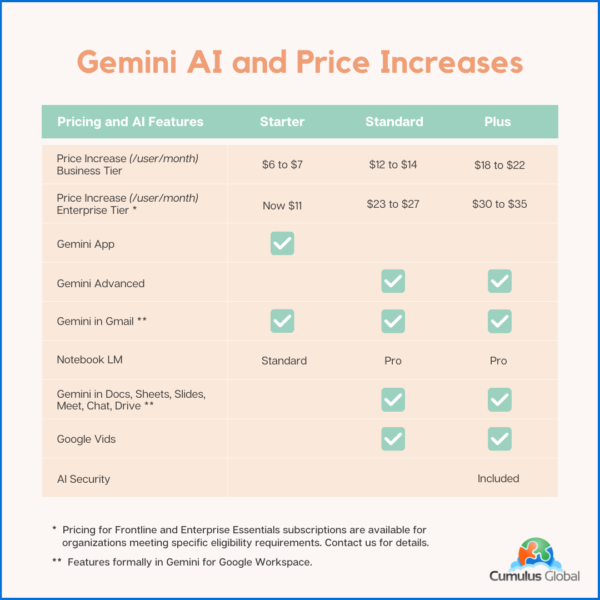
While customers will no longer need to pay as much as $30 per user per month for these capabilities, the cost for most Google Workspace subscriptions will increase by about 17%. This increase affects all subscriptions, even those opting not to use the newly embedded Gemini AI features.

For new customers purchasing directly from Google, the price increase took effect immediately.

For existing customers, Cumulus Global customers, and those working with other Google partners, the price increase takes effect on March 17, 2025.

  • If you have a Flexible Plan subscription, you will see the increase as of March 17, 2025.
  • If you have an Annual Plan subscription, or a multi-year agreement, you will see the increase at their next subscription renewal. You will not be charged for the additional Gemini AI functionality until this renewal (see below).

Product Update Highlights:

The product highlights, and caveats are as follows:

  • The Gemini App (gemini.google.com) remains
  • Gemini for Google Workspace is replaced by the embedded features based on your subscription.
  • All versions of Google Workspace will now include Gemini AI features. 
  • Google is deploying the Gemini AI features to existing customers in phases between January and March, 2026
    • The Gemini AI features will be enabled, by default, for all users
    • Enterprise Tier subscriptions can manage and disable Gemini AI features
    • Business Tier subscriptions must request access to Gemini AI admin controls

Pricing and AI Features Matrix

The following table summarizes the price increases and Gemini AI features for both the Google Workspace Business and Enterprise tiers with Annual Plan Pricing. Flexible Plan prices increase similarly, reflecting a 20% upcharge.

Google Workspace: New Pricing and Gemini AI Features

Note that your pricing for Archived Users, Vault, Pooled Storage, Voice, and other products will not change at this time.

Billing Changes

Google has indicated that it will cease billing for Gemini for Google Workspace licenses as of the end of January 2025.

As these services are billed in arrears, expect to see Gemini for Google Workspaces included on February 2025 invoices that cover January 2025.

If you have an existing single or multi-year agreement that includes Google Workspace and Gemini for Google Workspace, expect the Gemini for Google Workspace line item to be removed once service for January 2025 has been invoiced. If you prepaid for the year, you may be eligible for a credit or a refund.

We will update this blog post, and communicate with affected customers as we are able to confirm how these issues will be resolved.

Managing Gemini AI within Google Workspace

Admins with appropriate permissions can manage Gemini AI features. Users have limited ability to control AI options.

Admins

Admins have the following options to control AI settings:

  • Manage access to Gemini features in Workspace services (Enterprise editions only at this time)
  • Turn access to the Gemini app (gemini.google.com) on or off. (Note: this has no effect on other AI features in Google Workspace services.)
  • Turn NotebookLM on or off as an additional service.
  • Turn access to Google Vids on or off.
  • Control whether users can let Google AI take notes in meetings.
  • You can turn Google Workspace smart features on or off.
Users

Users can control the following AI options:

  • Smart features in Google products

Cumulus Global clients should contact our Service Team for assistance. If you are self-service with Google direct, or have licensing through another Google partner, schedule a call with one of our Cloud Advisors.

Time Sensitive Opportunities

If you have considered upgrading your Google Workspace subscription to a higher tier, we recommend doing so before March 15, 2025. 

  • We can upgrade your service with a one-year commitment. You still get the newly embedded Gemini AI features while locking in the current subscription price. We can also explore incentives for multi-year commitments.

If you are on a Flexible Plan, consider moving to an Annual Plan. 

  • While the Flexible Plan allows your monthly cost to directly reflect the number of active accounts, the vast majority of small businesses save money with an Annual Plan. 
  • Most businesses do not see the number of account removals needed to overcome the 20% surcharge on top of the price increase. 
  • Please schedule time with a Cloud Advisor to calculate which plan is best for you and your business. 
About the Author

Allen Falcon is the co-founder and CEO of Cumulus Global.  Allen co-founded Cumulus Global in 2006 to offer small businesses enterprise-grade email security and compliance using emerging cloud solutions. He has led the company’s growth into a managed cloud service provider with over 1,000 customers throughout North America. Starting his first business at age 12, Allen is a serial entrepreneur. He has launched strategic IT consulting, software, and service companies. An advocate for small and midsize businesses, Allen served on the board of the former Smaller Business Association of New England, local economic development committees, and industry advisory boards.

https://www.cumulusglobal.com/wp-content/uploads/2024/01/GCPA_Premier_Badge_Sell_160x160.png 160 160 Allen Falcon https://www.cumulusglobal.com/wp-content/uploads/2018/06/Cumulus-Global-logo-with-spacing.png Allen Falcon2025-01-20 14:59:472025-08-03 21:23:47Google Workspace: Gemini AI Features and Pricing Changes

Google Gemini Quick Start

October 15, 2024/in 3T@3 Webcast Series, AI in Google Workspace

(10/15/24) – The value of Google Gemini depends on how well you are able to use it. This Gemini Quick Start gives you an overview of your options, shares more than 11 ways you can use Gemini, and covers Gemini’s limitations.

Read more
https://www.cumulusglobal.com/wp-content/uploads/2018/06/Cumulus-Global-logo-with-spacing.png 0 0 Allen Falcon https://www.cumulusglobal.com/wp-content/uploads/2018/06/Cumulus-Global-logo-with-spacing.png Allen Falcon2024-10-15 16:28:042025-08-01 17:50:47Google Gemini Quick Start

Building a Foundation for AI Success: A Leader’s Guide

June 7, 2024/in AI in Google Workspace, eBook

eBook | Source: Microsoft — This Whitepaper shares insights from AI leaders about the five categories that, collectively, form a foundation for AI success and for building sustainable value with AI.

Read more
https://www.cumulusglobal.com/wp-content/uploads/2018/06/Cumulus-Global-logo-with-spacing.png 0 0 Allen Falcon https://www.cumulusglobal.com/wp-content/uploads/2018/06/Cumulus-Global-logo-with-spacing.png Allen Falcon2024-06-07 15:13:112025-08-01 18:13:27Building a Foundation for AI Success: A Leader’s Guide
Page 4 of 512345

Recent Posts

  • New Phishing Emails Now Evade Spam Filters
  • Where Have All the Google Workspace Discounts Gone?
  • Why AI Agents Never “Go Rogue”

Featured Blog Topics

  • Artificial Intelligence / AI
  • Managed Cloud Services
  • Cybersecurity

Read

  • Blog
  • Newsletter
  • Microsoft Cloud Monday
  • Google Workspace Wednesday

Watch

  • 3T@3 Series
  • Coffee and Clouds
  • Event Recordings
  • Cumulus Global Channel

Explore

  • Library
  • Events Calendar

Phone / Fax / Email

  • 866-356-1202
  • 508-948-4070
  • info@cumulusglobal.com

Headquarters / Boston

  • Street Address

    4 Bellows Rd / 2nd Floor
    Westborough, MA 01581

  • Mailing Address

    PO Box 1129
    Westborough, MA 01581-6129

Regional Offices

  • Southeast Office

    120 W Trinity Pl
    Decatur, GA 30030

Copyright © 2026 - Cumulus Global | Privacy Policy | Terms of Service | Disclaimer | Website by Cold Spring
Scroll to top Scroll to top Scroll to top
