Tuesday Take Away: Sanebox

Sanebox.300x250

Sanebox and Sanebox for Business

In an ideal world, our inboxes would hold only those items we expect to be working on now. Unfortunately, it is easy to be overwhelmed by the volume of email that comes in each day.

What if you could eliminate email clutter?  If you could …

  • Train your inbox to hold non-important emails for later?
  • Snooze non-urgent emails and have them return to your inbox later, at a time you choose?
  • Track responses and get notified when your email is not replied to by a certain date and time?

Now you can!

Sanebox and Sanebox for Business give you the power to manage the clutter in your inbox and create a more productive environment, across all of your devices.

Sanebox integrates with Gmail, Google Apps, Microsoft Exchange, and Microsoft Office 365.  Sanebox for Business gives users the power to manage their inboxes and gives businesses administrative control and a trackable ROI.

Learn more!

Click here for a 14-day Free Trial. Use Sanebox and see for yourself how it helps improve your productivity.

Read the Amazon best seller ebook, Outsmart Your Inbox: 25 Email Tricks for Busy Professionals

Watch the Sanebox video: “How it Works


Interested in Sanebox for your business? Contact us to discuss plans and options.


Cumulus Global Receives Inc. 5000 Honor for Second Consecutive Year

Inc 5000.2015

Cumulus Global, the innovative cloud solutions provider to small and midsize businesses, local governments, and K-12 schools announced today that it has been named to the 2015 Inc 5000, an exclusive ranking of the fastest growing private companies in America.  Ranked at #914, Cumulus Global was recognized for linking its success to the success of its customers across small and mid-size business, local government, and K-12 education markets.

“Our continuing growth and success would not be possible without the efforts and dedication of our team, the support of our industry partners, and the earned trust of our customers,” stated Allen Falcon, Cumulus Global CEO. “We are excited and honored to be included on this year’s list.”

Over the past year, Cumulus Global has added to its Boston and New York presence with offices in New Haven, Connecticut and Atlanta, Georgia. Cumulus Global has expanded its core services beyond Google for Work to include Microsoft Cloud solutions and a range of SaaS solutions that improve security, compliance, data protection, and productivity.

“For us, Success equals E2S2,” added Falcon. “We want to Enable our clients to modernize and grow their businesses; Empower our clients’ employees to work more effectively and efficiently; deliver Solutions that solve business challenges; and deliver a business advantage that contributes to our clients’ Success.”

The 2015 Inc. 5000 is ranked according to percentage growth from 2011 through 2014. To see the full list of winners, please visit http://www.inc.com/inc5000/list/2015.

SMB Cloud Pioneer Cumulus Global Takes on Microsoft Cloud

Microsoft 0365 icon
A pioneer in cloud computing solutions for small and mid-size businesses, Cumulus Global (www.cumulusglobal.com) announced today the addition of Microsoft Cloud Solutions to its portfolio of solutions. The addition of Microsoft Office 365 and Microsoft Azure services expands the range of cloud platforms, services, and applications that Cumulus Global provides directly to its customers.

“We are excited to have Cumulus Global join our partner network,” stated Jennifer Heard, vice president, Worldwide Corporate Account and Partner Sales at Microsoft Corp.  “As a born-in-the-cloud solutions provider, Cumulus Global understands that any successful migration to the cloud depends on user adoption of enhanced collaboration and information access capabilities. This opens up massive opportunities for partners and helps our mutual customers realize the true value of their solutions.”

In addition, the company is an authorized Microsoft Surface reseller, offering the tablet-based devices as a replacement for traditional desktops and laptops.

“As a cloud solutions provider, we have always focused on giving our customers solutions that help them succeed, directly or as a broker,” notes Allen Falcon, CEO of Cumulus Global, “Our relationship with Microsoft empowers our customers with a broader range of solutions that we can directly design, plan, migrate, manage, and support.”

Beyond email, file services, and collaboration, Cumulus Global is offering platform-as-a-service (PaaS) and infrastructure-as-a- service (IaaS) solutions. The company has existing relationships in place to assist with integrated CRM solutions.


For more information, or a free consultation, contact us today.


Cumulus Global Gets CRN Next-Gen 250 Award for Fourth Consecutive Year

next_gen_250
CRN, the benchmark publication for technology VARs and integrators, has named Cumulus Global to the CRN 2015 Next-Gen 250. As the fourth consecutive honor, CRN recognizes Cumulus Global for its continued leadership role as a forward-thinking service provider. Businesses, local governments, nonprofits, and schools benefit from Cumulus Global’s approach to cloud computing, mobility, and unified communications.

“We are more than honored to once again receive recognition from CRN,” stated Cumulus Global CEO Allen Falcon. “Our ability to remain forward-thinking is, in large part, due to our customers, who trust us enough to share their goals and objectives. Our customers help us understand their evolving needs so that we can adapt, be ready, and outpace expectations when those needs arise.”

Cumulus Global’s focus on customers follows four key tenants.  Enablement of businesses to leverage more effective technologies; Empowerment of individuals to perform their best, without IT barriers; Solutions with clear objectives and tangible results; Success for customers, as defined by the customer.

“Creative and agile solution providers are in demand now more than ever,” said Robert Faletra, CEO of The Channel Company. “Cumulus Global and the trailblazing solution providers honored in this year’s CRN Next-Gen 250 list continue to innovate and evolve to meet market demands and have clearly established themselves as the next generation of leadership in the IT channel.”

A sampling of the Next-Gen 250 list will be featured in the August issue of CRN and online at both www.crn.com and through the CRN Tech News App for iPad and Windows 8.

Cumulus Global, SMB Cloud Pioneer, Takes on Microsoft Cloud

Cumulus_Global-icon_sm
A pioneer in cloud computing solutions for small and mid-size businesses, Cumulus Global (www.cumulusglobal.com) announced today the addition of Microsoft Cloud Solutions to its portfolio of solutions. The addition of Microsoft Office 365 and Microsoft Azure services expands the range of cloud platforms, services, and applications that Cumulus Global provides directly to its customers.

“We are excited to have Cumulus Global join our partner network,” stated Jennifer Heard, vice president, Worldwide Corporate Account and Partner Sales at Microsoft Corp.  “As a born-in-the-cloud solutions provider, Cumulus Global understands that any successful migration to the cloud depends on user adoption of enhanced collaboration and information access capabilities. This opens up massive opportunities for partners and helps our mutual customers realize the true value of their solutions.”

In addition, the company is an authorized Microsoft Surface reseller, offering the tablet-based devices as a replacement for traditional desktops and laptops.

“As a cloud solutions provider, we have always focused on giving our customers solutions that help them succeed, directly or as a broker,” notes Allen Falcon, CEO of Cumulus Global, “Our relationship with Microsoft empowers our customers with a broader range of solutions that we can directly design, plan, migrate, manage, and support.”

Beyond email, file services, and collaboration, Cumulus Global is offering platform-as-a-service (PaaS) and infrastructure-as-a- service (IaaS) solutions. The company has existing relationships in place to assist with integrated CRM solutions.


Companies interested in learning more should contact us for a complementary discussion with one of our cloud advisors.


Drive Sales Enablement In Your Business by Leveraging the Cloud

Sales.Enablement
It’s not news that the environment in which your sales team operates is changing dramatically. According to Gartner, customers will soon manage 85% of their relationships without talking to a human; that means your sales team will need to be more efficient with their prospects and be empowered to deliver the right information at the right time.

And they’re not the only ones dealing with changes. CFOs are no longer dealing only with financial reporting, compliance and cost control. According to a study by BI company, Adaptive Insights, “By driving a culture of agile, data-driven decision making throughout a company, CFOs can help create a significant competitive advantage.” CFOs are more plugged into data than ever, and that is pushing entire organizations to adopt managed cloud services, technologies and practices that support this.

Sales teams and their support systems are no different. With all the changes empowered customers are presenting to sales teams, it’s more important than ever to know what tools and techniques will really work to help your sales team operate more productively, spending less time on non-productive administrative functions and more time delivering value and closing deals.

Cloud Sales Enablement

A key focus of discussion in how mid-sized businesses are addressing this change has been sales enablement. It’s widely agreed that sales enablement is constantly evolving, and there’s been plenty written about it to-date with multiple interpretations and definitions of just what it means to organizations. We prefer the definition that spun out of IDC a few years back:

Sales enablement is “getting the right information into the hands of the right sellers at the right time and place, and in the right format, to move a sales opportunity forward.”

So let’s break down sales enablement into its individual components, and see how your sales team might address each aspect by leveraging cloud-based technologies to make them faster, more efficient, and more responsive to your existing—and future—clients’ needs.

Getting the right information to sales members

How often has your salesperson been sitting down with a prospect, and they’ve had to respond to a request with the words, “I don’t have that, but I can get it to you when I get back to my (room, office, house)”? Often, sales people don’t have exactly what they need right when they need it. Perhaps it’s a PDF of a sell sheet they forgot at the last minute. Maybe it’s the contract is MS Word format, and they can’t edit it in the moment. Or, it could be a performance report showing how much more competitive your solution will help your prospect become. Depending on who you talk to, approximately 40% of sales go to the company that responds to your prospect first.

Imagine empowering your sales teams to get the right information in the hands of their prospect—right when they need it.

No need to return to the office and email a document. No need to leave, make a change to a contract, and delay signing (or worse) losing momentum. Better yet—being able to access proprietary and competitive information in the moment it’s needed to close the sale. Having your sales team plugged into and empowered by the cloud can really help them get the right information to those who need it.  

With Cloud Solutions, More Team Members Can Collaborate

Who’s to say that your salesperson is the one that’s going to move the next big deal through the next phase of the pipeline? A seller might be a customer service rep who’s helping your existing customer with an issue and has an opportunity to upsell them on your services. Anyone in your organization has an opportunity—given the chance—to sell to new and existing accounts.

In this scenario, having your data and collaboration tools in the cloud allows for a few things:

  1. Real-time communication. With cloud-based tools and apps, if a customer service rep is on the phone with a customer, they can instant message another employee to help solve a problem or meet a need. Or, imagine for a moment that you’re closing a deal without an engineer on hand to answer a critical question. With cloud-based communication, on-demand video conferencing brings the engineer into your meeting.
  2. Real-time collaboration. With the ability to upload, store, and access documents in the cloud, multiple users in different locations (or even right next to each other) can now comment and update documents in real time. The ability for a salesperson to update a proposal during a meeting, while project teams are on-hand to review, is a true game changer for many organizations.
  3. Assisted information and context. Cloud-based solutions allow you to bring all your tools and data together in one place. For example, in a properly implemented Google Workspace or Office 365 cloud solution, you’re able to do a number of things that aren’t possible with on premise solutions:
    1. With email, you can see your current chain, as well as other recent conversations with that person.
    2. When you’re searching for material and information on a particular topic (for example, a client or engagement), you’re able to search emails AND documents stored online.
    3. With cloud integration, you can view social and business content alongside the email you are responding to or the voicemail transcript you are reading, providing context to conversations.

All of these combine to empower sales teams and other employees when they’re in a position of adding value to prospects and existing accounts.

Enable Employees With Access to Documents at any Time

It’s 8:00 AM in Boston, and your top sales team is getting ready to deliver that huge financial pitch over breakfast in the CEO’s conference room. Based on a late night email from the prospective customer, they realize that they need information from another presentation — but it’s 5:00 AM in your Los Angeles office and no one’s home. Fortunately, with the cloud, your team can remotely and securely access your file services, update the document, and be ready to go without batting an eyelash.

Sales Members Can Access Key Info From Any Location

VPN has long been the go to for providing employees remote access to company assets. Everyone has a story about trying to work remotely and having to deal with VPN issues. These go away almost entirely when dealing with the cloud.

With the Proper Format, Cloud Can Drive Sales

We’re all pretty familiar with having our email and calendars on our phones now. But today, we have full editing suites that include document editing, presentation development, and spreadsheet tools available on mobile phones and tablets. The ability to work remotely directly in the environment, with the necessary tools, in the application preferred by a prospect, is invaluable to a sales person. No more looking at a printed page or pdf on your phone and waiting until you get back to the office to make changes. With the cloud, you make critical changes right on the spot.

Sales Cloud Enablement is Key in Modern Business

If your sales team isn’t focusing on moving opportunities to the next stage (closing), then they aren’t being productive. Research by Innoppl Technologies shows that 65% of sales reps who have adopted mobile CRM (cloud-based) have achieved their sales quotas, while only 22% of reps using non-mobile CRM have reached the same targets.

What are key components of the cloud that drive enablement?

Three of the ways that the cloud can enable your sales team:

  • Assistive Information: the ability for your salespeople to access related information and context, in real time, while on the phone or responding to emails.
  • Mobility: true integration of mobile and remote users into your environment (or, no more VPN!).
  • Personal Communication Modes: We operate in a time when 3 or 4 generations of people work on the same team. Preferred communication methods vary wildly. Cloud-based infrastructure  communications help bridge the gap between those that prefer face-to-face meetings, phone calls, emails, and texts.

One final bonus for Sales Cloud Enablement

Once you’re in the cloud, the cost of making incremental improvements goes down. There’s no need to invest in expensive software to see if it works with your sales team. You can begin implementing trial versions and adding incremental features to see what sticks and what adds value to your business.

Do you have a sales team that is mobile, but struggling to respond quickly to prospect demands because they’re ultimately tethered to a desk? What opportunities do you see in your organization for mobile solutions? Think it might be time to switch?


 

What is a Workload in Cloud Computing?

cloud workload defined
As any new technology takes hold, our vocabulary inevitably changes. New terms and phrases, or new meanings, take hold, and our vernacular grows and changes. When you talk to technologists about the cloud, the term du jour is Cloud Workload.

Cloud Workload Definition

Talking cloud environment, workload refers to any measurable utilization of cloud services. Cloud computing allows users to access and utilize computing resources, such as processing power, storage, and networking, on-demand over the internet from a managed cloud service provider. The more technical use refers to processor, memory, storage, or network loads. Workload often refers to a “package” of cloud use. The package may be part of an application, a full application, or a set of integrated applications.

Example of a Cloud Workload

Email is a workload; a file sync-and-share service is a workload; a back-end database is a workload; website analytics is a workload. The challenge, of course, is that your business does not think or run on technology components. You have people, processes, systems, and services.

Workloads can vary significantly based on their nature and purpose. Some common examples of cloud workloads include:

  1. Web Applications: Cloud platforms are commonly used to host web applications, websites, and web services. These applications can range from simple blogs to complex e-commerce platforms.
  2. Data Storage and Backup: Cloud storage services allow users to store and access data over the internet. These services often provide features like data redundancy and automated backups.
  3. Big Data Analytics: Cloud computing strategy enables organizations to perform large-scale data analysis and processing, leveraging the scalability of cloud resources to handle vast datasets.
  4. Machine Learning and Artificial Intelligence: Cloud platforms provide tools and infrastructure to develop and deploy machine learning models, making it easier for developers to integrate AI capabilities into their applications.
  5. Video and Media Streaming: Cloud-based video and media streaming services enable the distribution of multimedia content to a wide audience over the internet.
  6. Development and Testing: Cloud environments are frequently used for software development and testing, allowing developers to provision and configure virtual machines and other resources quickly.
  7. Internet of Things (IoT): Cloud platforms can handle data processing and storage for IoT devices, supporting the massive influx of data generated by interconnected devices.

The main advantages of running workloads in the cloud include flexibility, scalability, cost-efficiency, and reduced management overhead. Cloud providers offer various service models like Infrastructure as a Service (IaaS), Platform as a Service (PaaS), and Software as a Service (SaaS), or more recently SaaSOps to cater to different workload requirements.

When deploying a cloud workload, considerations include selecting the appropriate cloud service model, provisioning the required resources, ensuring data security, and optimizing performance to achieve the desired outcomes efficiently.

Importance of Managing Cloud Workload in Your Business

When planning your cloud presence, think of workloads in terms of business functions and systems. Yes, email may be a workload. But so maybe your “communication services,” your “customer service” function, or your “analytics services.”  By looking at workload in terms of your business, you will be less likely to fragment your cloud and on-premise systems. Building and managing the hybrid environment will be simpler and more effective over time.


To discuss your workloads and which may be best in the cloud, contact us for a free and no obligation consultation.


Launch Alert: Cloud Solutions Weekly

Cumulus_Global-icon_sm
As part of our commitment to provide information about cloud computing for small and mid-size enterprises, we are pleased to announce The Cloud Solutions Weekly.

Published every Friday at 10:00 am ET, The Cloud Solutions Weekly covers cloud computing and its potential role and value for your business.  We aggregate news, stories, and videos from more than two dozen reputable sources to ensure a broad range of coverage. And we don’t accept advertising to keep it clean and easy to read.

Subscribe to The Cloud Solutions Weekly to receive a weekly headlines summary in your inbox.


Service Alert: Photo Sharing in Hangouts Chat

ic_hangouts_gradient_190
The photo-sharing functionality in Hangouts is changing. Going forward, the ability to share photos and other multimedia in Hangouts Chat will be set by the Picasa Web Albums service rather than by the Google+ service.

Here’s what you need to know:

  • If Google+ is enabled in your domain, no further action is necessary. Google+ requires Picasa Web Albums so you can continue to share photos using Hangouts Chat just like you always have.
  • If Google+ is not enabled for your domain and you want to use the photo-sharing functionality in Hangouts Chat, you must turn on the Picasa Web Albums service in your Admin console.

Please note that Google+ and Picasa Web Albums are additional services and aren’t subject to the core terms of service for your Google Apps account agreement. The functionality change will take effect in the next few days.

If you have any questions at all, feel free to visit the Google Apps Help Center or contact us immediately to learn more about using Hangouts in your organization.

VDI Solutions: Uniting Performance, Scalability, and Cost-Efficiency


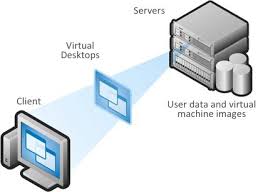
VDI solutions diagramLike many organizations, your foray into cloud computing may have started with an ancillary or security service, like email spam and virus protection. For some, the first or second step into the cloud was moving email off-premise.  For others, a cloud-based CRM service or VDI solution was the first application in the cloud.

Currently, we see organizations rapidly moving file services and storage into cloud-based solutions as more marketing, sales, and line of business applications switch to Software-as-a-Service (“SaaS”) or SaaSOps solutions. Often, this leaves you with a small set of business applications running on-premise.

VDI Solutions Explained

What do you do with applications and services left on-premise when most of your systems have moved, or will be moving, to the cloud?

While you may wish to keep these legacy systems on-premise, you can move them into a cloud or hosted Virtual Desktop Infrastructure (VDI) environment. VDI environments provide a virtualized, remote desktop accessible via browser or “receiver” app.  When connected, users get their full desktop environment with access to local and network applications.

Some applications, such as computer-aided design (CAD) and manufacturing/process controls, are not well-suited for VDI. Most local and network applications work well within a VDI environment. VDI services typically charge based on processor load, memory, and allocated disk space. Fees may also include standard office software, data backup services, malware protection, and other common network services.

Why use VDI Solutions?

  • Improved secure accessibility to legacy applications, particularly for remote and mobile users
  • Lower cost for IT and cloud infrastructure, especially when email, apps, and other services are moving to the cloud
  • Improved reliability and security, as VDI solutions run in professionally managed data centers
  • IT resources are free to work on higher value projects than maintaining core infrastructure and services
  • Lower cost and less administration of end-user devices, as you can move to thin clients, chromebooks, and tablets as existing desktops and laptops need replacing

When to use a VDI Solution? 

For some small and mid-size enterprises, VDI solutions provide a means to “clean out the closet”, to simplify their IT solutions and walk away from endless maintenance and updates. For others, a VDI solution enables them to move legacy systems and applications to a cloud-based environment.

When considering a VDI service for legacy applications and systems, answering a few basic questions while help you determine if your “when” is “now”.

  • Is the application is available in a Software-as-a-Service (Saas) subscription?
  • Does the application have custom modules or code that would prevent running the SaaS version?
  • Are application requirements — processor power, memory, disk space — known and understood?
  • How many users need access to the application?
  • How many users receive reports or data from the application?
  • What connections or integrations exist between local/network applications?

With answers to these questions, you can scope the size and configuration of your VDI environment. You can also assess if the benefits, and the costs, of a VDI solution outweigh the costs and effort required to maintain the systems on-premise.

As you move applications and services to the cloud, you will likely reach a point where you no longer have the critical mass necessary for on-premise servers to be the most economical and effective solution. When you reach this tipping point, a VDI solution will provide a secure home for your systems, your business, and your budget.