4th of 5: More Ways to Collaborate in Google Apps

docs
Google Apps is designed for secure sharing and collaborations.  Many users, however, still rely on the back-and-forth of email to get their work done.  Here is the 4th of 5 other ways to collaborate in Google Apps.

Comments and Real-Time Chats in Google Docs

You already know that, with permission, colleagues can view and edit shared documents together in real-time.  They can also engage in real-time chat from directly within the document windows.  Instead of calling a meeting, or setting up a conference call or hangout, team members can ask questions, suggest edits, and provide feedback immediately while working on the document.

If team members are working on the document at different times, they can highlight text and add a comment.  Visible in the margin, fellow collaborators are notified by email of the comments and receive a link that opens the document at the comment.  Comments can be directed to specific team members and team members can respond to directed requests by replying to the email.

Once a comment thread is finished, or the issue resolved, mark the comment as “resolved”. While the comment disappears from view, comments remain part of the document history and can be recalled should questions arise down the road.

Helping users get the most out of Google Apps is one of the reasons we offer a range of training and professional development services.  Contact us if you want to learn more.


3rd of 5: More Ways to Collaborate in Google Apps

google drive
Google Apps is designed for secure sharing and collaborations.  Many users, however, still rely on the back-and-forth of email to get their work done.  Here is the 3rd of 5 other ways to collaborate in Google Apps.

Shared Folders in Drive

Instead of sharing individual files with users or groups, create a project folder and share the folder with the team.  When you share a folder, all work uploaded to the folder or created within the folder, the file automatically is assigned the same sharing settings as the folder.

Project managers can still set permission levels based on need — view, comment, or edit — and you can override the inherited permissions for individual files and for sub folders as needed.

Training users to find and enter a project folder before working on the project is an easy tip that saves time and effort.

If you want to help your team get more from Google Apps, Contact us about our training options.

2nd of 5: More Ways to Collaborate in Google Apps

calendar
Google Apps is designed for secure sharing and collaborations.  Many users, however, still rely on the back-and-forth of email to get their work done.  Here is the 2nd of 5 other ways to collaborate in Google Apps.

Collaborate via Calendar

Google Calendar is good for more than just setting appointments.  Create a calendar for a project and share it with team members.  You can now track meetings, events, and project deadlines.   Adding member names to entries helps track responsibility and expectations; color coding helps flag priorities.

Team members can also create a task list on the side of the calendar.  Members can check-off completed tasks, making it easy for teammates and project leaders to get a sense of project status at-a-glance.

Need a way to track issues that come up each day?  Have team members add issues as “all day” events, colored in red.  Fellow team members can see critical issues at a glance, each time they check the calendar.

Helping your team understand and use Calendar in more advanced ways can improve team productivity.  Both of our self-paced Google Apps training solutions step people through the process.  Contact us to learn more about Boost eLearning and Synergyse.


1st of 5: More Ways to Collaborate in Google Apps

groups
Google Apps is designed for secure sharing and collaborations.  Many users, however, still rely on the back-and-forth of email to get their work done.  Here is the 1st of 5 other ways to collaborate in Google Apps.

Use Google Groups for your Group

Google Groups is designed to facilitate discussions among its members.  Create a group for your project team and your team members can read and respond to threaded discussions on the group’s home page, as well as by email.   Once created, you can subscribe or invite members to join (or require members to subscribe themselves).  And, you can invite and include project team members from outside your organizations.

Team members can post questions, ideas, issues, and get a quick response from teammates.  And, all project discussions are organized in a single location.

Groups also let you manage distribution lists and security.  Invite a group to an event using Calendar, and all members get the invite.  Share a document of folder on Drive with the group, and all members get access.

Since members can elect to be notified of every message immediately, or via daily and/or volume-based digests, individuals can still manage their inboxes as well.

Helping team members learn how to best use groups to collaborate is easy, as “Google Groups Training” is included in the Google Apps Training service from Boost eLearning. Contact us to learn more.


Restore Google Drive Files Offers Some (but not enough?) Protection

google drive
Among the myriad of new features and upgrades announced at Google I/O this week, Google added the ability to restore users’ Drive files that have been deleted from the Trash folder.

While offering some protection, the feature is limited in its scope.

  • You cannot restore individual files; you can only restore all files deleted within a date range you provide.  The minimum date range is 1 day (24 hours).
  • You can only restore files for individual users, one at a time.
  • You can only restore files that were deleted from Trash within 25 days.
  • When restoring files, the permissions are not restored.  Only the user will have access to the files.

With these limitations, we do not expect the ability to restore a user’s Google Drive files will be of great use to most organizations.  With a limited retention period and lack of granularity, the tool provides a big shovel when most users need a spoon.

The solution also depends on users’ ability to recover information from the Trash folder, a process we find difficult at times due to the limited ability to search Trash in Drive.

True backup/recovery solutions give users and administrators that critical features that deliver more usability and effectiveness:

  • Flexible retention:  Allow organizations to implement policies related document and records management, including extended retention and removal of data past retention windows.
  • File-Level / Item-Level Restore: Most data loss and restore needs result from human error or action and impact fewer than 5 files.  Acceptable restore capabilities include the ability to restore individual files (or entire accounts) and should include the ability to select file by version or point in time.
  • Protect Meta Data:  Protect the meta data as well as the files themselves.  File ownership, permissions, etc. should be preserved and recoverable with the file.
  • Data Export:  Provide the ability to export data so that it may be migrated to other accounts and/or other systems.
  • Administrative Control:  Identify and allow backup/restore administrators that are not full domain administrators.

Absent many of these features, the ability within Google Apps to restore a user’s Drive files is a limited feature that will not meet most organizations’ needs for data protection.

Third party backup/restore solutions are still a necessary and appropriate component of a robust Google Apps environment.

Feel free to contact us if you would like to explore backup/recovery options and solutions.

Vault for Drive is (Finally) Here!

Google Apps Vault
Within the announcements for Google Apps Unlimited and Google Drive for Work (more on these shortly!), are important changes to Google Apps Vault.

First and foremost, Google Apps Vault now includes Vault for Drive.  With Vault for Drive, you can immediately:

  • Search for specific users’ Drive files.
  • Preview search results in Vault to make sure you find just what you need.
  • Create copies of search results and export them for future use.

Settings retention policies, creating holds, and conducting domain-wide searches for Drive content will be available in the near future.

These new capabilities come at no additional cost for existing and new Google Apps Vault customers.

On July 8th, we are holding an open, free live webcast to provide an overview of Vault for Drive and the Admin Console features.  Please attend, or contact us if you have any questions.


Return of the Message Center and More


As Google continues to migrate Google Message Security and Message Discovery customers from the old Postini infrastructure, our clients have been concerned about functional and performance equivalency.   While filters and settings have been comparable for a while, and Google had previously added the quarantine notification, Google today announced the new Message Center.

Specifically for users that forward some or all of their email to on-premise servers or other email services, the Message Center lets users and administrators:

  • View and search 30 days of clean/spam mail
  • Mark single or multiple messages as spam or not spam
  • Deliver messages that are not spam to the on-premise mailbox
  • Add and remove contacts for whitelisting purposes
  • Bookmark URLs for searches and individual messages

This expanded functionality coincides with a series of upgrades to the SMTP relay service in Google Apps.   These updates help administrators in several ways:

  • Multiple authentication configurations: Admins can now configure multiple sets of authentication rules. For instance, you can specify that messages sent from one IP address are always allowed, messages from another IP address are only allowed if encrypted with TLS, and messages from another IP address range require SMTP AUTH.
  • SMTP AUTH: This newly supported authentication method uses Google “application-specific passwords” to allow admins to configure clients to authenticate to the relay service. This feature is available for registered Google Apps users only.
  • IP range description field: To manage IP addresses more efficiently, admins can enter descriptions in text fields for each IP address or range that you use to set authentication rules.
  • Selective enable/disable of IP ranges: Admins can selectively enable/disable IP ranges approved for relay as needed
  • Increased rate-limits for certain customers: In special circumstances, admins may increase the rate limits of 2,000 emails/user/day and 2,000 recipients/user/day by calling customer support. Requests need justification and are reviewed on a case-by-case basis.

With these enhancements, Google continues to increase the robustness of the Google Apps Platform, and reduces the need for most GMS and GMD customers to move to other spam, virus, and archiving solutions.


For Tea Living, Inspiration Accelerates after Move to Google Apps

Tea Living INC. (teacollection.com) brings worldwide cultures and modern design to children’s fashion. Twice each year, Tea packs their bags and travels the world to explore and discover. With original, high-quality designs inspired by their adventures abroad, Tea stands for practical luxury with pieces that are easy to care for and feel great to wear. Tea has won awards in innovation from their industry peers (as well as global recognition for their use of social media and technology), which clearly points to a path of continued growth.

With increasingly rapid growth over the past several years, Tea has gone from a single office in San Francisco to three locations, including a second office in San Francisco and a customer service center in Idaho. With remote salespeople and employees regularly traveling the world, Tea’s in-house email and file sharing servers were feeling the strain. Upgrading or expanding the email server would be a costly proposition.

Tea was already exploring options for hosted and cloud email services when the unthinkable happened. “Our Exchange server crashed and the mailstore was corrupted,” states Kenner Rawdon, Network Administrator of Tea Living INC. “Without email, our ability to effectively communicate–to service our customers–was at a standstill.”

Working with Boston-based Cumulus Global, a Google Apps Premier SMB Partner, Tea was up and running with Google Apps for Business in under a day. “In less time and effort than it would take to recover our Exchange server,” notes Rawdon, “we had global access to all of our email, calendars and contacts. Even with our emergency situation, the process was remarkably smooth.”

While Tea’s initial motivation was email, the company saw many other benefits from their move to Google Apps. With continuous world travel and an endless stream of photographs and images, Tea employees use Drive to upload and share pictures and files. Without the need for a VPN connection, employees no longer struggle with multiple login steps and performance issues. Telecommuters, mobile and remote staff use Drive and Docs to collaborate in real time and across time zones. Teams share information and ideas as they arise, without the limitations of email and voicemail. Using priority inbox and filters, employees report that they are able to stay organized and remain focused.

Innovation and creativity flow more easily without all the clutter.

“The impact of Google Apps is evolutionary,” concludes Rawdon. “We continue to find ways to work more effectively and be more productive as we continue to use more features of Google Apps’ features.” As an example, Rawdon sees growing use of Hangouts as a tool for meetings and calls. “Being able to see each other, along with the designs and images we share, will help us collaborate and make decisions more effectively. This personal interaction also fits well with our philosophy and culture.”

Tea Living INC. was co-founded by Emily Meyer and Leigh Rawdon, two moms who bonded over a love of travel. The company gives back to the community through its partnership with The Global Fund for Children, Tea’s School Days program, and the company’s Inspiring Mom Awards.

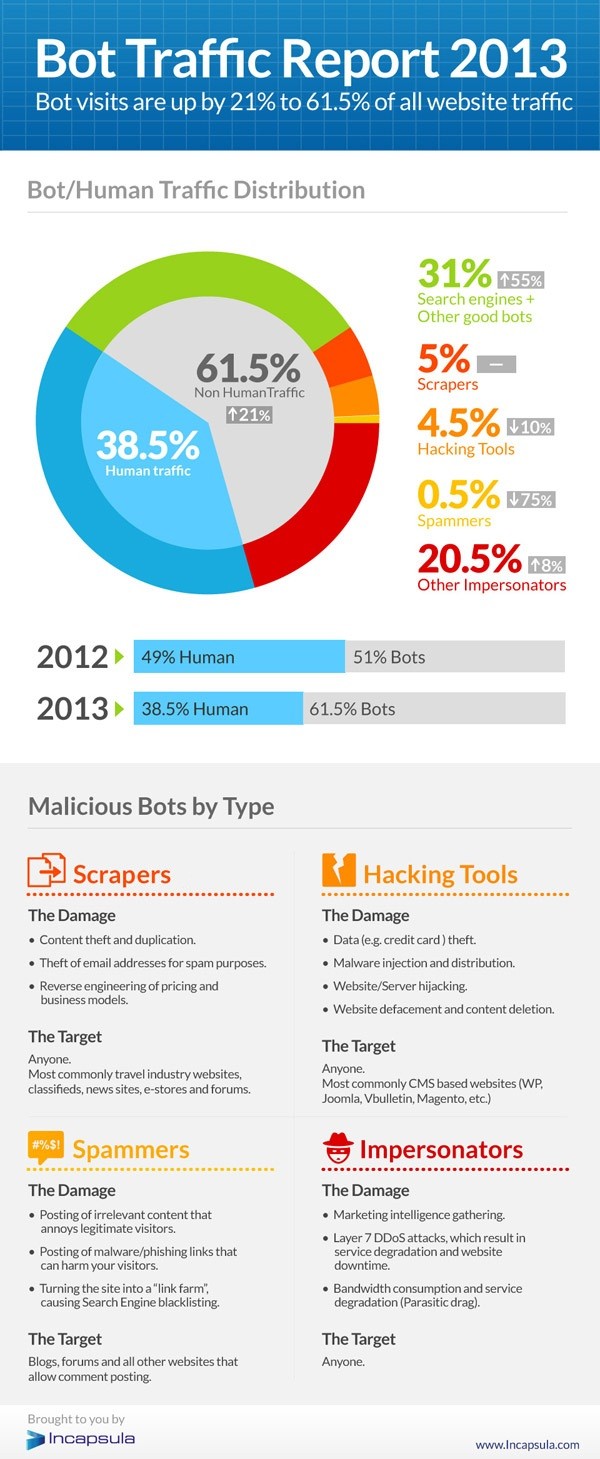
Lots of Bots; Not so Many People on the Internet?

bot-traffic-report-2013
As recently reported by CloudTweaks, a recently published analysis tells us that only 38.5% of Internet traffic is from humans.  The rest is from Bots — good and evil.

Good Bots are primarily search engines and data aggregation services.  These represent 31% of Internet traffic.  This leaves 30.5% of traffic originating from Bad Bots.  

What are the Bad Bots?

  • Scrapers: These bots scrape web sites, capturing text to steal email addresses for spam purposes or to reverse-engineer pricing and business models
  • Hackers: These bots break into sites to steal credit card data or inject malicious code
  • Spammers: Email addresses are the target for these Bots, enabling billions of useless and annoying email messages and inviting “search engine blacklisting”
  • Impersonators: These bots specialize in intelligence gathering, DdoS attacks and bandwidth consumption

The result?  Web sites, email systems, and other online activities should be secure.  Our defenses must continue to evolve and all technology users should have a basic understanding of the threats at hand.

Focusing on protecting users and data, rather than devices, creates a mindset that enables a more integrated approach and solutions.

Contact us to explore solutions that fit your business and budget.

Cumulus Global CEO Named Strategic Cloud Advisor for NexGen Cloud Conference

Cumulus Global today announced the addition of Allen Falcon, CEO of Cumulus Global, as a Strategic Cloud Advisor for the NexGen Cloud Conference & Expo slated to launch December 3, 2014 in San Diego, CA. Falcon brings his knowledge of cloud computing for SMBs and education to the advisory board, and will provide insight and direction through selecting topics and speakers for this industry event. The NexGen Cloud Conference & Expo is aimed at IT service providers looking to emerge as leaders in cloud computing services.

“I am honored by the invitation to the Advisory Board and I am looking forward to the opportunity to help further the industry”, stated Falcon. “Cloud Computing is not just a new technology and is not just a new approach to IT service delivery, Cloud Computing is transformative in its ability to enable change and growth for businesses of all sizes.”

The NexGen Cloud Conference & Expo intends to educate and inspire value-added resellers and managed service providers. The conference and exposition provides a great venue for company leaders to make connections, and find new directions.

“The Channel Company understands that cloud computing is driving ISVs, VARs, MSPs, and other IT service providers to rethink their strategy and business model”, notes Falcon. “This event brings the experts and advisors together in one place for an intensive learning and networking opportunity.”

Registration for the NexGen Cloud Conference & Expo is open, with pre-registration discounts available until June 6, 2014 at www.nexgencloudcon.com/.