Google Apps cPanel Gets and Upgrade (Part 2)

This is the second of a two-part series covering the new look and features in the Google Apps Admin Panel.

In addition to being a more uncluttered dashboard, the new and improved Google Admin Console will now make it easier than ever to customize the panel to your benefit.  The panel can now be readjusted to however you so desire by simply dragging and dropping icons onto the main screen, allowing you to access the services and management components you use most often.

You already know what the new interface looks like (see Part 1).  So what else can you do with the new admin panel?

Google Apps Admin Panel (Click to Enlarge)

You can access the other icons and applications by clicking the “More controls” button at the bottom of the screen.

This will provide you with another row of accessible icons.

Additionally, there are even more controls that are available, which can be exposed by using the “>” arrow at the bottom of the screen.

(Click on the image at the right to enlarge)

Let’s say that you want to add the Google “Groups” to your main panel, and more specifically, between the icons for “Company Profile” and “Billing.”  Doing this is as easy as just dragging the icon right up to the main dashboard.
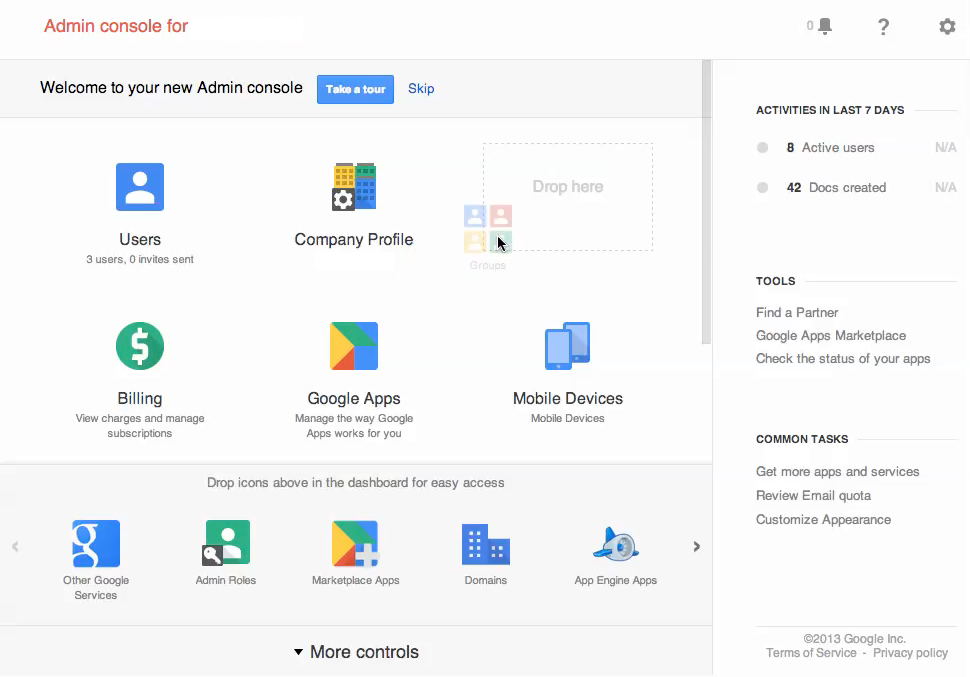
After you drop any icon, it becomes present on the predominant Dashboard.  Just as you can easily add icons to the panel, you can comfortably do the reverse in order to conceal those icons that you do not need front and center.

Want to learn more?

Still looking for more information?

Here is a video that demonstrates the new setup.  The full Console Guide is also available.  The Feature Map is an easy way to see how to perform common tasks.


Surface RT Deal for EDUs: Too Good to be Good

Out of JuiceWhen you see a prominent industry headline that reads “Microsoft Surface RT: Dumping Inventory Or Investing In Education?, you know something isn’t quite right.  Earlier this week, Microsoft announced it was slashing pricing on Surface RT tablets for schools down to $199 per unit with keyboard options bringing the price to $249 or $289.
The industry cannot help but wonder if Microsoft is trying to compete in the EDU market, or just looking to unload devices.  Microsoft’s intent is easy to question.

The dismal sales of Windows 8 in general is well-known, as ZDnet reported that through May 2013, Windows 8 sales under-performed the maligned and openly mocked Windows Vista operating system. And the industry is openly questioning Microsoft’s claims of licenses sold versus in use. In this blog, Preston Gralla of ComputerWorld summarizes criticism and challenges to Microsoft’s claims from sources ranging from IDC to the New York Times.

What is Going on Here?

Microsoft built an expensive tablet with and operating system that nobody wants. Even Microsoft OEMs, like Acer, dismiss Windows RT as “not influential.” And, the Surface RT only runs Windows RT… meaning that you are limited to applications designed to only run on Windows 8 (and not all of them will run cleanly on RT).

At $199 to $289, Microsoft has lowered the price of Surface RT tablets below those of iPads, to an amount that compares with the Acer and Samsung Chromebooks. The higher priced packages include a keyboard, a clear effort for the Surface RT to get closer to functional equivalence with Chromebooks.

Do not be fooled, however.  The end cost to schools (and businesses) is much greater than the buy price of the device. Going with a Surface RT tablet means leaving your existing applications behind and upgrading to the latest and greatest releases for compatibility. It also means investing in new endpoint protection solutions and mobile device management systems.

In addition, you have two soft costs to worry about. While almost all teachers and students can use a browser and browser-based tools, learning Windows RT is like starting over. With the release of Windows 8.1, Microsoft itself is acknowledging that users did not like Windows 8 and struggled with the transition.

The second soft cost: Obsolescence. Business and education software built for Windows 7 will not run on the Surface RT.  And with non-existent sales, betting that software publishers will invest in the Surface RT platform is risky.

In comparison, the catalog of web-based applications for education (and business) is skyrocketing. Picking end computing devices tied to growing markets and trends simply makes more sense.


Google Apps cPanel Gets and Upgrade (Part 1)

This is the first of a two-part series covering the new look and features in the Google Apps Admin Panel.

Most interface changes are dreaded by users and implemented with reluctance. However, instead of updating the Google Apps Control Panel to a more complex setup with less or equal function to its predecessor, this new panel is sleek, simple, and user-friendly. It was designed to make your day easier.

Want proof? Let’s go through some of the new features.

Now called the “Google Admin Console,” it has expanded to allow to administer other enterprise features from the panel, including Chromebooks and Map Coordinate, unifying administration and management.  The Admin Console is also available through a simple link: admin.google.com.

dashboard

As you can see, there is a similarity between the panel and the Google+ dashboard. The right section shows user activities, tools, and tasks, and the upper right has icons for alerts/notifications, help, and support.

The icons are pretty self-explanatory. When you open an icon, however, a drop-down appears in the upper left. When you open an icon such as “Company Profile,” the drop-down menu gives options for the profile, communication settings, personalization, custom URLs, and more.

By clicking the “Company Profile” with the drop-down arrow next to it, you can see your other icons from the home dashboard.

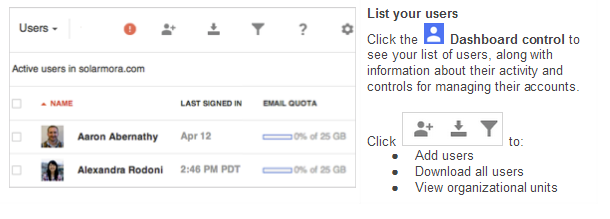
If you access “User” from the main menu, you  see the scree, above.

Additionally the new interface allows you personalize which details show underneath the column. You can also use filters to display users by a specific category. Whether assigning them into groups individually or in bulk, all you need to do is check the box next to each one and choose the appropriate action.is:

Profile information appears when opening up a specific user. From there you can reset the user’s password, add the user to groups, rename the user, and more. Hovering over certain areas will make more data appear. For example, when you hover over “Google Apps Enabled” to see what applications are enabled, it might show Google Drive, Google Calendar, Google Contacts, and more.

Whereas back on the dashboard, you can see your available services by clicking “Google Apps.” To manage the usages and settings, click on the app.

There are many useful features in the new Google Admin Console. From managing specific users to navigating the dashboard, all systems have been reworked and improved upon. We are excited to introduce this new chapter in the Google Apps Control Panel and look forward to using it.


Google Apps, PRISM, and the NSA

With media attention and hype, leaked documents, Congressional hearings, and a great deal of explanation and back-peddling, the world now knows that the United States government spies on people.

Okay, we already knew that.

So, we learned that about a secret “FISA” court that can issue secret subpoenas letting the government look at information about us.

Okay, we already knew that, too (many of us just did not pay attention or really seem to care very much).

So, we learned that the Government had issued subpoenas for huge amounts of data about phone calls from Verizon as part of secret program called PRISM.

Now must be the time to panic?

As our 24-hour, instant, news machine struggled to find alleged experts on this top-secret program, we began hearing reports that the National Security Agency has direct, unfettered, complete access to all of the data on all of the servers of all of the major public cloud providers, and that they were capturing, recording, and saving all of this information.

Unfortunately, the cloud service providers are prohibited by law from disclosing the the number of FISA subpoenas and/or the number of users subject to those subpoenas.  We do know, however, that all of the service providers deny any direct connection between their systems and the NSA.

Without accurate information, myths become ‘facts’.

For those of us that promote and rely on the cloud, including those of us running Google Apps for Business, Education, or Government, we want assurances that our data remains private.

Google Apps and Your Privacy

On June 7th, Google posted this statement on the Official Google Blog regarding the matter.  In short:

  1. The NSA and other agencies do not have unfettered access to customer data
  2. Google was not participating in, nor aware of the PRISM program
  3. Google actively works to limit the number and scope of FISA requests

Coincidentally, CIO Magazine reported on June 4th (before the FISA/PRISM revelations in the media) about Google’s efforts to modify or restrict FISA subpoenas.  You can see the article here.

Media reports have been largely inaccurate about the scope of the PRISM program and FISA warrants and its use on American citizens on US soil.

Google is not allowed to release the numbers and scope of the requests by law.  On June 11th, Google made public an official request to release that information so that Google customers will have a more accurate picture and will understand that their data remains secure.

Conclusion

The Terms of Service and Privacy Policy for Google Apps for Business, Education, and Government have very specific rules for how private Google keeps your data and how Google responds (and lets you respond) to subpoenas Google receives for customer data.

There is no evidence, or any indication, that Google has acted outside the bounds of these terms and conditions, even as Google vigorously defends the privacy of customer data in court.


Moving to the Cloud: Too Many Choices?


Green_GaugeThis post is the ninth, and final, post in a series addressing concerns organizations may have that prevent them from moving the cloud-based solutions.

Good News; Bad News.

The Good News:  Organizations can choose from a rapidly growing myriad of cloud computing services and solutions.

The Bad News:  Organizations can choose from a rapidly growing myriad of cloud computing services and solutions.

When looking to move into the cloud, organizations have an abundant set of choices and options that offer similar functions and services.  Even more challenging, many cloud solutions offer features that overlap, creating redundancy at the intersection (i.e., the Google Drive component of Google Apps versus Dropbox).

For many organizations, the marketplace is confusing and full of claims that may be hard to verify.  Too often, the decision falls to price, not business value, and organizations end up getting what they pay for.

Start at the Beginning

Organizations looking to move into the cloud should start at the beginning step of any successful IT project — business requirements.  What are the business reasons for moving into the cloud?  These could be a simple as “keep the same functionality as in-house systems, but at a lower cost” or as sophisticated as “expand into international markets”.

The business requirements drive the technical requirements.  The technical requirements guide the selection of the solution.  Evaluate how well the solution meets your technical requirements and how well it supports your business requirements first.  Include relevant issues of customization, management, and support.   Then, look at the cost.

Vet the Vendor

While the concept of cloud computing dates back to mainframe time-sharing services in the 1970s and 1980s, today’s marketplace is new.  Every cloud vendor is new to the market as their services are relatively (no more than 5 years old) new.   Do not assume “name brand” companies are best.  Microsoft, for example, is a well-established mature business.  And yet, they have proven they are very capable of failing when it comes to providing a reliable cloud computing service.

Look at prospective vendors for their track record (as limited as it may be) with respect to performance, availability, reliability, support, innovation, and customer service.  Talk with customers and see out organizations that have dropped the service.

Understand where the vendor is financially.  Are they profitable?  Are they running on venture funds, and will they be sustainable before the funds run out?  Is the vendor’s financial position improving as their sales grow?

Use a Trusted Partner

Find a partner that knows cloud computing and can help you find your way through the myriad of options.  Work with cloud solution providers that do not push you only to what they currently sell.  Better CSPs will direct you to other resources and will either contract with them on your behalf or hand off the relationship.

If your current IT firm or your internal IT team cannot navigate the cloud computing territory, look for a partner that will work with, and will help educate, your current IT staff and/or team.  As with your cloud solutions selection, choosing a cloud solutions provider is about business value.

A good CSP can help you find, vet, select, and implement the right solution.


Moving to the Cloud: Internationalization


Green_GaugeThis post is the eighth in a series addressing concerns organizations may have that prevent them from moving the cloud-based solutions.

Cloud computing is global and a growing number of cloud solution providers are global as well.  Data stored in the cloud can end up in data centers in other countries and jurisdictions with differing laws and level of privacy protection.   In addition, organizations may be subject to laws or regulations that restrict data from being stored across national boundaries or in other jurisdictions.

Some risk exists in national or local laws related to data privacy and ownership.

Learn Before You Leap

Before signing on with a cloud provider, ask the questions about where data is stored and how the provider is protecting your data from foreign governments and other interests.  Review all contracts, agreements, and vendor policy statements to ensure they are consistent with the message you hear from the sales team.

Look for adherence to privacy standards based on international treaties, such as Safe Harbor and EU Safe Harbor. While these programs cannot eliminate all risk, they do set reliable standards and ensure the vendor has a process for managing any issues that arise.

Explore options with your vendor.  Many cloud vendors allow customers to select specific data centers in which their systems will run and/or data resides.

Seek out some knowledge about the privacy laws and regulations in the countries in which your data may reside (many Canadian firms, for example, see the US Patriot Act as a risk when data resides in the US).

With a small amount of due diligence, organizations can judge the vendor’s competency in managing data privacy and ownership across boundaries, and can ensure the cloud solution meets the organization’s needs above all.

Next Post in the Series:  Coming Monday June 10th

Previous Post in the Series:  Regulatory Compliance

Moving to the Cloud: Regulatory Compliance


Green_GaugeThis post is the seventh in a series addressing concerns organizations may have that prevent them from moving the cloud-based solutions.

Moving to the cloud often entails more than switching to an email service or spinning up a some cloud-based storage and servers.  For many businesses — including Small and Mid-Size Businesses (SMBs) — regulatory requirements place demands on IT systems and security.  And, while these requirements impact in-house and cloud solutions, moving to the cloud requires planning.

The most common regulations for SMBs relate to consumer (customer) privacy:  HIPAA, which protects personal health information, and PCI, which protects personal and credit related information.  Many SMBs, however, must also meet the requirements of Sarbanes/Oxley, FINRA, SEC, and various state regulations.

The solution:  Integrating Solutions.

Fortunately, the tools and systems exist to provide compliance with data security and privacy regulations.  Cloud vendors are creating environments and the management controls necessary for customer regulatory compliance and certification.

The challenge is to make sure that all of the pieces work together.

  • Message Archive/eDisovery:  Manages retention of email as official business records and provides the eDiscovery and audit tools necessary to meet federal subpoena requirements.
  • Message Encryption: Encrypts email at the individual message level based on content and rule sets, requires users to authenticate before accessing the message, and prevents forwarding.
  • Two Factor Authorization / Single Sign-On: Provides identity management services and audit trails beyond core products in order to meet regulatory or policy requirements 
  • Third Party Encryption:  Encrypts data in the browser or client before transmission to the cloud, providing a second level of encryption prior to the encryption provided by the cloud vendor.  In the event of a vendor data breach, the exposed data would be encrypted.

These types of solutions, and others, provide cloud environments with the capabilities to meet regulatory requirements.  Vendor contracts and policies should still be carefully reviewed for any terms and conditions that threaten compliance.

And remember, no vendor can ensure compliance.  Compliance exists when the technology meets the technical standards and is used in accordance with policies and procedures that meet the regulatory intent.

Next Post in the Series:  Internationalization

Previous Post in the Series:  Integration with Legacy Systems

Moving to the Cloud: Integration with Legacy Systems


Green_GaugeThis post is the sixth in a series addressing concerns organizations may have that prevent them from moving the cloud-based solutions.

Very few businesses go “all-in” when moving into the cloud.  Most businesses start their move into the cloud with specific applications and services.  For small and mid-size businesses, the trend is to go cloud with critical core services, such as email and calendaring, and/or applications, such as CRM.  Over time, businesses add additional applications and services, such as file services, and hosting of legacy applications and servers.

The result:  Most businesses have a hybrid environment of on-premise and cloud solutions.

For many businesses, this creates a new need to integrate existing systems with new cloud-based applications and services.

While this may seem overwhelming, the scope of the integration depends, in large part, how well your in-house systems integrate today.   For most small and mid-size businesses (SMBs), legacy application integration focuses on a few key features:

  • Email / Messaging:  Legacy applications and systems should be able to send notifications, alerts, and other messages.
  • Shared Storage:  Legacy applications may need to use cloud-based storage for data storing and sharing.  Depending on the need, direct access may be preferred to a sync solution.  Also, business applications often need locations in which to deliver reports and other automated output.  Still others may need to be able to link to documents saved in the file service.
  • Contacts:  Legacy applications, particularly those responsible for customer relationship management (CRM) functions (sales, support, service, marketing) will need to synchronize contact information in a way that does not result in duplicate data or data loss.  The same holds true for Enterprise Resource Process (ERP) and Professional Service Automation (PSA) systems.
  • Calendars / Events:  CRM, ERP, and PSA systems may also look to sync or manage calendars and events.  As with contacts, avoiding duplication and lost data is critical.
  • Data Import/Export:  Legacy systems may have the ability to import/export data from/to other systems.  In some instances, the import/export is manual or scripted to occur at specific intervals.  Some systems support automated synchronization or provide an interface for real-time data exchange.

When looking at cloud solutions, take a moment to research your current environment and needs:

  • What integration exists today?  Does it help or hinder?
  • What integration capabilities do legacy applications support that are not currently in use?  Would these be useful/helpful/meaningful?
  • What integration do you need, or want, to make your business more efficient?
  • What capabilities does the proposed cloud solution have for integration?  Can you leverage these to your advantage?  Is the cost of integration worth the potential benefits?

With a short assessment, organizations can determine if, when, and how to best integrate new, cloud-based solutions with legacy applications and systems.  As with any IT project, the focus should be on resulting business value.

Next Post in the Series:  Regulatory Compliance

Previous Post in the Series:  Lock-In

Google+ Hangouts and Google Apps: OFF for a Reason

As Google prepares to replace Google Talk with Google+ Hangouts, customers expect to benefit from the improved audio/video quality and features that Hangouts offer over Talk.

There are very good reasons why Google+ Hangouts are OFF by default in Google Apps for Business (Gov and Edu, too).  Before you turn on Google+ Hangouts, understand the current ramifications.

  • Preview Mode:  Google+ Hangouts are not yet officially released and, as such, get “best effort” support as opposed the technical support under the Terms of Service.
  • Incompatibility:  Google+ Hangouts are not compatible with Google Apps Vault.  Any organization that plan on using Vault, or that may need to use Vault, should not opt-in to Google+ Hangouts.
  • Data Location:  Google Apps customers under data location restrictions cannot opt-in to Vault.
  • No Enterprise Controls:  These controls are not yet available for Google+ Hangouts at this time.  As such, there are no warnings for users when chatting outside the domain and there is no way to block users’ chat status outside of the domain.

Google advises enterprise environments to continue using Google Talk for instant messaging, voice, and video conferencing.

Cumulus Global shares this recommendation, as the implications of adding Google+ Hangouts is not fully understood.  Organizations interested in a test domain may contact us for assistance.


Moving to the Cloud: Lock-In


Green_GaugeThis post is the fifth in a series addressing concerns organizations may have that prevent them from moving the cloud-based solutions.

When looking at cloud solutions, most organizations spend a great deal of time, appropriately so, investigating how they will move data and processes into the cloud.  At the same time, organizations should understand how they will get data out of the cloud should they decide to switch solutions in the future.

While this seems like a new issue or concern, the reality remains that organizations switch systems and data migration and integration issues exist — cloud or not.  The same analysis and decision making process that organizations follow for in-house systems should be followed for cloud solutions.

Platform as a Service (PaaS) solutions provide environments that, in general, enable data and application movement.  Moving to a Windows Server image in the cloud is not much different from moving to an in-house Windows server.  Key considerations focus on the amount of data and the time/efficiency of moving the data on or off the cloud server.

Software as a Service (SaaS) solutions can prove more challenging.  Migrating to or from a cloud-based application provides the same challenges as migrating data to a new in-house application.  Record matching, data scrubbing, and data translation are all issues to be considered.  In addition to the strength of the import utilities, understand the strength and cost of the export utilities.  Some SaaS applications only provide comprehensive export capabilities at their most expensive licensing options.

Fear of “Lock-In” should not prevent organizations from moving into cloud solutions.  Rather, a small amount of due diligence will ensure that the “how” and “how much” of a future migration is understood.

Next Post in the Series:  Integration with Legacy Systems

Previous Post in the Series:  Privacy