For those running or considering Google Apps, Google’s highly redundant, multi-tenant infrastructure protects data from nearly all risk of loss or corruption due to hardware or system failure. Understanding the other risks to our data lets us decide when and how to better protect ourselves.
In this live web event, Allen Falcon, CEO of Cumulus Global, will discuss the business risks and use cases that drive the need for data protection and data loss prevention and will look at practical, affordable solutions.
Joined by experts from Backupify and Cloudlock, Falcon will overview and demonstrate affordable solutions for creating a secure and protected data ecosystem using Google Apps and Google Drive.
And, as always, there will be plenty of time for your questions.
https://www.cumulusglobal.com/wp-content/uploads/2018/06/Cumulus-Global-logo-with-spacing.png00Allen Falconhttps://www.cumulusglobal.com/wp-content/uploads/2018/06/Cumulus-Global-logo-with-spacing.pngAllen Falcon2013-03-06 23:17:332013-03-06 23:17:333rd Tues @ 3 Webcast: Protecting Data in Google Apps
This blog post is the second in a series on Data Protection issues and practical solutions.
Backup and Restore, the most basic form of data protection, has been a standard IT practice since teams or Operators managed racks and rows of tape drives and tapes for early mainframe computers. Borrowing from proven audio technologies, tape backups protected programs and data from the fickle failings of early disk drives.
As computers became more interactive, and more personal, the need for backup and restores services expanded. Yes, your hardware might fail. More likely, however, an assistant would “save as” over the boss’ most recent masterpiece. Computers were new, and human error was inevitable. Then came viruses, poorly written applications, spyware, bots, and the Internet (the ying and yang of all things good and evil).
As we move into the cloud, some of the reasons for backup/restore remain, and some new ones emerge.
For those of us running Google Apps for Business, Education, and Government, Google’s highly redundant, multi-tenant infrastructure protects us from nearly all risk of data loss or corruption due to hardware or system failure. Understanding the other risks to our data lets us decide when and how to better protect ourselves.
Third Party Applications
While domain-level access for applications is usually restricted to administrators, users often have the ability to run and connect third party applications to accounts. Whether global or individual, poorly written third party applications can wreak havoc with your data. Applications that need write access to docs, email, calendars, or contacts, can overwrite or delete content. Determining the scope of a problem, and recovery, can be nearly impossible without reviewing all of your data.
User Error
Recent research shows that data loss within Google Apps is due to user error 63% of the time (0% is caused by Google). As with any new system, unfamiliarity can bring unintended harm. Ill-placed pastes, mistaken deletions, and save instead of “save as” are some of the ways data may be lost. Even more complex, mistakes using Manage Revision settings, and permanently deleting items, can make recovery impossible.
Willful Misconduct
Protecting your data from the employee (or soon to be ex-employee) intent on doing harm is nothing new. In Google Apps, as well as any other system, employees with access to sensitive information often have the ability to damage or destroy that information in ways intended to harm your business.
Security Breach
Google Apps is one of the most secure public cloud services in the world. Even so, no system is ever completely safe from user identity theft or corrupt systems with access. A mal-ware infected computer running Google Drive can allow damage to data in Google Apps as easily as with a computer connected to a Windows server down the hall. If a user — knowingly or as a result of social engineering — shares his or her identity, hackers and others can damage your data.
Google Error
While Google has never had errors resulting in permanent data loss, and Google’s systems are designed to withstand multiple points of failure, a very, very small chance still exists that a software or hardware error could corrupt data.
All of these cases are, and have been, reasons to run a backup/recovery service. But at what point do you add backup/recovery to your? For most, the answer is as simple as the answer to the following question:
If you had this data on a server in your computer room, would you back it up?
If the answer is “Yes”, than you should protect the data where it lives — even in Google Apps.
For others, it is one of critical mass. When the cloud is considered a secondary data store, some wait for usage to reach a level “significant” enough to warrant the additional cost of backup/recovery services. Unfortunately for some who “wait and see”, the significance is often measured by the pain of a data loss event.
00Allen Falconhttps://www.cumulusglobal.com/wp-content/uploads/2018/06/Cumulus-Global-logo-with-spacing.pngAllen Falcon2013-03-05 13:42:372013-03-05 13:42:37Cloud Backup/Recovery: The Same, Only Different
As reported by ZDnet on the Feb 25th, Microsoft’s new Outlook.com service suffered an outage lasting more than seven (7) hours. Many customers could not log in, and those that could experiences significant performance issues.
Even more disturbing, Microsoft did not acknowledge the outage until over 4 hours into the incident, via Twitter. And, 7 hours into the outage, the outlook.com status page failed to note the outage at all.
This outage follows two Office 365 Outages totaling more than 9.5 hours of down-time in November, 2012.
While Microsoft has not commented on the cause of the Outlook.com outage, their apology to customers back in November disclosed that Microsoft cannot dynamically add and allocate resources to their infrastructure. The best they can do is improve their ability to recovery (related: Microsoft’s Apology Says Volumes about Office 365 Outages).
With a history of operational failures and acknowledged limitations in the underlying architecture, one has to wonder how well Microsoft is able to manage multi-tenant services. Will the pattern of failures lead to a lack of trust?
https://www.cumulusglobal.com/wp-content/uploads/2018/06/Cumulus-Global-logo-with-spacing.png00Allen Falconhttps://www.cumulusglobal.com/wp-content/uploads/2018/06/Cumulus-Global-logo-with-spacing.pngAllen Falcon2013-03-04 08:30:082013-03-04 08:30:08Outlook.com Goes Dark This Time: Can Microsoft Run Cloud Services?
Originally posted by David Politis, CEO of BetterCloud. BetterCloud offers FlashPanel, an integrated management and administrative tools for organizations using Google Apps. Cumulus Global recommends and includes Flash Panel with most Google Apps implementations.
—
Being a Gmail and Google Apps fanatic, I’ve always been intrigued by the concept of Chromebooks and Chrome OS in general. And with every 3 minute reboot of my aging Windows laptop this past spring, I became more tempted to take the plunge and go 100% web with a Chromebook, at least for the large portion of my day when I’m working in Google Apps and not installable software programs. So when the new Samsung 550 Chromebooks came out this past June, I made my case to the bossman that we should order a few of these devices. They’re cheap, and if we’re true Google Apps experts developing for the Google Apps ecosystem, we need at least a basic understanding of how Chromebooks function and are managed in a business environment.
What I didn’t expect, however, is that I’d be using a Chromebook nearly 100% of the time in the months to follow – we’ve even converted the office’s Controller, an Excel power user, to a Chromebook and Google Spreadsheets. So with about 4 months of Chromebook experience under my belt, I thought it would be a good time to share some of the top reasons why a few of my coworkers and I find Chromebooks indispensable.
Speed
You’ve heard the stats, “8 second boot, instant wake from sleep” etc. etc. I can tell you this: you won’t fully appreciate this kind of speed until you use it. I used to come into the office, turn my laptop on, go get a cup of coffee and chat with a couple coworkers, then come back to a laptop that was still rolling out of bed. The Chromebook is ready to go when you are, and over the course of days, weeks and months, saving a few minutes here and there really adds up. You can get similar speeds with any computer using a solid-state drive, but if you don’t have $1,000 to spend on a new MacBook Air, you can get the same speed with the new $249 Chromebook.
Simplicity
While the simplicity of Chrome OS is certainly a big reason for its speed, the simplicity in and of itself actually makes working in Chrome OS a very nice experience. The tools you need to access consistently throughout the day, like Gmail and Google Drive, are always at your fingertips in the launch bar. Obviously you can do this on a “real” laptop with hot keys, browser shortcuts, etc. but with a Chromebook it’s just so easy. And I find that the stripped-down nature of Chrome OS creates far less distractions.
Security and Standardization
There’s definitely a security benefit for personal Chromebook users, as the device doesn’t truly store local files (more security by limitation) and the OS only boots from a read-only version, but the security benefits are even greater for an organization deploying Chromebooks. As an IT administrator, not only can you implement security settings like restricting sign-in to accounts on your domain only or wiping local files after every log out, but you can also standardize certain aspects of the Chromebook experience by proactively pushing out useful Chrome extensions, or even pre-configuring WiFi network logins for every Chromebook on your domain, or particular Org. Units (useful if you use geography to group your OUs).
Using Chromebooks has been a great experience for our team. Not only do we get lightning-fast, affordable laptops, we also have seen Chrome OS evolve significantly over the past 4 months alone. The user experience has improved pretty significantly every few weeks, while the Chrome OS team continues to add more “traditional” PC features like extended desktop and better multimedia support. It’s certainly a Google-centric solution so we wouldn’t recommend it for everyone, but if you’re a Google Apps customer and are already spending the majority of your day in a web browser, it’s worth checking out a Chromebook.
—
Editor’s note: Click Here if you are interested in learning more about Chromebooks, or taking one for a test drive.
https://www.cumulusglobal.com/wp-content/uploads/2018/06/Cumulus-Global-logo-with-spacing.png00Allen Falconhttps://www.cumulusglobal.com/wp-content/uploads/2018/06/Cumulus-Global-logo-with-spacing.pngAllen Falcon2013-03-01 08:30:212013-03-01 08:30:21Guest Post: Why Half of Our Company is Using Chromebooks Full-Time
Yahoo CEO Marissa Mayer is putting an end to Yahoo employees working from home as part of her heroic effort to turn around the struggling company. As best we can tell, here are the top 10 reasons why employees can no longer work from home.
10: Sitting in Bay Area traffic for hours each day is more productive than working at home
9: Forcing employees to pay more for gas, commuter rail, and child care will help the economy
8: Employees that struggle to balance work and family are happier, more productive, and fiercely loyal to their employer
7: Employees that come to the office get cool benefits like free gourmet food, laundry service, exercise classes, and massages. Oh, wait, that’s Google
6: Marissa Mayer has always wanted to appear in a Dilbert cartoon
5: Talent and results are meaningless unless you work in a cubicle
4: The Internet is a fad and should not be used for business
3: Sharing documents with real-time collaborative editing and managed revisions, instantly messaging teammates, and working together are all less productive than waiting for an available conference room
2: Interactive meetings using Hangouts, with multi-party voice and video conferencing, desktop sharing, and real-time collaboration is just science fiction
And the Number One reason Yahoo employees can no longer work from home ….
https://www.cumulusglobal.com/wp-content/uploads/2018/06/Cumulus-Global-logo-with-spacing.png00Allen Falconhttps://www.cumulusglobal.com/wp-content/uploads/2018/06/Cumulus-Global-logo-with-spacing.pngAllen Falcon2013-02-27 11:00:582013-02-27 11:00:58Top 10 Reasons Yahoo Employees Can No Longer Work From Home
Cumulus Global announced today a strategic alliance with The 4th Bin for Responsible e-Waste services. Through the alliance, Cumulus Global will offer e-Steward certified recycling services to customers in and around New York, along with secure data storage destruction services to customer nation-wide. In addition to e-Steward Certification, the 4th Bin has attained ISO 14001 and R2 Certification, reinforcing the company’s commitment to responsible recycling and customer solutions.
“As we move companies into cloud-based solutions, they are reducing their on-premise technology footprints,” noted Allen Falcon, CEO of Cumulus Global. “By offering a means for customers to recycle equipment and destroy sensitive data, we can help customers avoid near- and long-term liability issues.”
For businesses in New York City, The 4th Bin provides convenient pickup services. The 4th Bin collects all types of electronics, including computers, printers, phone systems, storage arrays … anything that has a battery or plugs in. Cumulus Global and The 4th Bin will processes data storage media for secure, verified destruction from anywhere in the continental United States.
About The 4th Bin
The 4th Bin is a leading provider of ethical electronic waste rescue and recycling solutions, serving both residences and commercial businesses with door-to-door pick-up of all electronics. With a commitment to the highest ethical standards in respect to e-waste recycling, The 4th Bin has created a simple and inexpensive way for consumers and companies to recycle or reuse their electronics, while working together to manage the NYC e-waste problem. By also delivering secure, on-site data destruction services and IT asset management and disposition, The 4th Bin is your complete e-waste partner.
https://www.cumulusglobal.com/wp-content/uploads/2018/06/Cumulus-Global-logo-with-spacing.png00Allen Falconhttps://www.cumulusglobal.com/wp-content/uploads/2018/06/Cumulus-Global-logo-with-spacing.pngAllen Falcon2013-02-27 08:30:002013-02-27 08:30:00Cumulus Global Partners with 4th Bin for e-Waste Services
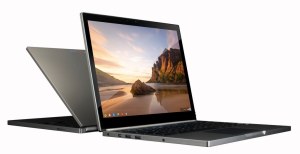
Last week, Google announced the Chromebook Pixel, a high end laptop running Chrome OS and designed for users that work in the cloud. The unit is HD audio and video, a dual-core Celeron i5 processor, and up to 32 GB of solid state storage. The 12.86″ touchscreen has an unusual, but very useful, 3:2 aspect ratio, which beats Apple’s Retina displays in terms of pixel density.
At $1,299 for a WiFi model and $1,499 for the LTE version, some in the tech press question who would buy the Pixel. Others, like us, see the value proposition.
We see the LTE model as extremely useful, particularly given the 1TB of free Google Drive space you get for 3 years with the system. Why? The aggregation of features make this device a perfect replacement for professionals and other knowledge workers that live and work via the web — in the cloud.
Connectivity
According to Ookla, my 4G LTE smartphone gets 30 Mbps on download and 18 Mbps on the upload. That’s almost identical to the 35 Mbps symmetric FIOS line that serves an office of eight web-heavy users. The Pixel LTE gives you high-speed, ubiquitous access to the Internet so you can work in the cloud without working about hot spots and performance.
Compatibility
With QuickOffice installed, you can bring in, access, and edit your legacy MS Office applications without blinking an eye. The “hurdle” of moving away from MS Office just dropped to the ground.
Convenience
The LTE model has 64 GB of local storage — plenty of capacity for working off-line when cellular service is blocked and WiFi is not available (planes, trains, etc). And, unless you are streaming videos or playing on-line games, the battery should give you about 5 hours of useful work (enough to cross the country).
Integration
With 1TB of Google Drive storage per device/user, the Chromebook Pixel provides enough storage for most small and mid-size businesses. And, with Google Apps as its base, you can integrate your business applications and tools to ensure your data is protected and secure.
If you still need access to Windows-only legacy apps, we can provide you a virtual desktop that runs in a Chrome tab.
If you …
Work in the cloud
Leverage the capabilities of Google Apps
Use web-based and cloud applications to run your business
… the Chromebook Pixel may be right for you.
https://www.cumulusglobal.com/wp-content/uploads/2018/06/Cumulus-Global-logo-with-spacing.png00Allen Falconhttps://www.cumulusglobal.com/wp-content/uploads/2018/06/Cumulus-Global-logo-with-spacing.pngAllen Falcon2013-02-26 08:00:542013-02-26 08:00:54Who Will Use the Chromebook Pixel? Maybe You!
Cumulus Global today announced revenue growth exceeding 300% for 2012 as the company’s cloud solutions business continues to expand. Sales for 2012 surpassed $3.3 million dollars compared to $972,000 in 2011. Net income before taxes jumped over 400%, to more than $200,000 for 2012. This growth reflects increasing demand from Cumulus Global’s core small and mid-size business markets, as well as the company’s expansion into new market segments.
“In the last 18 months, we have helped more than 120 school districts migrate to Google Apps for Education, deploy Chromebooks for Education, and protect their networks and in-house data,” noted Allen Falcon, CEO and co-founder. “We see increasing opportunity in the educational market.”
The company also sees increasing demand from local, municipal, and county governments and agencies throughout New England and nationally. Falcon expects revenues from Google Apps for Government and related services to “more than triple over the next twelve to eighteen months.” Falcon attributes this growth to the migration, education, and support services offered, including the company’s participation in the FCC E-Rate program for schools and libraries.
Serving the needs of small and mid-size businesses, those with 1 to 1000 employees, remains a core market for Cumulus Global. According to Falcon, “Our core SMB market grew by more than 30% last year and we see that rate of growth accelerating.” Falcon attributes this growth to the company’s focus on solutions rather than technology.
“We do not sell hype or technology,” stated Falcon. “We work with our customers to identify if and how cloud solutions can improve efficiency, expand services, drive revenue, and lower costs. We bundle products and services that overcome challenges and enable growth.” Partnering with more than a dozen ISVs and solution providers, Cumulus Global can meet customers’ regulatory compliance, security, data management, and IT administration needs.
For companies, non-profits, government agencies, and schools interested in learning more, Cumulus Global conducts regular webcasts and Q&A sessions.
https://www.cumulusglobal.com/wp-content/uploads/2018/06/Cumulus-Global-logo-with-spacing.png00Allen Falconhttps://www.cumulusglobal.com/wp-content/uploads/2018/06/Cumulus-Global-logo-with-spacing.pngAllen Falcon2013-02-25 13:20:152013-02-25 13:20:15Cloud Solutions Drive Rapid Growth for Cumulus Global
In the beginning, seeing a preview of documents in Google Drive meant clicking an link and waiting for a new browser window or browser tab to open up. Your preview would appear, if the file type was compatible, surrounded by all the menu bars and trappings of a Google Doc screen.
All that is changing.
Google is rolling out a new preview for files in Google Drive, starting now.
Google Drive will let you quickly preview more than 30 file types and quickly flip between files until you find the one you want. You’ll see the new preview automatically if you open a photo, video, or PDF. To see a preview of a Google document, right-click on the file name and select “preview.”
Once the preview window is open, you can …
Click on the arrows on either side to flip to other files.
Watch video files or scroll through multi-page documents.
Select and copy text from the preview — even for a PDF or Microsoft Word document
Use the zoom buttons to see a file in more detail.
Each file preview also gives you one-click access to share, download, print or open a file for editing.
https://www.cumulusglobal.com/wp-content/uploads/2018/06/Cumulus-Global-logo-with-spacing.png00Allen Falconhttps://www.cumulusglobal.com/wp-content/uploads/2018/06/Cumulus-Global-logo-with-spacing.pngAllen Falcon2013-02-21 10:48:482025-08-12 09:46:15Helpful Hint: Modern Preview in Google Drive
With all of the industry focus on data loss and disaster recovery, you may be surprised at the state of affairs.
53% of businesses experienced data loss within the past 12 months; up from 31% in the prior year (EVault 2012 Survey)
24% of IT Managers admit to not telling their CIOs that some data is not backed up, including data on mobile devices
38% of IT managers worry about the security and effectiveness of their backup solutions
58% of downtime and data loss was caused by storage problems or failures (Continuity Risk Benchmark)
86% of companies experienced unplanned downtime last year (Acronis Disaster Recovery Index Survey)
60% of companies identify human error as the most common cause of downtime and data loss (Acronis Disaster Recovery Index Survey)
What does this mean?
Whether running systems in-house or in the cloud, businesses MUST understand the risks to their data and system, and have reasonable protections and responses in place. Solutions that focus on addressing hardware and software errors may not protect you from user mistakes and missteps.
False Sense of Security in the Cloud
When moving to the cloud, businesses must remember that while good cloud infrastructures provide protection from hardware/software type failures, your data is still susceptible to user error. Backup/recovery services offer protection for cloud-based data that rivals services available for in-house solutions.
Want More Info?
Please contact us if you would like to discuss your needs and available options.
https://www.cumulusglobal.com/wp-content/uploads/2018/06/Cumulus-Global-logo-with-spacing.png00Allen Falconhttps://www.cumulusglobal.com/wp-content/uploads/2018/06/Cumulus-Global-logo-with-spacing.pngAllen Falcon2013-02-15 13:12:402013-02-15 13:12:40Data Loss and Recovery Are Still a Growing Concern
We may request cookies to be set on your device. We use cookies to let us know when you visit our websites, how you interact with us, to enrich your user experience, and to customize your relationship with our website.
Click on the different category headings to find out more. You can also change some of your preferences. Note that blocking some types of cookies may impact your experience on our websites and the services we are able to offer.
Essential Website Cookies
These cookies are strictly necessary to provide you with services available through our website and to use some of its features.
Because these cookies are strictly necessary to deliver the website, refusing them will have impact how our site functions. You always can block or delete cookies by changing your browser settings and force blocking all cookies on this website. But this will always prompt you to accept/refuse cookies when revisiting our site.
We fully respect if you want to refuse cookies but to avoid asking you again and again kindly allow us to store a cookie for that. You are free to opt out any time or opt in for other cookies to get a better experience. If you refuse cookies we will remove all set cookies in our domain.
We provide you with a list of stored cookies on your computer in our domain so you can check what we stored. Due to security reasons we are not able to show or modify cookies from other domains. You can check these in your browser security settings.
Google Analytics Cookies
These cookies collect information that is used either in aggregate form to help us understand how our website is being used or how effective our marketing campaigns are, or to help us customize our website and application for you in order to enhance your experience.
If you do not want that we track your visit to our site you can disable tracking in your browser here:
Other external services
We also use different external services like Google Webfonts, Google Maps, and external Video providers. Since these providers may collect personal data like your IP address we allow you to block them here. Please be aware that this might heavily reduce the functionality and appearance of our site. Changes will take effect once you reload the page.
Google Webfont Settings:
Google Map Settings:
Google reCaptcha Settings:
Vimeo and Youtube video embeds:
Other cookies
The following cookies are also needed - You can choose if you want to allow them:



 Last week, Google announced the Chromebook Pixel, a high end laptop running Chrome OS and designed for users that work in the cloud. The unit is HD audio and video, a dual-core Celeron i5 processor, and up to 32 GB of solid state storage. The 12.86″ touchscreen has an unusual, but very useful, 3:2 aspect ratio, which beats Apple’s Retina displays in terms of pixel density.
