
Prevent AI Data Leaks with the Right Tools
As leaders of small and midsize organizations, we need to operate efficiently and effectively within a range of security constraints. Laws, regulations, industry standards, and contractual obligations set expectations and, in most cases, impose requirements on how we manage and run our business and IT. Now, artificial intelligence (AI) adds a new layer of security challenges.
AI is most effective when it has access to a broad range of relevant information. However, that access must be carefully limited to authorized users, creating a delicate balancing act.
AI data leaks occur when AI tools and systems expose information to unauthorized users or share it inappropriately. These leaks can happen internally or externally, and may be accidental or intentional.
Preventing AI data leaks requires actively governing permissions and access, along with choosing AI tools that align with your security and privacy requirements.
Setup AI Data Governance
The days of “set and forget” permissions are over. At the macro level, AI data governance requires actively managing access controls and permissions settings.
Begin by reviewing and auditing your current access controls and permissions settings. It is common for users to rely on default sharing settings or to adjust permissions for convenience, often extending access inappropriately. While people may not actively search for and find private information, AI will.
Running an audit tool and resetting permissions can help close these gaps and provide a fresh starting point. Once permissions are properly configured, advanced security tools enable ongoing monitoring to identify new threats as they emerge. These tools can notify users and administrators of potential issues and modify permission changes to reduce risk.
Pick Secure AI Tools
With data access controls and permissions properly secured, the next step is ensuring that the AI tools and systems you use do not put your data at risk.
When selecting AI tools, look for the following attributes:
1. Adheres to Security Standards
Include security as a critical criteria when selecting your AI tools and systems. Verify that the AI tools you pick adhere to industry and regulatory security standards.
2. Does NOT Train Models Without Permission
Never use an AI tool that trains their models without your permission. These tools effectively absorb anything you input and incorporate it into their models, potentially exposing your data to other users.
3. Does NOT Allow Human Data Review Outside Your Domain
Avoid AI tools and systems that allow humans outside of your organization to see or use data you have entered into the system. Even if these systems are not using your data to train their models, if others can see it, then it is not secure.
4. Does NOT Sell or Use Data for Other Purposes
Choose AI tools and systems that do not sell or use your data for purposes beyond providing the service. Outside of training, some AI tools mine data for sale to others for research, marketing, and other purposes.
The general rule of thumb is: If you pay, your data is private. If the tool is free, so is your data.
However, some paid AI tools still include terms and conditions that allow data collection and usage. Before moving forward with any AI tool or system, always check the fine print.
How We Help
Schedule an intro meeting with one of our Cloud Advisors. Our team can discuss how you can assess your risk, create effective policies, and select tools that deliver productive, secure, and affordable AI solutions. The meeting is free and without obligation.
About the Author
 Bill is a Senior Cloud Advisor responsible for helping small and midsize organizations with productive, security, and secure managed cloud services. Bill works with executives, leaders, and team members to understand workflows, identify strategic goals and tactical requirements, and design solutions and implementation phases. Having helped hundreds of organizations successfully adopt cloud solutions, his expertise and working style ensure a comfortable experience and effective change management.


 On January 15, 2025, Google announced a major shift for Google Workspace. Going forward, all Google Workspace licenses will include Gemini AI features and functions. Specific capabilities will vary by license type.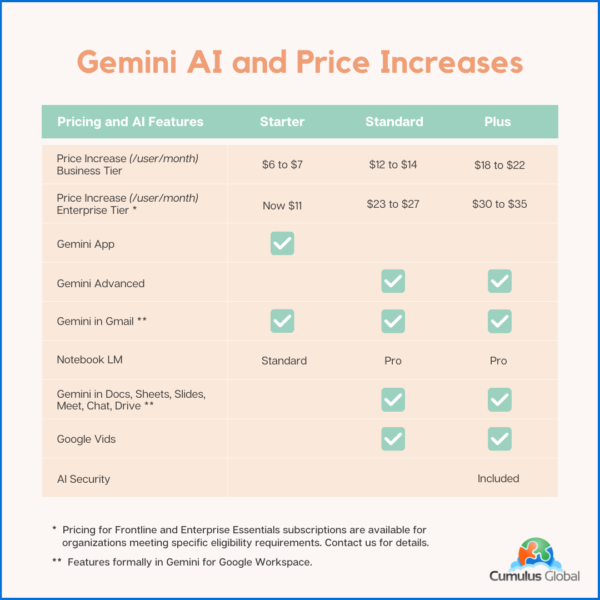
 As we head into the new year, we face an uncertain business landscape. Politics, the economy, and technology advances create new tech-related challenges and opportunities. As you make your plans, be ready for these 3 things in 2025.