Changing the Focus on Backup Protection
Recovery-Point-Objective-RPO
As we’ve stated before, “Backup is easy; Recovery is hard”.  Every business should, at this point, understand the risks of poor data backup and protection. The risks come from the types and amount of data that is lost and, if it can be recovered, how long that recovery takes. And remember, recovery often takes more effort than simply restoring files from a backup set.

Perspective = Priority

When looking at how well your backup system is protecting your business, two factors should be top of mind:

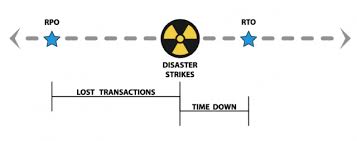
RTO: Recovery Time Objectives — How long will it take to return to normal operations. RTO is not just the time it takes to load your data back onto your systems, RTO includes the time it takes to repair and recreate damaged information and data created or modified since the last backup.

RPO: Restore Point Objectives — Your RPO determines how much data you are willing to lose, or can afford to lose. Most small and mid-size businesses backup daily. On average, a system failure will result in half a day of lost data. For an office worker editing a report, this is traumatic and inconvenient. For a manufacturer or retail business, half a day can represent hundreds or even thousands of orders and financial transactions.

As always, quicker RTOs and smaller RPOs come with trade-offs.  Recovery methods like image snapshots, for example, can provide rapid RTOs and small RPOs. In exchange, you are likely losing granularity — the ability to recovery individual files.

Understand the reasons  you are protecting your data.  Protection from system failure, in which you need to recovery a full server, lends itself to imaging and other snapshot methods.  Recovery of files or data lost to program error, malware, or user activity, needs a solution with granularity.

Start with an understanding of the type of protection you need and your RPOs and RTOs.  From there, you can pick the solutions (yes, you may want or need more than one method) for recovering data and your business.


We offer  a range data protection solutions, with a range of products, for on-premise and cloud-based data. Contact us for a free assessment of which type of solution is best for you.




Cumulus Global Named as Pacesetter for Second Consecutive Year

BBJ Pacesetter 2015

Boston Business Journal Ranks Cumulus Global as the 8th Fastest Growing Private Company in Massachusetts.

For the second consecutive year, the Boston Business Journal recognized Cumulus Global as a BBJ Pacesetter.  Ranked as the 8th fastest growing private company in Massachusetts, the Pacesetter Award places among some of the region’s most innovative companies.The Pacesetter Award recognizes businesses with exceptional cumulative revenue growth over a four-year period, highlighting businesses and entrepreneurs that create the dynamic and innovative economy in Massachusetts.

In accepting the award, Allen Falcon, CEO of Cumulus Global, thanked the partners, vendors, and advisors that have helped the company grow. He gave special thanks to customers, stating “We would not be here today, if not for customers that understand the value of trusted relationships.”

Based in Westborough, Massachusetts, Cumulus Global serves small and mid-size businesses, schools, and local governments in Massachusetts, throughout New England, and across North America. The company has offices in New York and Atlanta, with plans for continued growth and expansion.

“We continue to see shifts if how business want to use cloud and hosted solutions,” noted Falcon following the awards ceremony. “We continue to remain nimble, creating solutions that use technology to solve business problems in ways that help businesses thrive and grow.”

Cumulus Global’s recognition as a 2015 Pacesetter follows other recent industry accolades, including being ranked at #349 on the Inc. 500 list of fastest growing private businesses in America.

Security Alert: New Malware Wipes Hard Drives to Prevent Detection

computerkey
As first published on ZDnet’s Zero Day Blog, Cisco System’s Talos Group has identified a new strain of malware that will render systems useless to avoid detection and analysis.

Named as the Rombertick strain, the spyware collects data on everything a victim does online, indiscriminately, without focusing on specific areas such as online banking or social media.

Most concerning, however, is the Rombertick’s built in defenses. If the virus detects that it is being analyzed it will attempt to overwrite the Master Boot Record, rendering the PC inoperable. If that fails, the virus will destroy all files in a user’s home folder by encrypting each file with random keys.

In short, once infected, it is nearly impossible to remove without rendering you PC useless.

As Rombertick infection rates are still low, the best protection is good security practices:

  • Make sure you anti-virus software is up to date and switch to (or add) a cloud-based AV solution with continuous updates.
  • Do not click on attachments from unknown senders
  • Block email attachments that include executable scripts or code

While these steps are helpful, a defense-in-depth approach is best at identifying and preventing malware, particularly for viruses that are designed to evade detection.


If you would like to verify the robustness of your anti-virus protection, we can add a cloud-based layer of protection at no cost for a month and help you analyze your results. Contact us for additional information.

Click these links to learn more about our Webroot solutions and additional data protection and security solutions.


Share Your Selfie in #MyClassContest by Edutopia

National Teacher Day
In honor of National Teacher Day, Edutopia launched a contest in which you can win a new tablet.

Upload a selfie of you, in a scene from your education world, and tag it with “#MyClassContest”. The click here and claim your photo to enter the contest.

A Better Cloud Admin Solution

BetterCloud Logo
With over 200 new features add yearly, the capability of Google Apps is growing in features and capabilities. Across our customer base, we see adoption and use of these features by individuals and teams growing as well.

You want and need to understand how Google Apps is being used, and working, for your business. With more collaboration and data in the cloud, you want to ensure that documents are properly shared, with appropriate privacy and protections. At the same time, we want to keep administration simple and efficient.

We have a solution:

BetterCloud recently release a new tiered service designed to solve each of these issues, and you can try it for free.

BetterCloud Basic is a Domain Health Center for your Google Apps domain, letting you monitor activity, define alerts, and analyze usage.

BetterCloud Pro is a robust suite of administration and management tools for Google Apps that simply admin tasks with an expanded set of controls that save you time and effort.

BetterCloud Enterprise adds auditing, discovery, compliance, and data loss prevention features, giving you the ability to monitor, manage, and mitigate data permissions and exposures in real time.


You can try BetterCloud for free, and without obligation.  Here’s our offer:

We will …

  • Install BetterCloud Basic for free in your Google Apps domain
  • Activate a no-obligation, 30 day trial of the BetterCloud Enterprise and Pro Features
  • Over the course of the free trial, we will highlight and demonstrate key features, including running a basic data security audit report for your review

At the end of the the trial, you decide if the cost/benefit of BetterCloud Pro or Enterprise is appropriate for your domain, and we will keep you subscribed. If not, you can keep using BetterCloud Basic for free.

To keep it simple, you can request the trial with two clicks.  Click here* to open a request email, then click Send.  Our team will promptly respond and activate your free trial.


*If you purchased Google Apps directly from Google, or another partner, we can still provide the trial. We also offer license discounts and other incentives for moving your account over to us. Contact us if you are interested in the savings and/or our services.


Reconsider Your File Sync-and-Share Services

File sync share
It is no wonder why file sync-and-share services are so popular. They are easy to setup and use, particularly with people outside your company or organization. And, most people you want to share with have, or are willing to create, a free account to see your shared files.

As a business, government, school, or non-profit, however, you may want to reconsider how you let your team use file sync-and-share services.  Here’s why:

Who “Controls” the Data?
  • Do you know if individuals are sharing information inappropriately?
  • Could you recover files deleted by a user from their account?

File sync-and-share services create de facto peer-to-peer networks. Files are “owned” by the person that created or uploaded them. Permissions are controlled by each user, not by any central policy. As such, you have little ability to monitor or manage access to your data, which puts your business at risk for data breaches, as well as policy and regulatory violations.

Can You “Find” the File?
  • Are you comfortable with a peer-to-peer file service with little central control?
  • Are folks wasting time figuring out in which folder files are stored?

With each user creating folders and files to meet their own organizational needs, finding files shared with you can be challenging. As users create similarly named folders, locating files can be a challenge. You should never need to call a person for help locating a shared file.

Where, “Exactly”, is the File?
  • Would a lost or stolen laptop or phone give somebody easy access locally saved files?
  • Is locally saved data as secure as data on your server?

Chances are, your team is syncing files to/from laptops and mobile devices. So even if you are using a secure file sync-and-share service, your data is likely at risk. File sync-and-share services create local directories for storage and most services rely on your local security to protect those files. In other words, your data may be on a laptop or mobile device with no (or trivial) password protection. Adding drive-level encryption is an option, but adds money, complexity, and support costs to your environment.


Fortunately, solutions exist.

Secure, enterprise file sync-and-share solutions provide centralized control of what data can be synced to local devices, and by whom. These solutions also require login verification before accessing information on the local devices. Managed cloud file services let employees use locally installed apps with cloud-stored data, while providing centralized ownership and permissions management. Each solution has its limitations and benefits; understanding how your users need and prefer to work is key to making the picking the best solution.


Contact us for more information about available cloud file service options.


A New Look for Spring

Home Page Snaptshot
Yes! We launched our new website!

Our objective, to provide a better understanding of our solutions and the breadth of products and services we mix and match to create them.

Our focus remains on helping you achieve your goals and objectives by providing you with cloud-enabled technologies, services, and expertise.

We will continue to add and enhance the content in our belief that information is key to making sound decisions. To that end, the Resources section gives you access to our Cloud Solutions eNewsletter, our monthly 3T@3 Webcast series, and the Cloud Solutions Daily.

4 Questions to Ask When Selecting an Email Encryption Solution

Email Lock
Once you determine who within your organization should be using email encryption to secure sensitive and protected information, you need to select from sea of vendors all claiming to be the “leading” provider.

Here are four (4) questions to ask when selecting an email encryption solution

1) Does the solution include a hosted, shared email encryption network?

Encrypting every email is hard, expensive, and does not accommodate the way most of us work. Using passwords and accessing portals are extra steps that take time and can create frustration. A shared email encryption network ensures that 100% of emails sent within the network are secured without any additional actions required by the sender or the recipient.

2) Does the solution offer policy-based encryption filters?

Most encryption solutions relying on users to trigger encryption by clicking a button or putting a tag into the subject line.  Even if users understand every scenario that warrants encryption, they are likely to miss a few along the way. Solutions with policy-based encryption filters scan and automatically encrypt messages that contain sensitive information. The best solutions provide standard heuristics for common regulatory requirements and let you create custom policies to meet your business’ specific needs.

3) Is the solution easy to use?

Email is a business tool, and email encryption is no different. Ideally, the solution should be easy to use for sender and recipient. Difficult processes result in mistakes, compliance breaches, lost productivity, and users circumventing the system. Easy to use solutions foster adoption and compliance by automatically encrypting message, decrypting inbound messages at the gateway, and ensuring that replies and forwards get encrypted as well.

4) Is the solution provider awesome?

Choosing an email encryption provider is a long-term commitment and the lowest price is not always the best deal. Make sure your provider is trusted by others in your industry. Check to ensure their infrastructure has certifications and accreditations, such as SysTrust/SOC 3 or PCI Level 1. Make sure the solution can be deployed quickly and that your provider supports your deployment technically and with user training. Verify that your provider will support you on an on-going basis and minimize the resources required from you and your team.


 We offer multiple email encryption solutions. Contact us to discuss your needs and explore the solution best for you and your business.


Take Another Look at ASUS

ASUS Chromebook
When we started providing Chrome devices to schools, options were limited. Today, nearly every major and secondary workstation manufacturer has at least a small line of Chrome devices. While this gives you more options, the choices can be overwhelming.

Recently, we took a fresh look at ASUS, and we think you should as well. Here are 4 reasons why:

1) Quality
When ASUS entered the Chromebook market, they did so with a low-cost, low-end unit that had a spinning disk drive. The brand was perceived as not having the quality to survive the K-12 environment. Since then, however, ASUS has led the market with advances in the Chromebox and has released models like the C200 and C300 that are proving themselves in the real world.

2) Service and Support
ASUS is standing by its products. ASUS is the only brand that includes accidental damage in its standard 1 year warranty. The coverage covers one repair during the year, but can be customized to extend the number of years and/or incidents covered.  The need for 3rd party coverage is gone.

3) Creativity
Looking at ASUS’s line of Android Tablets and in their Windows products, we see ASUS bringing many of the same creative form factors (advanced touch screen, flip, and “2 in 1”) to the Chrome device market. And we reasonably expect these new devices to be price competitive with the bigger players on the market.

4) Market Position
While not a small company by any stretch of the imagination, ASUS is still a relatively small player in the Chrome device market. ASUS is eager to grow and makes it easier for resellers to create custom solutions for you, our customers.


Interested enough to kick the tires, contact us to arrange a free evaluation kit.


Beauty in the Box

Asus Chromebox
It looks simple enough. A small form factor desktop computer running Chrome OS. In it’s native mode, the Chromebox lets you access any website and any cloud-based service with a web interface that you can imagine or ever want.

What makes the Chromebox really beautiful, however, is what it can do when assigned to special tasks.

Kiosks

Bundled with the Chrome Management Service, you can easily configure Chromeboxes to run as a single application kiosk. Whether providing information to customers in your store, allowing visitors to check in at the lobby desk, or to provide games for kids to play in your waiting room, the small form factor and easy setup make Chromeboxes an affordable solution to install and maintain.

Chromebox for Meetings

For less than $1,000, you can enable video conferencing in almost any small or mid-size conference room. Bundled with an HD camera, an HD conference speaker/microphone, and management software, you can link the device to the conference room calendar. Video conference setup is automatic and attendees can start the conference with a single press of a button on the remote control. Easier to use than traditional video conferencing, you can share presentation materials from any participant in the meeting.

Digital Signage

Combine the kiosk capabilities of the Chromebox with free or low cost tools, and your Chromebox becomes one of the most affordable digital signage solutions on the market. Securely manage display presentation and content remotely from any web-connected device without investing in expensive, proprietary systems.


If you are interested in or need kiosk, video conferencing, or digital signage solution, contact us to discuss your needs and evaluate solutions.